 My

Loom
The default screen recorder for client updates, with a free plan that caps screen recordings at five minutes while leaving meeting recordings unlimited
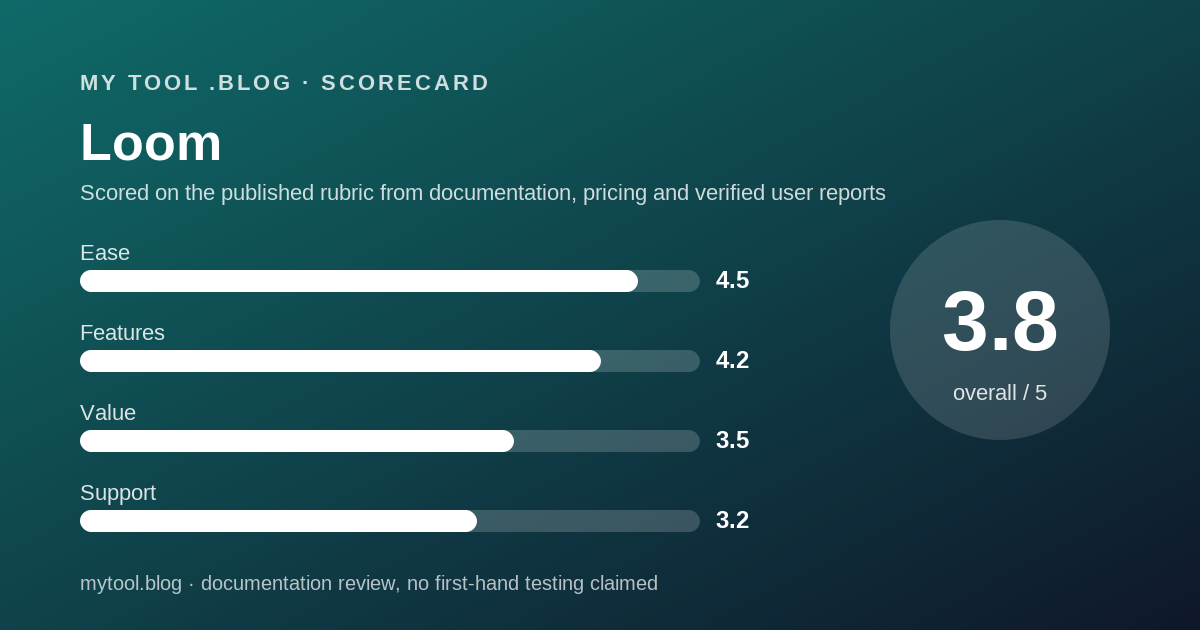
Scored on the published rubric, from documentation, pricing and verified user reports.
Best for: A freelancer who sends short client updates instead of booking calls, can live inside a five-minute cap, and does not mind Loom branding on the video page.
Verdict
What this review is based on: the vendor's pricing page as the browser rendered it on November 4, 2026, the plan comparison grid on that page, the pricing FAQ beneath it, and the pricing catalogue embedded in the page source. No account was opened. On this blog that is the documentation review label, the third of the three honest positions, and the weakest of the three.
The free plan is better than its reputation and worse than it looks.
It allows up to 50 workspace members, up to 25 videos per person and unlimited screenshots. It also allows unlimited meeting recording length.
But screen recordings stop at five minutes, and video quality stops at 720p. For a freelancer, the five-minute cap is the whole decision.
The first paid step is $18 per user per month, printed as $180 per user per year in the page's own pricing data. That is the price of a sixth minute.
Visit Loom
We have no affiliate relationship with this vendor. Link goes to the official site.
Where it is strong
- **The free plan is not a time-limited trial.** It lists up to 50 workspace members, up to 25 videos per person and unlimited screenshots as ongoing allowances, not as a countdown (pricing page, November 4, 2026).
- **Meeting recording length is marked unlimited on every plan, including Starter.** Screen recording length is the row that is capped, which is an unusual split and works in a freelancer's favour for call capture.
- **Transcriptions in 50-plus languages sit on the free column**, alongside closed captions, video comments, emoji reactions and viewer insights (plan comparison grid, November 4, 2026).
- **The annual discount is arithmetically honest.** The embedded pricing data gives $18 monthly against $180 annually, which is 16.7% below the monthly rate by our arithmetic, against a page badge reading save up to 17%.
- **Platform coverage is unusually wide for this category:** the page offers Mac, Windows, iOS and Android, plus a Chrome extension. Two of the alternatives in this cluster are macOS-only or browser-only.
Where it falls short
- **Five minutes per screen recording on the free plan.** That is enough for a status note and not enough for a walkthrough, and it is the single row that sends freelancers to the $18 tier.
- **720p on the free plan.** High definition up to 4K begins at Business, so free recordings of a code editor or a design file will be soft where it matters most.
- **Loom branding stays on free videos.** Remove Loom branding is a Business row, so the cheapest way to send an unbranded client video is $180 a year for one seat.
- **A 2024 date is still sitting on the 2026 pricing page.** The FAQ on buying through Loom.com versus Atlassian.com is dated October 23, 2024 and says the company was acquired by Atlassian last year.
- **Deactivating a seat forfeits the money.** The FAQ states that a deactivated workspace member forfeits all fees and access for the remainder of that billing cycle, and no refund window is printed anywhere on the page.
At a glance
| Starting price | $0 (Starter), then $18 per user per month or $180 per user per year |
|---|---|
| Pricing note | Starter $0, capped at up to 50 members, up to 25 videos per person and 5 minutes per screen recording at up to 720p; Business $18 per user per month, or $180 per user per year in the page's own pricing data; Business + AI $24 per user per month, or $240 per year; Enterprise quote-only, listed as Let's Talk (pricing page, checked November 4, 2026) |
| Free plan limits | Up to 50 members; up to 25 videos per person; 5 minutes per screen recording; unlimited screenshots; unlimited meeting recording length |
| Free plan quality | Video quality up to 720p; high definition up to 4K begins at Business |
| Branding removal from | Business, $18 per user per month, which also adds logo on the video page and player colours |
| AI tier | Business + AI, $24 per user per month or $240 per year, listed as most popular |
| Trial | 14 days on Business + AI; Enterprise trials are arranged through sales |
| Annual discount | 16.7% by our arithmetic on both paid tiers, against a badge reading save up to 17% |
| Platforms | Mac, Windows, iOS, Android and a Chrome extension |
| Stated reliability | A 99.95% uptime SLA, listed as an Enterprise row only |
What this review is based on, and what it cannot tell you
Four readings, all on November 4, 2026, all of loom.com/pricing: the rendered page, the plan comparison grid, the pricing FAQ, and the price catalogue embedded in the page source.
That last reading matters. The cards print monthly figures only, so the annual price had to come out of the page source rather than off the page.
No account was opened on any plan. Nothing here describes what recording feels like, how well the trimming works, or whether the AI titles are any good.
The product's reputation for being effortless is not a thing a price list can confirm, and this review does not try. For the three positions this blog takes on evidence, see what I will and will not claim.
What Loom is, and who now owns the price list
A screen recorder with hosting, sharing and analytics attached, sold per user, in four tiers.
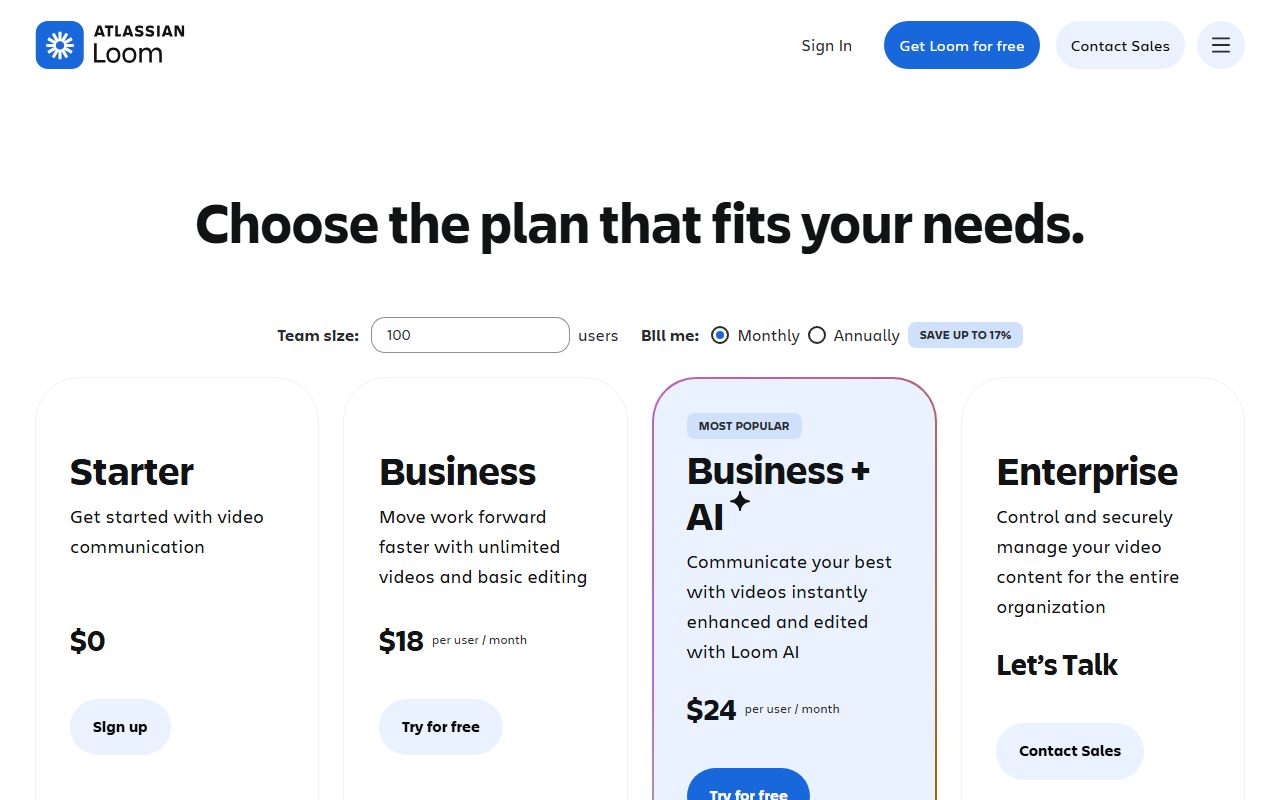
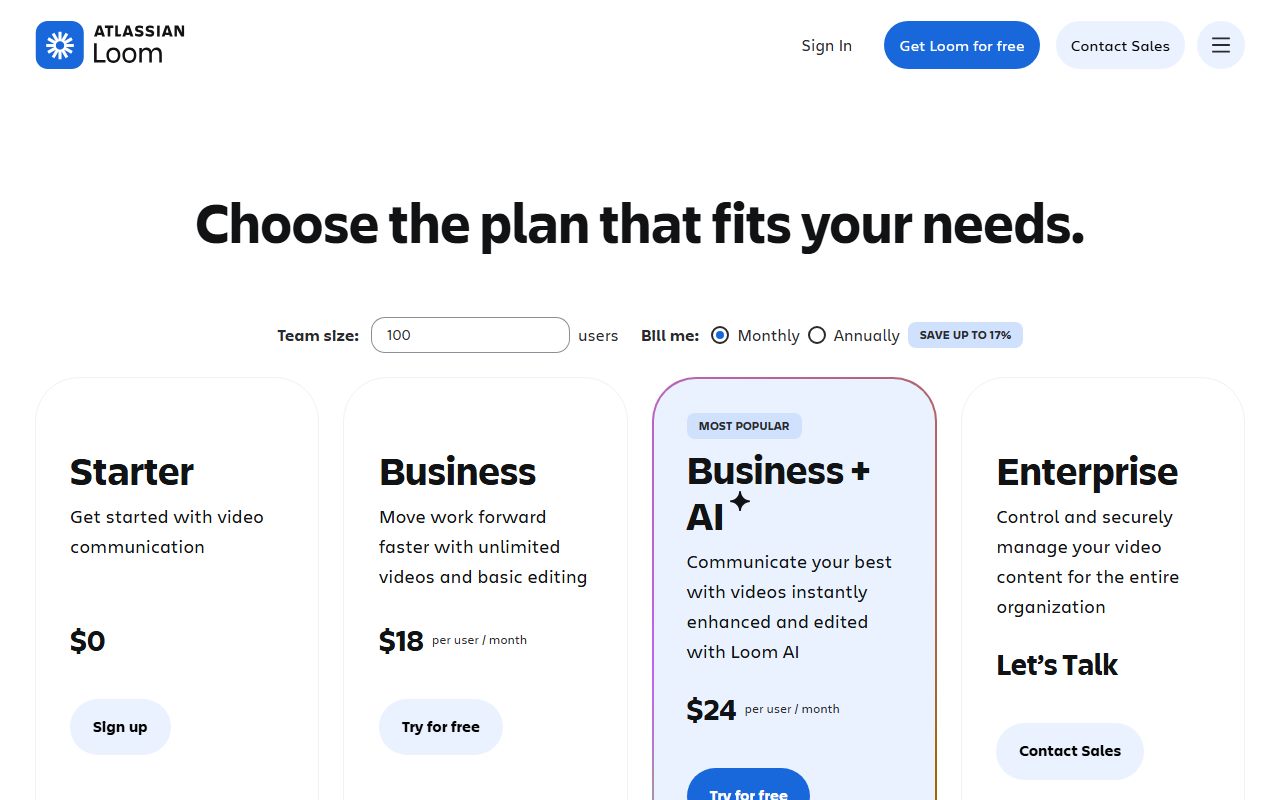
The tiers are Starter at $0, Business, Business + AI carrying the most popular label, and Enterprise with no number and a Let's Talk button.
The vendor line on this review reads Loom, Inc. (Atlassian) because the pricing FAQ says so. Loom was acquired by Atlassian, and the page describes two different places to buy the same product.
That FAQ answer is dated October 23, 2024 and begins by saying the acquisition happened last year. On a page read in November 2026, a date two years old is a reason to confirm every figure at checkout.
The page also carries a vendor claim of more than 25 million people across 400,000 companies. No third-party profile was opened here, so that number is reported, not checked.
The free plan is generous on seats and strict on seconds
This is the row-by-row result from the Starter column of the comparison grid, read on November 4, 2026.
Marked on Starter: up to 50 members; up to 25 recordings per person; unlimited screenshots; unlimited meeting recording length; video quality up to 720p; screen and camera bubble recording; system audio.
Also on Starter: transcriptions in 50-plus languages; closed captions; video comments; emoji reactions; watch later; viewer insights; folders; video archiving; one all-company space; GIF thumbnails; privacy controls.
The integration list on the free column includes Slack, Gmail, GitHub, Jira, Confluence and Upwork, plus embeds for Notion, FigJam, Intercom, Zendesk, Dropbox and GitLab.
Marked absent on Starter: unlimited videos; unlimited recording time; 4K; trim and stitch; custom thumbnails; embedded links; branding removal; password protection; search; video uploads; engagement insights; priority support.
- The one row that decides it: screen recording length reads 5 min per video on Starter and unlimited on all three paid tiers.
- The row nobody expects: meeting recording length reads unlimited on Starter too, so recording a client call is uncapped while recording your own screen is not.
- The row that shows up in the video: Starter is capped at 720p. High definition up to 4K begins at Business.
Five minutes is a product decision, not an accident
It is worth saying plainly what the cap does to a freelancer's workflow.
Five minutes covers a status update, a quick question, a bug report with a cursor pointing at it. It does not cover a design walkthrough, a handover, or a how-to for a client's staff.
The workaround is to chop a walkthrough into three videos. That is possible and it is worse: three links, three view counts, three places for a client to stop watching.
So the cap is set exactly where the commercially valuable recording begins. A freelancer who starts sending client walkthroughs will hit it in the first week.
The cheapest way past it inside Loom is Business, $18 per user per month, which the page source prices at $180 per user per year.
The cheapest way past it outside Loom is a competitor whose base price has no length cap in it at all, and two of the price lists read in this category on the same day start lower than $180.
The habit of checking a cap before a price is the same habit described in the October 7 journal entry.
How the pricing is structured, and where the 17% applies
Two billing periods, four tiers, no minimum seat count printed, and one discount badge that is true of both paid tiers.
The cards print $18 and $24 per user per month. The embedded catalogue in the page source pairs those with annual figures of $180 and $240 per user.
By our arithmetic, $180 a year is $15 a month and $240 is $20, which puts annual billing 16.7% below monthly in both cases. The badge above the cards reads save up to 17%, and the FAQ repeats save 17%.
That is one of the cleaner discount claims in this cluster. It survives multiplication, which is not something every vendor's badge does.
Enterprise has no figure at all. For a one-person business that column is decoration, and the only row in it worth noting is the 99.95% uptime SLA.
Payment is credit card by default. The FAQ says ACH exists but requires a sales conversation and an eligibility assessment.
Where each paid step earns its money
Read the grid as a sequence of unlocks rather than a feature list and the ladder is short.
Business buys the end of the caps: unlimited videos, unlimited recording time, 4K, basic waveform editing, trim and stitch, custom thumbnails, embedded links, uploads and downloads.
It also buys the things that make a video look like yours rather than Loom's: branding removal, a logo on the video page, player colours, password protection and three extra spaces.
Business + AI buys automation on top: AI workflows, auto titles, auto summaries, auto chapters, auto tasks, auto CTAs, filler word removal, silence removal, meeting notes and recap emails, plus admin insights.
For a one-person business the honest reading is that Business is the tier and Business + AI is an upsell priced at an extra $60 a year per seat by our arithmetic.
- Starter, $0: 25 videos per person, 5-minute screen recordings, 720p, Loom branding, no search.
- Business, $18 per user per month or $180 per year: no caps, 4K, editing, branding removal, password protection, priority of nothing in particular.
- Business + AI, $24 per month or $240 per year: the AI suite, meeting notes and recaps, admin insights, priority support.
- Enterprise, by quote: SSO and SCIM, Salesforce, a 99.95% uptime SLA, downloadable user insights, Atlassian Guard Standard included.
The AI numbers on the page are the vendor's own
Three figures are printed in the FAQ to justify Business + AI, and all three belong to the company selling it.
The page says 67% of users do not edit the auto-generated title. It says 73% of people called the AI suite extremely or very valuable. It says the suite produces 18% more viewer engagement.
None of those was checked against a third party here, and no methodology is linked beside them. They are survey and telemetry numbers, reported by the beneficiary.
That does not make them false. It makes them the kind of number this blog prints with the source attached rather than as a finding.
The more checkable AI statement is the data one: the FAQ says OpenAI receives transcript text in order to generate titles and summaries, and does not receive full videos or audio.
For a freelancer under a client NDA, that sentence is worth more than all three percentages.
Two places to buy the same product, priced differently
This is the strangest thing on the page, and it affects what a freelancer should click.
The FAQ states that feature access differs between a Loom.com sign-up and an Atlassian.com sign-up, and that the difference is temporary while the two platforms merge.
Atlassian.com buyers get the Atlassian administration hub, Loom recording entry points inside Confluence and Jira, and the same SSO and SCIM provisioning as other Atlassian apps through Atlassian Guard.
Annual billing differs too. Loom.com charges by the distinct number of paid users on the plan. Atlassian.com charges by user tier, billing the tier that most closely matches your user count.
For one seat, tier billing is a rounding risk rather than a saving. A freelancer buying a single seat should read the total at checkout rather than the card.
The cost of surprises like this is the subject of what a tool costs besides its price.
What the page does not tell you
Four absences, named so you can ask rather than assume.
It does not print a refund window. The only money statement is that a deactivated seat forfeits fees and access for the remainder of the billing cycle, which is the opposite of a refund.
It does not print a storage limit anywhere. Unlimited videos appears on the paid columns and no gigabyte figure appears on any column.
It does not describe support for Starter or Business. Priority support is a Business + AI and Enterprise row, which tells you where the front of the queue is, not what the queue is.
It does not say whether the 14-day Business + AI trial needs a card. The sign-up copy elsewhere on the page says no credit card required about the free plan, not about the trial.
When the renewal comes round and these gaps start mattering, how to decide to cancel a tool you pay for is the relevant checklist.
Alternatives worth reading the price list of
The useful comparison depends on whether your problem is the five-minute cap, the branding, or the bill.
- Choose a cloud editor instead if you want timeline editing and a custom domain in the base price, and read which tier removes the vendor's branding before comparing headline figures.
- Choose a macOS-only app instead if you want one price with every feature in it. One competitor's yearly card prints $9 a month against Loom's $18 monthly, and has no free plan at all.
- Choose a timer instead if what you actually need is billable evidence rather than video. Harvest invoices from the free plan and Clockify tracks unlimited users at $0.
- Choose a meeting link instead if the recording is a substitute for scheduling. Cal.com and Calendly both have free tiers, compared in Calendly vs Acuity.
Buy it if, skip it if
The short form, with the condition in bold. Both lists come from the four readings dated November 4, 2026, and neither is a judgement about how the recorder behaves in daily work.
Bottom line
Loom is the default in this category and the free plan is the reason, right up to the moment you need a sixth minute.
Fifty members, 25 videos a person, unlimited screenshots and unlimited meeting length at $0 is a real offer, not a trial. Five minutes and 720p is where it stops being one.
For a freelancer the question is narrow. If your client videos are short status notes, Starter is free forever and nothing here should move you. If they are walkthroughs, the price is $180 a year for one seat.
At $180 the comparison stops being with free tools and starts being with the rest of the category, where one price list is lower and one is a different shape entirely.
The same reasoning applies to every subscription on a freelancer's desk, which is why this blog also grades invoicing and proposal software one price list at a time.
Two things to establish before you pay: whether you are buying on Loom.com or Atlassian.com, and what the total reads at checkout rather than on the card. The grading method is at editorial policy.
Sources
All readings are of loom.com/pricing on November 4, 2026, taken from the rendered page and from the page source, not from a search result.
The annual figures of $180 and $240 per user appear in the price catalogue embedded in the page source; the cards themselves print only the monthly figures. Both are listed above.
The October 23, 2024 date on the Atlassian billing answer is quoted as it appears on the page.
Buy it if
- Your client updates run past five minutes and you want them to look sharp. Business at $180 a year for one seat buys unlimited length, 4K and the removal of Loom branding in one step.
- You record calls more than you record your screen. Meeting recording length is marked unlimited on Starter, so the free plan handles call capture without a cap.
- You work across Windows and a phone. Mac, Windows, iOS and Android are all offered, which rules out the macOS-only alternatives in this cluster.
- You already pay Atlassian for something. The FAQ describes Jira, Confluence and Atlassian Guard tie-ins, and buying through Atlassian.com changes what you get.
Skip it if
- You need an unbranded, high-definition client video and nothing else. Loom sells that at $180 a year for one seat, and at least one macOS-only competitor prints a lower yearly card for a tool with no plan tiers at all.
- You want the lowest annual bill in this category. Business is $180 a year for one seat before any AI feature, which is above the cheapest per-seat prices read in this category on the same day.
- You want a printed refund window. The page states that deactivated seats forfeit fees for the rest of the cycle and never names a refund period.
Frequently asked
Is Loom free, and what does the free plan actually allow?
The Starter plan is $0. It lists up to 50 workspace members, up to 25 videos per person, unlimited screenshots and unlimited meeting recording length. Screen recordings stop at 5 minutes and quality stops at 720p, checked November 4, 2026.
How much does Loom cost for one freelancer?
Business is $18 per user per month, printed as $180 per user per year in the page's own pricing data. Business + AI is $24 per month or $240 per year. For one seat those are the whole bill, since no minimum seat count is printed.
Can I remove the Loom branding on the free plan?
No. Remove Loom branding is listed as a Business row, alongside adding a logo to the video page and customising player colours. On Starter the branding stays, so the cheapest unbranded video costs $180 a year for one seat.
Does Loom have a free trial of the paid plans?
Yes, 14 days on Business + AI according to the pricing FAQ, with Enterprise trials arranged through sales. The page does not print a trial length for Business on its own, and does not say whether a card is required.
Is the annual discount really 17%?
Close enough to be honest. The embedded pricing data gives $18 monthly against $180 annually and $24 against $240, which is 16.7% in both cases by our arithmetic. The badge reads save up to 17%.
What happens to my money if I remove a seat?
The FAQ states that a deactivated workspace member forfeits all fees and access for the remainder of that billing cycle, and that a downgraded Creator keeps access until the cycle ends. No refund window is printed on the page.
Does Loom send my videos to an AI provider?
The FAQ states that OpenAI receives transcript data as text files in order to generate titles and summaries, and that OpenAI does not receive full videos or audio. Loom's sub-processor list and AI terms are linked from the same answer.
Does it matter whether I buy Loom on Loom.com or Atlassian.com?
The FAQ says it does. Atlassian.com purchases get the administration hub, recording entry points inside Jira and Confluence, and Atlassian Guard provisioning. Annual billing also differs: per paid user on Loom.com, per user tier on Atlassian.com.
Sources
- Loom pricing page: plan cards, team size selector and annual toggle - checked November 4, 2026
- Loom pricing page: plan comparison grid, members and recording length rows - checked November 4, 2026
- Loom pricing FAQ: trials, Atlassian.com billing, seat deactivation, AI data use - checked November 4, 2026
- Loom pricing page source: embedded price catalogue giving monthly and annual figures - checked November 4, 2026
Visit Loom
We have no affiliate relationship with this vendor. Link goes to the official site.