 My
My
Calendly
The default booking link, free for one event type and one calendar, with every second event type priced per seat
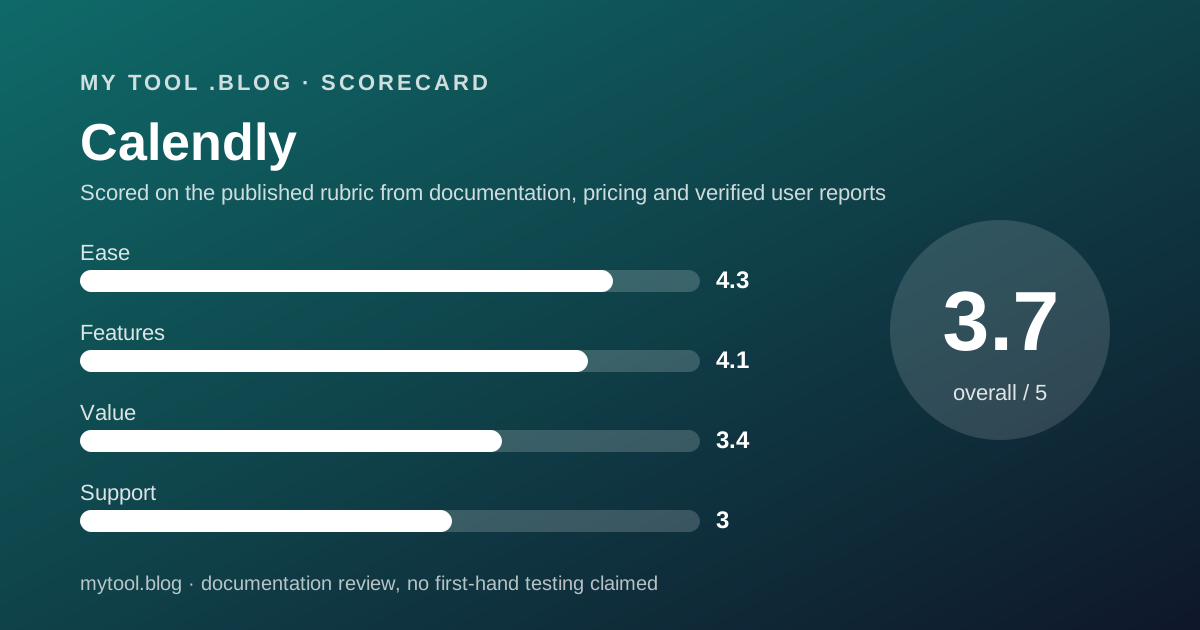
Scored on the published rubric, from documentation, pricing and verified user reports.
Best for: A freelancer who books one kind of meeting from one calendar and can stay on the free plan, or who books several kinds and will pay for one Standard seat to get unlimited event types, reminders and payments.
Verdict
What this is based on: the Calendly pricing page, its plan comparison table and its sign-up page, read on October 10, 2026. No Calendly account was opened for it. That is the documentation review label, the third of the three honest positions on this blog, and it means the editors can report what the page promises and nothing about the product in use.
The page describes a product with a generous floor and a steep first step. The Free plan is always free and includes one event type, one calendar connection, unlimited one-on-one meetings, a booking page and a browser extension. For a freelancer with one kind of call, that is the whole product at $0.
The moment you need a second event type, a second calendar, a reminder sequence or a payment on booking, you need Standard. The page shows $10 per seat per month beside a Save 17% label on yearly billing; the monthly figure did not render on our visit, and by the editors' arithmetic from the stated saving it would be about $12.
The trial is 14 days on the Teams Plus experience with no card. Support channels are not described on the page, and the Trustpilot picture is split, with 30 percent one-star.
Visit Calendly
We have no affiliate relationship with this vendor. Link goes to the official site.
Where it is strong
- **A free plan with no expiry**: one event type, one calendar connection, unlimited one-on-one meetings, a booking page and the browser extension, described as always free (pricing page, October 10, 2026).
- **Unlimited event types and six calendar connections on Standard**, the two limits a working freelancer hits first (pricing page, October 10, 2026).
- **Payments on booking through Stripe and PayPal from Standard**, so a deposit can be taken at the moment the slot is reserved (pricing page, October 10, 2026).
- **Invitees never need a seat.** The page states seats are required only for users who connect calendars and host meetings (pricing page, October 10, 2026).
- **A 14-day trial with no credit card**, on the Teams Plus experience per the sign-up page (October 10, 2026).
Where it falls short
- **The second event type costs a seat.** Everything beyond one meeting type and one calendar is Standard, at $10 per seat per month on yearly billing (pricing page, October 10, 2026).
- **The monthly-billing price did not render.** The page shows a yearly figure and a Save 17% label; the editors could not read the monthly number and will not state it as fact (October 10, 2026).
- **Support channels are not described on the pricing page**, and Trustpilot reviewers' most common complaint is the chatbot standing between them and a person (October 10, 2026).
- **Round-robin and routing are Teams only**, at $16 per seat per month on yearly billing, which a two-person studio pays double for (pricing page, October 10, 2026).
- **SMS reminders are not mentioned anywhere on the pricing page**, so a freelancer who needs text reminders cannot tell from the page whether they exist or what they cost (October 10, 2026).
What this review is based on, and what it cannot tell you
Documentation only. Everything below comes from the Calendly pricing page, its plan comparison table and its sign-up page, read on October 10, 2026. No account was opened, no trial was started, and nothing here describes the product in use.
That is the third of the three positions this blog allows itself, set out in what I will and will not claim. A documentation review reads the price list carefully so that the afternoon a client asks for a booking link, the price of the second event type is not a surprise.
One limit of this reading needs stating up front. The pricing page has a yearly and monthly billing toggle, and on our visit only the yearly figures rendered. Where a monthly price appears below, it is the editors' arithmetic from the page's own Save 17% and Save 20% labels, and it is marked as such. The journal entry of October 7 read the same page three days earlier and the same caution applies to it.
What Calendly is
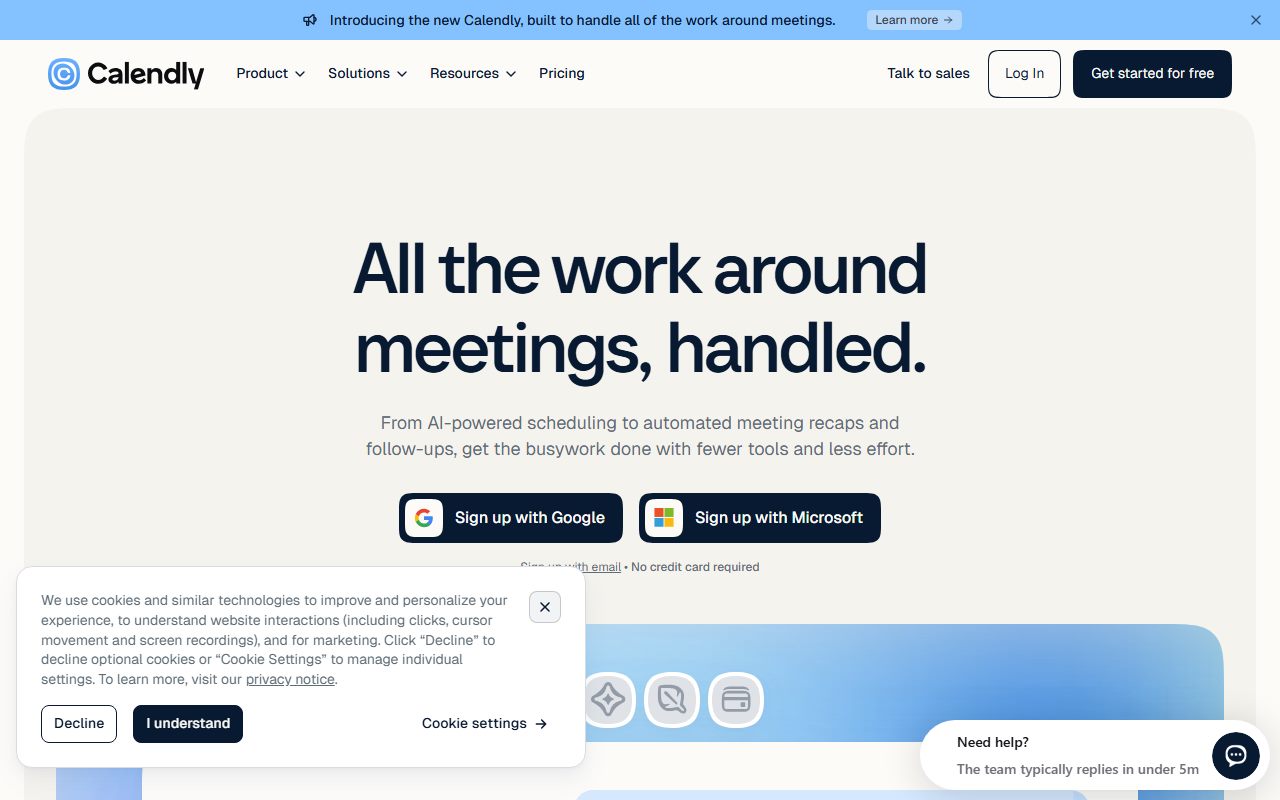
Calendly is a booking page sold per seat per month, where a seat belongs to the person whose calendar is connected and who hosts the meetings.
The shape is the opposite of Bonsai, which includes scheduling as one feature inside a contracts-and-invoices suite. Calendly is scheduling and nothing else, with payments, reminders and CRM connections attached to the booking rather than to the project. It is also unlike Harvest, where the unit is the hour; here the unit is the slot.
For a freelancer the question is how many kinds of meeting you offer. One kind from one calendar, and the Free plan is the product. Two kinds, or a second calendar, and you are a Standard customer. The pricing page's own structure makes that the whole decision.
Who Calendly is best for
Read from the pricing page's plan cards, Calendly is shaped for these people:
- A consultant who offers one call type, a discovery call or a check-in, and wants it bookable from a link at no cost.
- A freelancer with several services who needs a separate event type for each and will pay one Standard seat for unlimited types.
- Anyone who takes a deposit at booking, since Stripe and PayPal payments arrive on Standard.
- Someone whose work calendar and personal calendar both block time, because Standard connects six calendars against one on Free.
- A person who sends follow-ups through HubSpot or Mailchimp, both connected on Standard.
- A two- or three-person studio that needs round-robin or routing, which is Teams at $16 per seat on yearly billing.
Who should skip it
Three profiles the page argues against:
- Anyone whose only need beyond Free is a second event type. Cal.com lists unlimited event types at $0.
- Anyone who needs text reminders, packages or a waitlist printed on the plan. The Calendly page mentions none of them; Acuity prints all three.
- Anyone choosing on the monthly price, since the page did not show it on our visit.
What each plan includes, as of October 2026
Four plans, read from the pricing page on October 10, 2026.
Free is described as always free. It lists one event type, one calendar connection, one-on-one scheduling, unlimited meetings, a customisable booking page and the browser extension.
Standard lists unlimited event types, six calendar connections, automations and reminders, HubSpot and Mailchimp connections, Stripe and PayPal payments, and Notetaker and Callie as add-ons. Round-robin routing is marked as not included.
Teams adds round-robin and team scheduling, lead qualification and routing, centrally managed event types, Marketo and Pardot connections, Salesforce meeting delivery and an optional SSO add-on.
Enterprise adds Salesforce lookup routing, a Microsoft Dynamics connection, SSO and SAML, domain control, audit logs, a data deletion API, onboarding and a dedicated account team.
- The line that defines the entry price: the second event type and the second calendar both live on Standard (pricing page, October 10, 2026).
- The line that moves a studio to Teams: round-robin and routing.
- What every paid tier states: seats only for hosts, never for invitees.
- What the page does not say: SMS, Calendly's own payment fee, support channels, and the monthly-billing price.
How the pricing is structured
Per seat per month, with yearly billing shown and monthly billing implied.
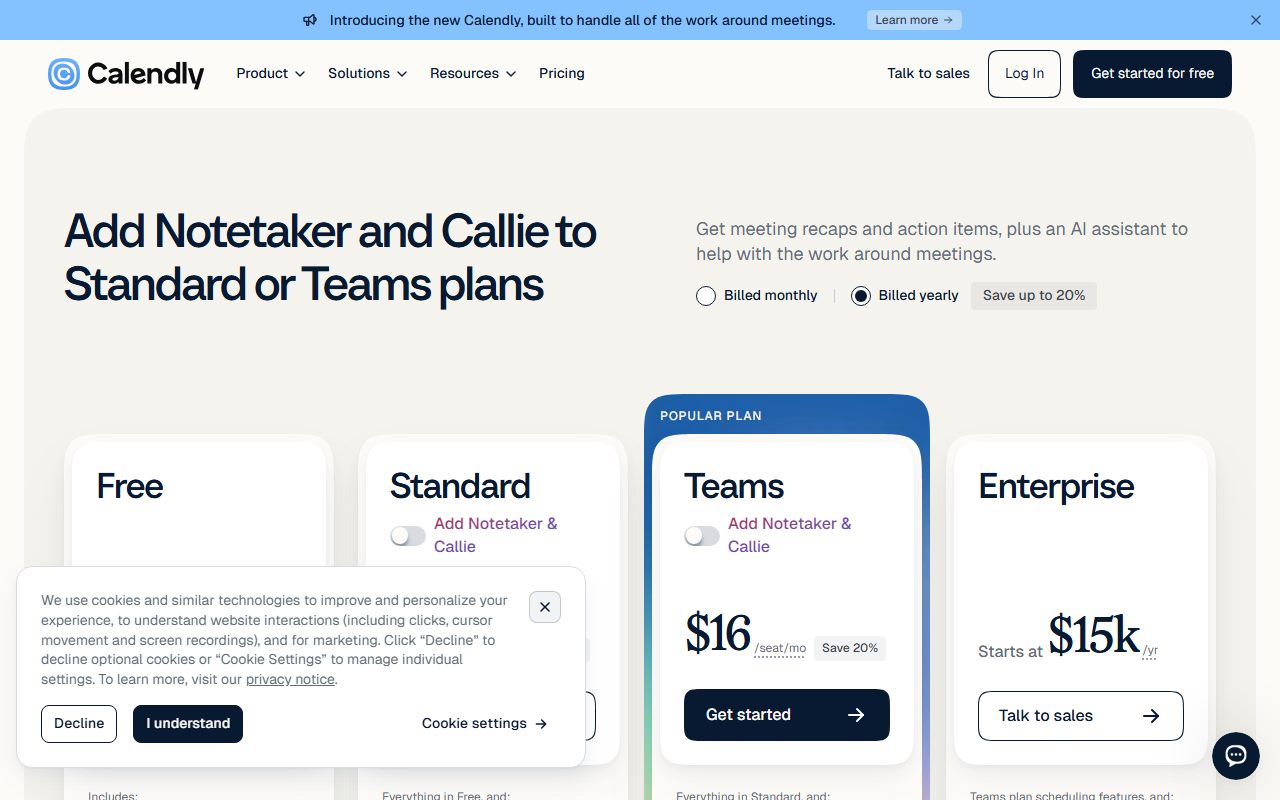
On October 10, 2026 the page showed Standard at $10 per seat per month next to a Save 17% label and Teams at $16 next to Save 20%, under a billed yearly and billed monthly toggle. Enterprise starts at $15,000 a year with a 50-seat minimum, in US dollars only.
Editorial arithmetic from those figures: one freelancer on Standard yearly is $120 a year. If the Save 17% label is read literally, the monthly-billing price would be about $12, or $144 a year. One Teams seat yearly is $192; two Teams seats, the smallest studio that needs round-robin, is $384.
There are no add-on prices on the page. Notetaker and Callie are listed as add-ons on Standard without a figure. SSO is an optional add-on on Teams without a figure.
Against this blog's scheduling cluster on the same date: Cal.com's Teams plan is $12 per user per month yearly and its free plan has no event-type cap; Acuity's Starter is $16 a month yearly for one calendar with no free plan. Calendly's Standard sits between them in price and below Cal.com in what the free tier allows. Calendly vs Acuity works the two paid options through in detail.
The price the page does not print
Two figures a freelancer would want are absent.
The first is the monthly-billing price. The toggle exists, the yearly figures render, and the monthly figures did not on our visit. A page that sells by the seat should show both numbers in text; this one, at least on the day, showed one. A buyer who wants to pay monthly for a two-month project cannot read the cost from the page without clicking through.
The second is the payment fee. Stripe and PayPal collect on Standard, but the page does not say whether Calendly adds a platform fee on top of the processor's, as some scheduling tools do. The editors cannot tell you what a $200 deposit costs to collect through a Calendly booking.
What a tool costs besides its price is this blog's list of the lines to find before signing. On this page, two of them are missing.
Ease of use: what the score is built from
A 4.3, from structure and from the verified-review picture, with one deduction.
The case for the score is the Free plan's shape: one link, one calendar, unlimited meetings, no expiry, and a browser extension. There is nothing to configure before the first booking arrives. The Trustpilot sample described below names ease of use for business meetings among its consistent praise.
The deduction is for the page itself. A billing toggle that does not render its second state, add-ons without prices and FAQ questions whose answers did not load are small signs of a page optimised for the yearly click rather than for reading.
Features: broad on the paid tiers, narrow on Free
A 4.1, and the split is the reason.
Standard's list is long for one seat: unlimited event types, six calendars, reminders and automations, two marketing connections and two payment processors. Teams adds the routing and CRM delivery a small agency would want. The comparison table runs to dozens of rows.
Free, by contrast, is one event type and one calendar. That is enough for one kind of meeting and not for two, and the page does not pretend otherwise.
The deductions are for what is missing from the page rather than from the product: no mention of SMS reminders, no waitlist, no packages or memberships, no client intake forms listed by name. Acuity prints all of those on its tiers; Calendly's page leaves a freelancer guessing.
Value: the free plan is excellent and the first step is steep
A 3.4, and the arithmetic drives it.
For one event type the value is unbeatable: the product costs nothing and has no expiry. For two event types the price is $120 a year on yearly billing, which is the whole Standard seat for one extra meeting type. Cal.com gives unlimited event types away, and that comparison sets the ceiling on this score.
Standard earns the price only if you use the rest of it: six calendars, reminders, payments, HubSpot or Mailchimp. A freelancer who uses three of those four is getting a fair trade. A freelancer who needs one more link is not.
The missing monthly price and the unstated payment fee each cost a fraction, for the reason given above: a per-seat product should print both.
Support: not described on the page, and the reviews are split
A 3.0, and provisional.
The pricing page does not describe support channels, hours or response targets for Free, Standard or Teams. Enterprise lists onboarding and a dedicated account team. The vendor does not publish, on that page, what a single Standard seat receives when a calendar connection breaks.
The Trustpilot picture fills some of the gap and lowers the score. Reviewers who reached a live agent describe quick and friendly resolution. The most common complaint is the automated chatbot that delays reaching a human, followed by chats closed without resolution and booking or calendar errors that persisted for weeks. The page also notes the company has not replied to negative reviews.
If a later version of this review can cite a help-centre page on support channels per plan, the score will be revisited.
What verified users report
On October 10, 2026, Trustpilot listed 696 reviews for calendly.com with a TrustScore of 4.1, 273 of them posted in the previous twelve months. The split was 56 percent five-star, 5 percent four-star, 3 percent three-star, 6 percent two-star and 30 percent one-star.
The praise clusters around helpful live support staff, ease of use for scheduling business meetings, and refunds granted when customers explained their circumstances. The complaints cluster around the AI chatbot, long waits for a human, unresolved calendar-integration errors, unexpected subscription charges, and slow responses to reports of spam meeting invitations.
A split of 56 percent five-star against 30 percent one-star is a polarised sample. G2, Capterra and the app stores were not opened for this review, and no figure from them is reproduced.
Limits stated by the vendor
The page is specific about plan contents and silent about costs after the subscription.
Stated: one event type and one calendar on Free. Stated: six calendars on Standard. Stated: seats for hosts only. Stated: 50-seat minimum and $15,000 floor on Enterprise. Stated: 14-day trial, no card, on the sign-up page.
Not stated: the monthly-billing price. Not stated: Calendly's own fee on Stripe or PayPal payments. Not stated: SMS. Not stated: support channels per plan. Not stated: add-on prices for Notetaker, Callie or SSO.
How to decide to cancel a tool you already pay for is the test this blog applies at renewal. For Calendly the test is simple: count your event types in month eleven. If the answer is one, the renewal is a mistake.
Alternatives worth reading the price list of
Two, both read on this blog in the same week.
Cal.com is the free alternative. Its pricing page lists unlimited event types and calendars, email and SMS notifications and Stripe and PayPal payments on a $0 plan for one user, with Teams at $12 per user per month yearly. Choose Cal.com if your only need beyond Calendly Free is a second event type. Choose Calendly if your clients already expect its links and you will use Standard's reminders and marketing connections. The full terms are in the Cal.com review.
Acuity Scheduling is the printed-features alternative. No free plan, Starter at $16 a month yearly for one calendar, but text reminders, packages, gift certificates and a waitlist all named on its Standard tier at $27. Choose Acuity if you sell sessions and packages to clients. Choose Calendly if you book meetings and nothing more. The Acuity review and Calendly vs Acuity set the two side by side.
All three sit in order in the best scheduling tools for freelancers.
Buy it if, skip it if
Conditions, not conclusions, because a documentation review is not entitled to conclusions.
- Stay on Free if you offer one kind of meeting from one calendar. That is the whole product at $0, with no expiry.
- Take Standard yearly if you need several event types, reminders and a payment on booking, and will use most of them. That is $120 a year on the published terms.
- Take Teams only if you need round-robin or routing across two or more hosts; one person has no use for it.
- Skip it if your only need beyond Free is a second event type, or if you need SMS, packages or a waitlist printed on the plan.
- Do not rely on this post if you want to know what Calendly is like to use. Nobody here has used it, and the label says so.
Bottom line
On the published terms as of October 10, 2026, Calendly has the best free scheduling plan for a freelancer with exactly one kind of meeting, and the most expensive second event type in this blog's cluster.
The product the page describes is a per-seat booking tool whose Standard tier earns its $120 a year through calendars, reminders and payments rather than through event types alone. The hazards are a monthly price that did not render, a payment fee that is not printed, support that is not described, and a review sample with 30 percent one-star.
If a later post on this blog carries the paid and in use label for Calendly, it will say which plan, since when, and what the first collected deposit actually cost. Until then this is a reading of a price list on one date. There is no affiliate link on this page and no commission attached to it.
Sources
Read on October 10, 2026. Where a figure is missing above, the vendor does not publish it on these pages.
- Calendly pricing page, plan cards, comparison table, FAQ headings: calendly.com/pricing
- Calendly sign-up page, 14-day Teams Plus trial, no credit card: calendly.com/signup
- Trustpilot listing for calendly.com, 696 reviews, TrustScore 4.1
- This blog's scope and labels: what I will and will not claim
- This blog's editorial policy: editorial policy and about
Visit Calendly
We have no affiliate relationship with this vendor. Link goes to the official site.