 My
My
Cal.com
A scheduling tool whose free plan lists unlimited event types, SMS notifications and payments, with a $12 Teams tier and an open-source community edition you can host yourself
Scored on the published rubric, from documentation, pricing and verified user reports.
Best for: A freelancer who needs more than one booking link, wants SMS and email reminders and a payment on booking without a subscription, and is comfortable with a younger product whose pages leave some terms unstated.
Verdict
What this is based on: the Cal.com pricing page, the project's GitHub repository, the Cal.diy installation page and the platform FAQ, read on October 10, 2026. No Cal.com account was opened for it. That is the documentation review label, the third of the three honest positions on this blog, and it means the editors can report what the page promises and nothing about the product in use.
The page describes the most generous free scheduling tier this blog has read. For one user at $0 it lists unlimited event types and calendars, email and SMS notifications, integrations with more than a hundred apps, a mobile app and browser extension, Stripe and PayPal payments, two-way Salesforce and HubSpot sync and a one-click Calendly import. The page says there are no usage limits.
The paid step is Teams at $12 per user per month on yearly billing, which buys round-robin, collective and managed event types, recurring events, routing forms, analytics and removal of Cal.com branding. A 14-day trial covers it.
The cautions are of a different kind from the other two tools in this cluster. The monthly-billing price is not shown. Support channels are not described below Enterprise. And the open-source story has shifted: the repository now describes a self-hosted community edition called Cal.diy under the MIT licence, separate from the hosted product.
Visit Cal.com
We have no affiliate relationship with this vendor. Link goes to the official site.
Where it is strong
- **Unlimited event types and calendars at $0**, described as free forever with no usage limits for one user (pricing page, October 10, 2026).
- **Email and SMS notifications on the free plan**, which neither Calendly's nor Acuity's page offers below a paid tier (pricing page, October 10, 2026).
- **Stripe and PayPal payments and two-way Salesforce and HubSpot sync on Free**, features Calendly's page places on Standard and Teams (pricing page, October 10, 2026).
- **A one-click Calendly import** listed on the free plan, so switching costs time rather than retyping (pricing page, October 10, 2026).
- **Teams at $12 per user per month yearly** with round-robin, collective events, routing forms, analytics and branding removal, and a 14-day trial (pricing page, October 10, 2026).
- **An open-source community edition** you can run on your own server, described on the repository as MIT-licensed with no hosted version (GitHub and cal.diy, October 10, 2026).
Where it falls short
- **No monthly-billing price is shown** for Teams or Organizations; the page gives yearly figures with a Save 25% label only (pricing page, October 10, 2026).
- **Support channels are not described** for Free or Teams; priority Slack and account support appear only on Enterprise (pricing page, October 10, 2026).
- **Cal.com branding stays on your booking page on Free**; removal is a Teams feature at $12 per user per month yearly (pricing page, October 10, 2026).
- **The open-source edition and the hosted product are now separate things.** The repository describes Cal.diy as self-hosted only with no commercial code, and the installation page calls it the community edition of Cal.com; a buyer cannot assume the two have the same features (October 10, 2026).
- **Trustpilot complaints name confusing billing and trial steps**, and one unresolved Cal Payments withdrawal case, in a sample that is otherwise strongly positive (October 10, 2026).
What this review is based on, and what it cannot tell you
Documentation only. Everything below comes from the Cal.com pricing page, the project's GitHub repository, the Cal.diy installation page and the platform FAQ, read on October 10, 2026. No account was opened, no trial was started, no server was set up, and nothing here describes the product in use.
That is the third of the three positions this blog allows itself, set out in what I will and will not claim. A documentation review reads the price list carefully so that when a free plan sounds too generous, the terms behind it have been checked rather than assumed.
One limit of this reading needs stating up front. The pricing page says no usage limits and lists SMS on the free plan, but prints no SMS allowance, no payment fee and no monthly-billing price. Where a figure is missing below, the sentence says so rather than guessing.
What Cal.com is
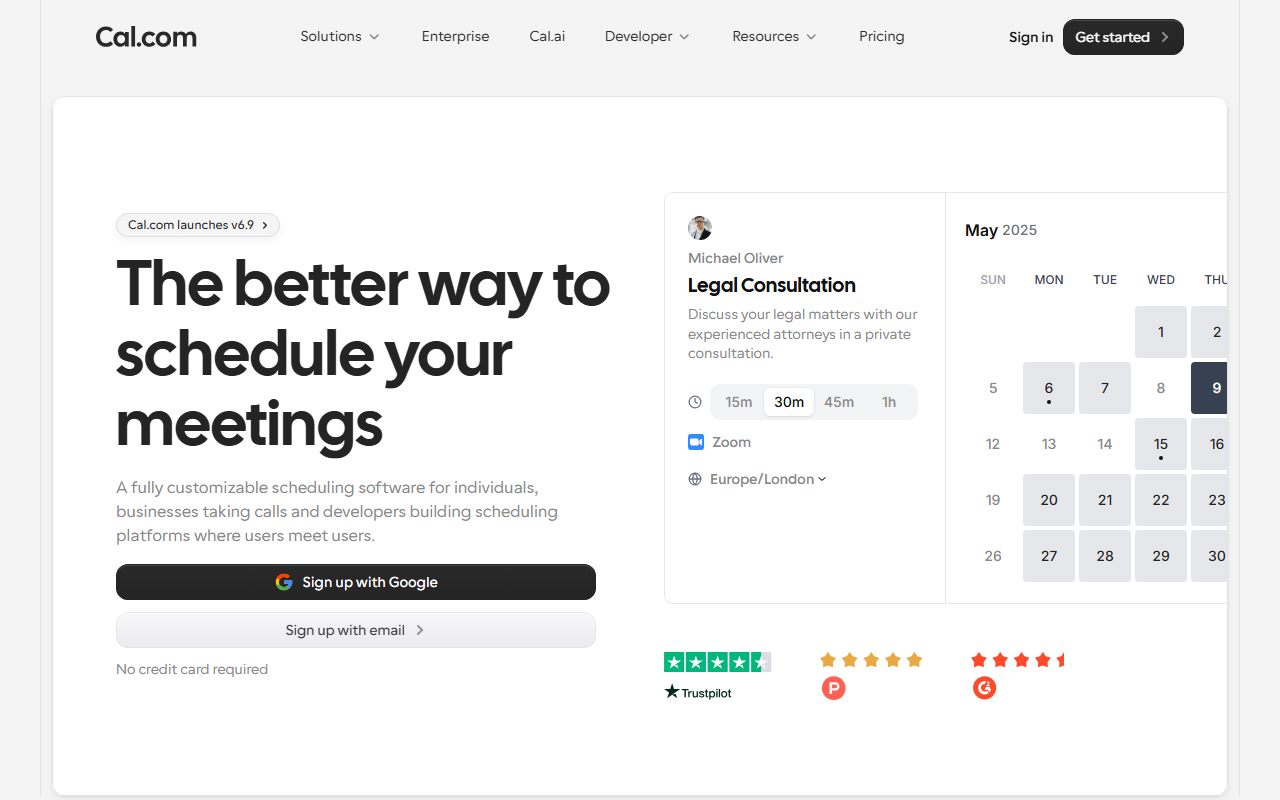
Cal.com is a booking page sold per user per month above a free tier, with an open-source community edition alongside it.
The shape is closest to Calendly: links, event types, calendar connections, reminders and payments on booking. The difference is where the lines fall. Calendly's page puts the second event type, the second calendar and payments on a paid seat. Cal.com's page puts all of them on the $0 plan and sells team coordination instead.
It is further from Acuity, whose page is about sessions, packages and intake forms. Cal.com's page does not mention packages or memberships at all.
The second half of the product is the code. The GitHub repository, read October 10, 2026, now describes a project called Cal.diy as the fully open-source, MIT-licensed, self-hosted edition, with no hosted version and no commercial code, and points commercial users to Cal.com. The installation page calls Cal.diy the open-source community edition of Cal.com. A reader who remembers Cal.com as simply open source should note the split.
Who Cal.com is best for
Read from the pricing page's plan cards, Cal.com is shaped for these people:
- A freelancer with three or four kinds of call who wants a separate link for each without paying a seat.
- Someone whose clients forget appointments and who wants SMS as well as email reminders without a subscription.
- A consultant who takes a deposit at booking, since Stripe and PayPal are on Free.
- Anyone leaving Calendly, with the one-click import the page lists.
- A two-person studio that needs round-robin or a shared booking page, which is Teams at $12 per user per month yearly.
- A developer or technically minded freelancer who would rather run the community edition on their own server than pay for hosting.
Who should skip it
Three profiles the page argues against:
- Session businesses that sell packages, memberships or gift certificates. None appears on the page; Acuity names all three.
- Anyone who needs a described support channel before trusting a booking page with client payments; the page offers none below Enterprise.
- Anyone who wants the self-hosted edition to match the hosted one feature for feature; the repository now says it carries no commercial code.
What each plan includes, as of October 2026
Four plans, read from the pricing page on October 10, 2026.
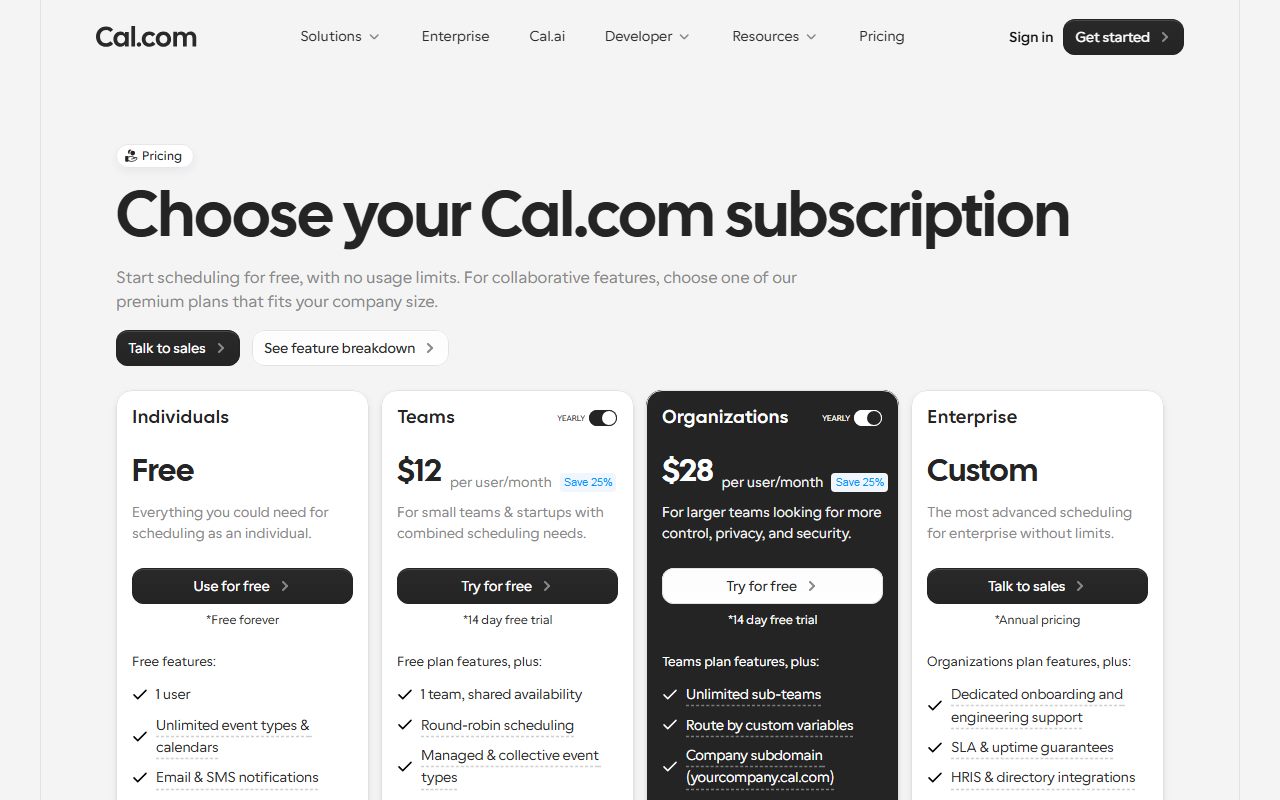
Free is $0 for one user and is described as free forever with no usage limits. It lists unlimited event types and calendars, email and SMS notifications, integrations with more than a hundred apps, a mobile app and browser extension, Stripe and PayPal payments, two-way Salesforce and HubSpot sync and one-click Calendly import.
Teams is $12 per user per month on yearly billing with a 14-day trial. It adds one team with shared availability, round-robin scheduling, managed and collective event types, recurring events, customisable notifications, removal of Cal.com branding, routing forms, booking analytics and custom APIs.
Organizations is $28 per user per month yearly with a 14-day trial. It adds unlimited sub-teams, routing by custom variables, a company subdomain, SAML SSO and SCIM, SOC 2, HIPAA and ISO 27001 compliance, instant meetings, domain-wide delegation, role-based permissions and additional APIs.
Enterprise is custom annual pricing with dedicated onboarding and engineering support, SLA and uptime guarantees, HRIS and directory integrations, priority Slack and account support, and a dedicated database.
- The line that defines the entry price: for one person there is none; everything a solo freelancer books with is on Free (pricing page, October 10, 2026).
- The line that moves people to Teams: branding removal and round-robin.
- What the page states as unlimited: event types and calendars, and usage generally.
- What the page does not quantify: SMS volume, payment fees, the monthly-billing price, and support channels below Enterprise.
How the pricing is structured
Per user per month above a free tier, with yearly billing shown and monthly billing absent.
On October 10, 2026 the page showed Teams at $12 per user per month and Organizations at $28, each beside a Save 25% label, and gave no monthly-billing figure for either. Enterprise is by annual quote.
Editorial arithmetic from those figures: one user on Teams yearly is $144 a year; two users, the smallest team that needs round-robin, is $288. If the Save 25% label is read literally, the monthly-billing price for Teams would be $16, but the page does not print it and the editors will not state it as fact.
There are no add-on prices on the page; the platform FAQ, read the same day, says the per-booking developer plan is deprecated and closed to new customers.
Against this blog's scheduling cluster on the same date: Calendly Standard is $10 per seat per month yearly and its free plan stops at one event type; Acuity Starter is $16 a month yearly with no free plan. For one freelancer Cal.com's relevant price is $0, which is the point. Calendly vs Acuity covers the two paid options; this page is the free one both are measured against.
The terms the pricing page leaves open
Three gaps, each of which matters more as the free plan is used harder.
SMS. The page lists email and SMS notifications on Free and says no usage limits, but prints no message allowance, per-message charge or country list. The editors cannot confirm from the page whether SMS is unlimited or metered.
Payments. Stripe and PayPal are on Free. The page does not say whether Cal.com adds a platform fee above the processor's rate. One Trustpilot reviewer describes an unresolved withdrawal issue with Cal Payments, which is a separate product the pricing page does not price.
Support. Nothing is described for Free or Teams. For a tool that will hold your client payments and your calendar, that is a line to resolve before relying on it. What a tool costs besides its price is this blog's list of exactly these lines.
The open-source question, as the pages now state it
This section exists because the facts changed and a reader deserves the current version.
On October 10, 2026 the GitHub repository at calcom/cal.com described Cal.diy as fully open source under the MIT licence, self-hosted only, with no hosted or managed version and no commercial or enterprise code, directing commercial or enterprise needs to Cal.com. It showed 48.9 thousand stars.
The Cal.diy installation page described it as the open-source community edition of Cal.com, running on Node.js, yarn, Git and PostgreSQL, with Linux suggested for production, and noted that both names are registered trademarks of Cal.com, Inc.
For most independent workers the hosted Free plan is the relevant product. The community edition, which the editors did not install, is the fallback if the hosted terms ever change, a kind of insurance Calendly and Acuity do not offer.
Ease of use: what the score is built from
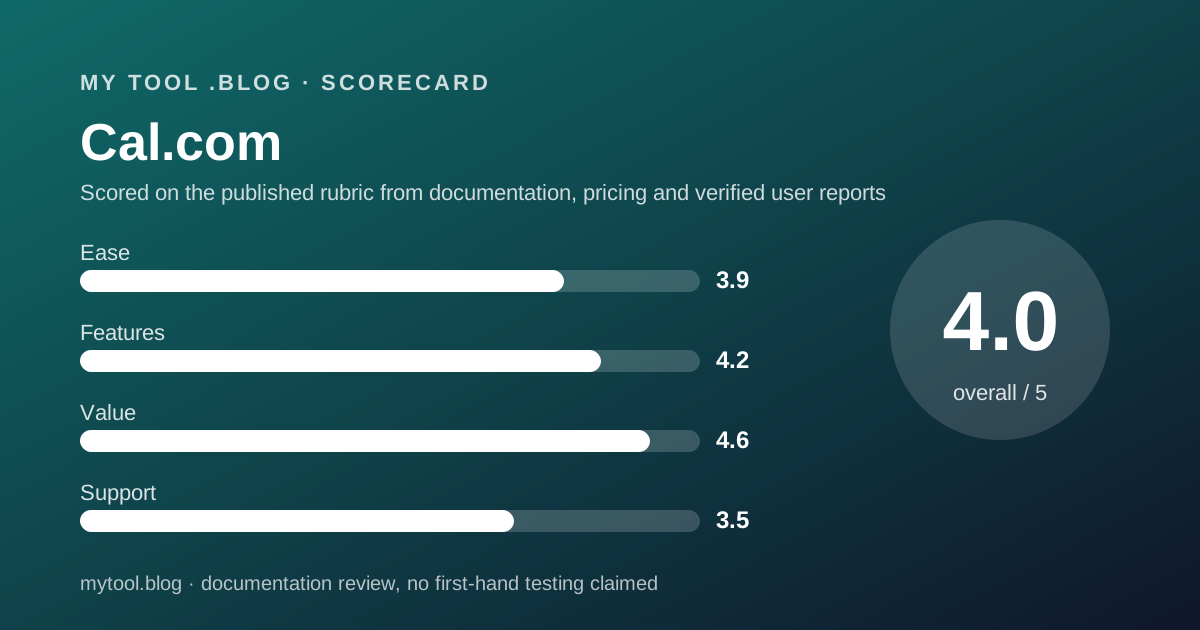
A 3.9, from structure and from the verified-review picture, with one deduction.
The case for the score is that there is nothing to decide for one person. Free covers the whole solo use case, and the page is short enough to read in two minutes. Trustpilot reviewers describe the platform as intuitive and flexible.
The deduction is for the billing path. Reviewers name confusing billing and upgrade steps, including the trial and skip-trial process, as a recurring complaint, and the page's missing monthly figures are consistent with that. Setting up a tool is easy; understanding what you will be charged is, on the evidence, less so.
Features: wide on Free, team-shaped above it
A 4.2, and the free tier carries it.
Unlimited event types and calendars, SMS and email, payments, CRM sync, a mobile app, an extension and an importer, all at $0, is a list that Calendly's page spreads across Free, Standard and Teams. For a solo freelancer who books meetings, Cal.com's Free plan on paper is the most complete tool in this cluster.
Above Free, the additions are team features; a solo worker gains branding removal and recurring events from Teams and little else.
The deductions are for what the page does not mention: packages, memberships, gift certificates, a waitlist and intake forms by name. A session-based freelancer will find more of their business described on Acuity's page.
Value: the best in the cluster, with the caveats stated
A 4.6, the highest value score this blog has given in scheduling, and the arithmetic is short.
For one freelancer the published price of a working booking page with several event types, reminders by two channels and payments on booking is $0. Calendly charges $120 a year for the second event type by the editors' arithmetic. Acuity charges $192 a year for its first tier.
The deductions are the open terms: SMS volume, payment fees and support, each of which could carry a cost the page does not print. A later reading that finds any of them metered will lower this score, and the label says so.
For a studio, Teams at $144 per user per year is $24 less than Calendly Teams at $192 and includes branding removal, which Calendly's page does not mention at any tier.
Support: not described, and the reviews are mixed on it
A 3.5, and provisional.
The pricing page describes no support channel, hours or response target for Free, Teams or Organizations. Enterprise lists priority Slack and account support and dedicated onboarding.
The Trustpilot picture is unusual: fast, helpful support is the most common praise, and slow or automated support is among the most common complaints. The sample is strongly positive overall, which lifts the score above Acuity's and Calendly's despite the silence on the page. A help-centre page on support channels per plan would prompt a revisit.
What verified users report
On October 10, 2026, Trustpilot listed 427 reviews for cal.com with a TrustScore of 4.7, 205 of them posted in the previous twelve months. The split was 87 percent five-star, 6 percent four-star, 2 percent three-star, 2 percent two-star and 3 percent one-star.
The praise clusters around fast, helpful customer support with quick escalations, an intuitive and flexible scheduling platform, Cal Video as a free alternative to paid video tools, and developer-friendly features and integrations. The complaints cluster around slow or unclear support at times, confusing billing and upgrade steps including the trial process, automated replies, one unresolved Cal Payments withdrawal issue, and configuration steps that are hard to follow.
A split of 87 percent five-star against 3 percent one-star is the strongest in this cluster, from the smallest sample. G2, Capterra and the app stores were not opened for this review.
Limits stated by the vendor
Stated: Free for one user with no usage limits. Stated: Teams $12 and Organizations $28 per user per month yearly. Stated: 14-day trial on both. Stated: the platform plan is closed to new customers.
Not stated: the monthly-billing price. Not stated: SMS allowance or cost. Not stated: any fee on Stripe or PayPal payments. Not stated: support channels below Enterprise. Not stated: which hosted features the community edition lacks.
How to decide to cancel a tool you already pay for is the test this blog applies at renewal. For a solo user of Cal.com there is nothing to cancel, which is the simplest possible result of that test.
Alternatives worth reading the price list of
Two, both read on this blog in the same week.
Calendly is the incumbent. One event type and one calendar at $0, Standard at $10 per seat per month yearly for unlimited event types, six calendars, reminders and payments. Choose Calendly if your clients already expect its links and you will use Standard's marketing connections. Choose Cal.com if you want the second event type, SMS and payments without the seat. The Calendly review has the terms.
Acuity Scheduling is the sessions alternative. No free plan, Standard at $27 a month yearly with text reminders, a waitlist, packages, memberships and gift certificates named. Choose Acuity if you sell packages and need intake forms and a waitlist. Choose Cal.com if you book calls and want to pay nothing. The Acuity review and Calendly vs Acuity cover the paid pair.
All three sit in order in the best scheduling tools for freelancers; for hours rather than slots, Harvest is the free-plan pick on the invoicing side.
Buy it if, skip it if
Conditions, not conclusions, because a documentation review is not entitled to conclusions.
- Use Free if you are one person who books calls, needs several event types, wants SMS and email reminders, and can accept Cal.com branding on the page.
- Take Teams yearly if you are two or more hosts who need round-robin or a shared page, or one person who must remove the branding. That is $144 per user per year on the published terms.
- Ask in writing before relying on it for the SMS allowance, any payment fee and the support channel, none of which the page prints.
- Skip it if you sell packages or memberships, which the page does not mention.
- Do not rely on this post if you want to know what Cal.com is like to use. Nobody here has used it, and the label says so.
Bottom line
On the published terms as of October 10, 2026, Cal.com has the most generous free scheduling plan this blog has read: unlimited event types and calendars, SMS and email notifications, payments and CRM sync at $0 for one user.
The product the page describes is a booking tool that gives the solo use case away and charges teams $12 per user per month yearly for coordination and branding. The hazards are the terms the page leaves open, SMS volume, payment fees, support and the monthly price, and an open-source story that has split into a community edition and a hosted product.
If a later post on this blog carries the free plan only label for Cal.com, it will say how many SMS reminders went out, whether any were charged, and what a collected deposit cost. Until then this is a reading of a price list on one date. There is no affiliate link on this page and no commission attached to it.
Sources
Read on October 10, 2026. Where a figure is missing above, the vendor does not publish it on these pages.
- Cal.com pricing page, plan contents, Teams and Organizations prices, trial: cal.com/pricing
- GitHub repository calcom/cal.com, Cal.diy description, MIT licence, self-hosted only, 48.9k stars
- Cal.diy installation page, requirements, community edition statement: cal.diy/installation
- Cal.com platform FAQ, per-booking billing, platform plan deprecated: cal.com/docs/platform/faq
- Trustpilot listing for cal.com, 427 reviews, TrustScore 4.7
- This blog's scope and labels: what I will and will not claim
- This blog's editorial policy: editorial policy and about
Visit Cal.com
We have no affiliate relationship with this vendor. Link goes to the official site.