 My
My
Harvest
Time tracking and invoicing with a free plan that stops at two projects, not at the useful features
Scored on the published rubric, from documentation, pricing and verified user reports.
Best for: A solo freelancer who bills by the hour across one or two long-running clients and wants invoicing in the same place as the timer.
Verdict
What this review is based on: the vendor's published pricing page and its feature comparison table, as read on October 8, 2026. No paid or free account was opened for it, and it is not based on working in the product. On this blog that is the documentation only label, the third of the three honest positions, and it is the weakest of the three. Treat it as a careful reading of a price list, which is what a documentation review is.
The reading itself is favourable in an unusual way. Harvest's free plan is not a crippled demo. Per the comparison table, it includes time tracking, invoicing, expense tracking, project estimates, reporting basics, both hourly and fixed-fee projects, up to four custom reports, more than fifty integrations and the desktop and mobile apps. What it does not include is a third project, or a second person.
So the wall a freelancer hits here is a count, not a feature. That is a kinder shape than most free tiers and it makes the upgrade decision easy to predict. The part the page does not answer is what the usage-based charges cost, and that gap is the reason this is not a recommendation.
Visit Harvest
We have no affiliate relationship with this vendor. Link goes to the official site.
Where it is strong
- **The free plan keeps the useful features.** Time tracking, invoicing, expenses, estimates, reporting basics and 50-plus integrations are all listed as included (feature comparison, October 8, 2026).
- **The free limit is legible:** one seat and two projects, stated as a number rather than buried in a fair-use clause (pricing page, October 8, 2026).
- **$9 per seat per month billed annually**, which the page prints as $108 per seat per year, against $11 billed monthly (pricing page, October 8, 2026).
- **A 30-day trial with no card collected**, and the page states that an un-upgraded trial account is deactivated rather than charged, with data retained (pricing FAQ, October 8, 2026).
- **You can drop back to free from the trial** if the account meets the free plan's requirements, which is the escape hatch most trials omit (pricing FAQ, October 8, 2026).
Where it falls short
- **The usage-based charges are not priced on the page.** It says additional invoices, projects, clients and tasks are billed based on what you use, without rates. The vendor does not publish those figures there.
- **Two projects is a low ceiling for freelance work**, where a project is often one client engagement rather than one year of work (pricing page, October 8, 2026).
- **Seats cannot be removed mid-cycle.** The page says you may add seats at any time, prorated, but a reduction only takes effect at renewal (pricing FAQ, October 8, 2026).
- **Profitability reporting, timesheet approvals and the activity log sit on Enterprise** at $14 per seat per month annually, not on Teams (feature comparison, October 8, 2026).
- **The review scores quoted on the vendor's own page are the vendor's claims**, not figures we read on G2 or Capterra ourselves. We could not open those sites on October 8, 2026.
What this review is based on, and what it cannot tell you
Documentation only. This is a reading of Harvest's pricing page and its feature comparison table on October 8, 2026. No Harvest account was opened, no plan was bought, and nothing below describes what the software is like to work in.
That label exists because of a promise made on this blog before any review went up. What I will and will not claim sets out three positions: paid and in use, free plan only, and documentation only. The third one cannot carry a verdict about whether a paid plan earns its money, so this one does not.
What a documentation review can do is read the price list more carefully than you will at the moment you need an invoice sent by Friday. That is the job here. The same job was done for two other tools in the October 7 journal entry on the FreshBooks and Calendly pricing pages, and the contrast with Harvest turns out to be the interesting part.
What Harvest is
Harvest is a time-tracking product with invoicing attached, sold per seat per month, with web, desktop and mobile apps.
The shape matters more than the feature list. In Harvest, hours are the primary object. You track time against a project, and invoices are generated from those hours. That is the opposite of an invoicing-first tool, where you type an amount and time tracking is an afterthought.
So the question is not whether Harvest is better than FreshBooks. It is whether your work is billed in hours. If it is, the timer and the invoice living in one place removes a transcription step that produces most billing errors. If you bill fixed fees only, much of what you would be paying for here sits unused, although the comparison table confirms fixed-fee projects are supported on every plan.
The free plan is the story, and the limit is a count
Most free tiers are shaped to be annoying. This one is shaped to be small.
Per the feature comparison table on October 8, 2026, the Free plan carries one seat and two projects, and includes time tracking, expense tracking, invoicing, project estimates, reporting basics, support for both time-and-materials and fixed-fee projects, up to four custom reports, more than fifty core integrations including Asana, Slack, Stripe, QuickBooks and Xero, the Harvest Forecast integration, and the web, desktop and mobile apps.
Read that list again and notice what is absent from it: nothing a solo freelancer does daily. Invoicing is not withheld. Integrations are not withheld. The paid-only rows begin at billable and cost rates for teams, team reporting, and bulk import of projects and people, which are all features for having colleagues.
The pricing page's own summary is blunter than most marketing: perfect for getting started, need more projects or team members, upgrade anytime, your data carries over.
- On Free: 1 seat, 2 projects, up to 4 custom reports, $0 forever (pricing page, October 8, 2026).
- First paid-only rows: billable and cost rates for teams, team reporting, project and people import, accounting and payment integrations, scheduled phone support.
- Enterprise-only rows: unlimited custom reports, profitability reporting, timesheet approval, activity log, SAML-based SSO, custom exports, require notes.
- Not stated anywhere in the table: what a third project costs on Free, because there is no third project on Free.
Where the free ceiling actually sits for a freelancer
Two projects sounds generous until you define the word.
If a project in your working life means a client, two is tight. Three concurrent clients is an ordinary month for a freelancer, and the page gives no mechanism to buy a third project without moving to Teams.
If a project means a client relationship rather than a deliverable, and you keep one long-running project per client with tasks underneath, two can last years. The comparison table lists tasks as a separate billable object from projects, which suggests that structure is supported.
The page does not define the boundary, and we did not open an account to find out. So this is the single question to answer before relying on the free plan, and it is answerable in ten minutes inside a trial: can a finished engagement be archived to free up one of the two project slots? If yes, the free plan is durable. If no, it is a short runway.
How the pricing is structured
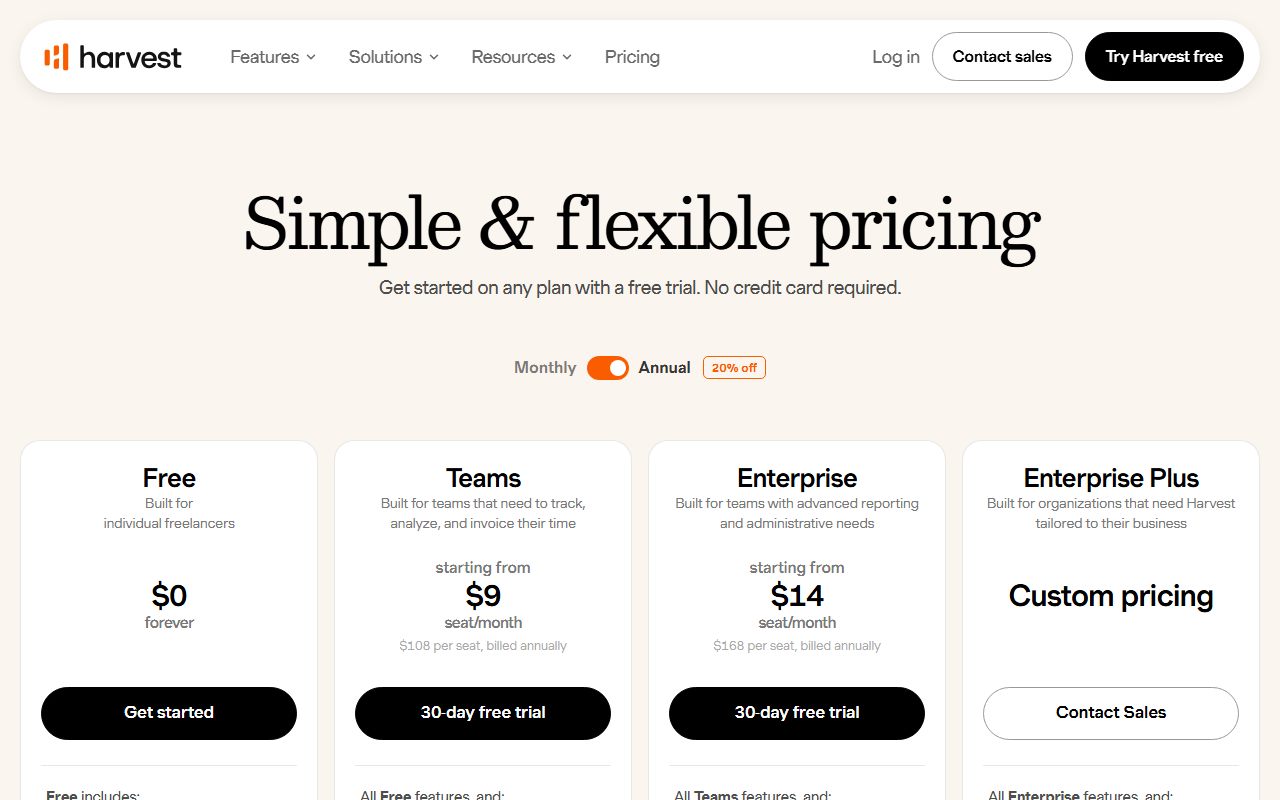
Three published tiers and one sales tier, all in US dollars per the page's own footnote.
Teams is $9 per seat per month billed annually, which the page also prints as $108 per seat per year, or $11 per seat per month billed monthly. Enterprise is $14 per seat per month billed annually, printed as $168 per seat per year, or $17.50 billed monthly. Enterprise Plus is custom pricing through sales. Free is $0 forever.
The 20 percent annual discount is stated in the FAQ as automatic when you pay for the year up front. Our arithmetic from the published figures: a single Teams seat costs $108 a year annually against $132 monthly, a difference of $24.
At ten or more seats paid annually, the FAQ says you can request an invoice and pay by ACH or bank transfer instead of card. Below ten seats, card only.
The number the page does not print
This is the paragraph that stops this review from being a recommendation.
Under both paid plans, the pricing page carries the same sentence: your base rate includes core features, and as your team grows, additional invoices, projects, clients and tasks are billed based on what you use, so you are never overpaying.
That is a usage meter described without a rate. Read as a buyer, the clause says the seat price is a floor rather than a bill, and the plan table does not say how far above the floor a busy month lands. The Free plan's small print points the same way: the usage of some features may require the payment of fees, see our Help Center.
We tried to read the help centre article behind that link on October 8, 2026 and could not reach a page with per-unit rates. So the honest statement is that the vendor does not publish these figures on the pricing page, and we are not going to estimate them.
If you are choosing between Harvest and a flat per-seat competitor, this is the question to put in writing before you pay: what does an extra invoice, project, client or task cost, and at what point does metering start?
What the trial terms actually promise
The trial is better documented than most, and the good parts are specific.
Per the pricing FAQ on October 8, 2026, the trial runs 30 days and no credit card is collected. If you have not upgraded by day 30, the account is deactivated rather than charged, and the page states the data is not deleted and will be waiting if you return.
You can switch to the free plan at any point during the trial, as long as the account meets the free plan's requirements, which the FAQ surfaces as a link during the upgrade flow.
One exception is printed plainly: premium features such as profitability reporting and timesheet approvals are available during the trial, but SAML-based single sign-on cannot be enabled in a trial account. That is an unusually honest footnote and worth repeating, because an evaluation that cannot test the login path is not a complete evaluation for anyone who needs SSO.
What the vendor says users think, and why that is not evidence
The pricing page carries its own social proof, and it should be read as the vendor's claim rather than as independent data.
The page displays 4.3 with 1,500-plus reviews on G2, 4.6 with 4,200-plus reviews on Capterra, and 4.8 with 12,000-plus App Store reviews, alongside 70,000-plus businesses, 10 million-plus invoices created and 50 billion dollars-plus in payments processed. The footer of the help centre repeats the 70,000-plus figure.
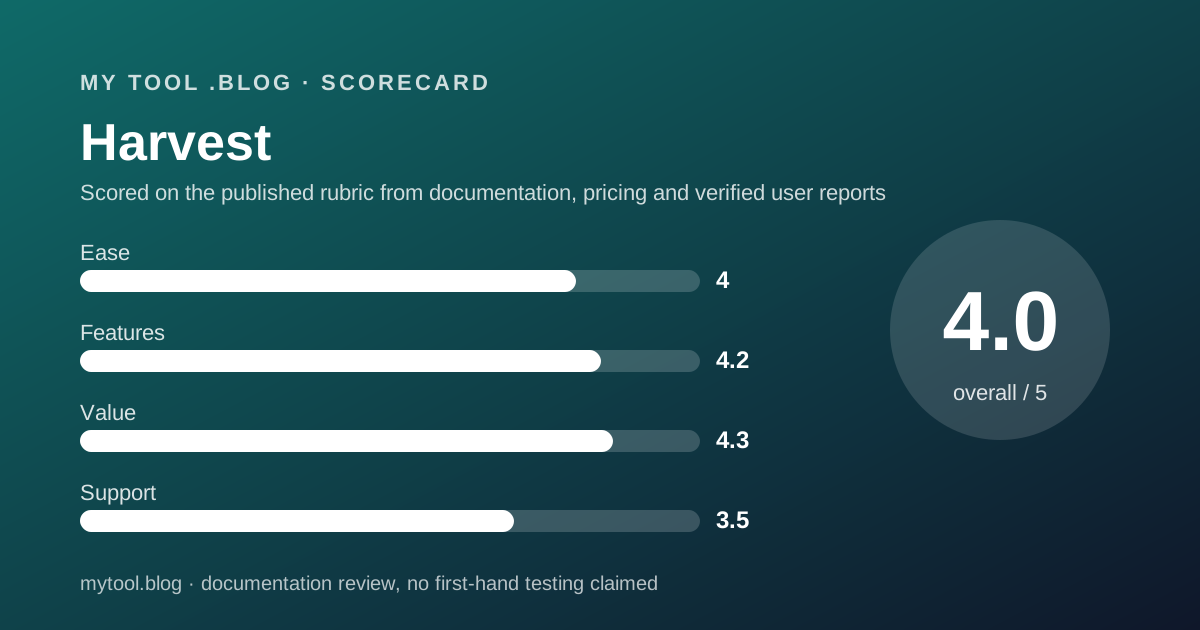
We could not open G2 or Capterra ourselves on October 8, 2026 to confirm those scores or read the complaints behind them. So they appear here attributed, with the date, and they carry no weight in our scores. The four pillar scores above are built from the pricing page and the feature comparison table only.
That is a thin evidence base and saying so is the point of the documentation only label.
Alternatives worth reading the price list of
Two of the obvious ones already have their pricing pages read on this blog, which makes the comparison cheap to do.
FreshBooks is the invoicing-first alternative. The October 7 journal entry records its Lite plan at a promotional $1 per month for the first year against a regular $23, with a five-billable-client cap, and Plus at $8.60 for three months against a regular $43. Choose FreshBooks if invoices and expenses are the main job and hours are incidental. Choose Harvest if the hours come first, because its free plan asks for no promotional clock at all.
The broader contrast is in the shape of the offer, not the price. FreshBooks discounts a subscription for a period and then charges the regular rate. Harvest gives away a small permanent plan and meters growth. The first needs a date in your calendar. The second needs a question answered about rates.
Buy it if, skip it if
Conditions rather than conclusions, because a documentation review is not entitled to conclusions.
- Try the free plan if you bill by the hour and run one or two projects at a time. On the published terms that costs nothing and loses no core feature.
- Pay for Teams if you need a third project or a second person, and pay annually, because the page's own discount makes $9 the real price.
- Wait if a predictable monthly bill matters more than the features, until someone at Harvest tells you in writing what the usage charges are.
- Look elsewhere if you need profitability reporting or timesheet approvals on a small budget, since those sit on Enterprise at $14 per seat per month annually.
- Do not rely on this post if you want to know whether Harvest is pleasant to use. Nobody here has used it, and the label says so.
Bottom line
On the published terms as of October 8, 2026, Harvest has the most freelancer-shaped free plan in this category that this blog has read so far: $0 forever, one seat, two projects, and almost every core feature left switched on.
The upgrade trigger is a count you can see coming, which is rare and genuinely good design. The hazard is the sentence about usage-based charges with no rates attached, and until that is published the bill has a floor but no visible ceiling.
If a later post on this blog carries the paid and in use label for Harvest, it will say which plan, since when, and what the usage line on the invoice actually came to. Until then this is a reading of a price list on one date, which is exactly as much as it claims to be. There is no affiliate link on this page and no commission attached to it.
Sources
Read on October 8, 2026. Where a figure is not here, it is because the vendor does not publish it on these pages.
- Harvest pricing page, plan prices, free plan limits, feature comparison table and pricing FAQ: www.getharvest.com/pricing
- Harvest help centre, searched for usage-based fee rates without finding a rate card: help.getharvest.com
- This blog's scope and labels: what I will and will not claim
- This blog's editorial policy and corrections rules: editorial policy and about
Visit Harvest
We have no affiliate relationship with this vendor. Link goes to the official site.