 My
My
Bonsai
Proposals, contracts and invoices in one chain, priced per user, with the invoicing switched off on the cheapest tier
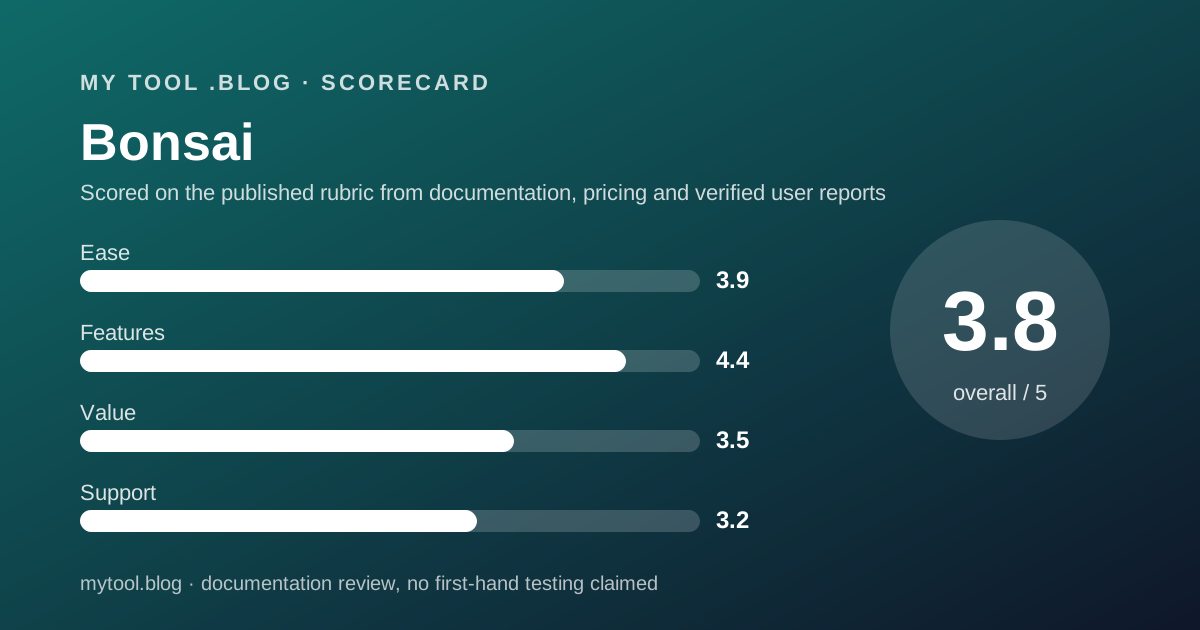
Scored on the published rubric, from documentation, pricing and verified user reports.
Best for: A freelancer whose every engagement starts with a proposal and a signed contract, who wants the invoice generated from that same record, and who is prepared to pay $19 per month annually for Essentials because Basic does not include invoicing.
Verdict
What this is based on: the Bonsai pricing page, its feature table and its Payments page, read on October 10, 2026. No Bonsai account was opened for it. That is the documentation review label, the third of the three honest positions on this blog, and it means the editors can report what the page promises and nothing about the product in use.
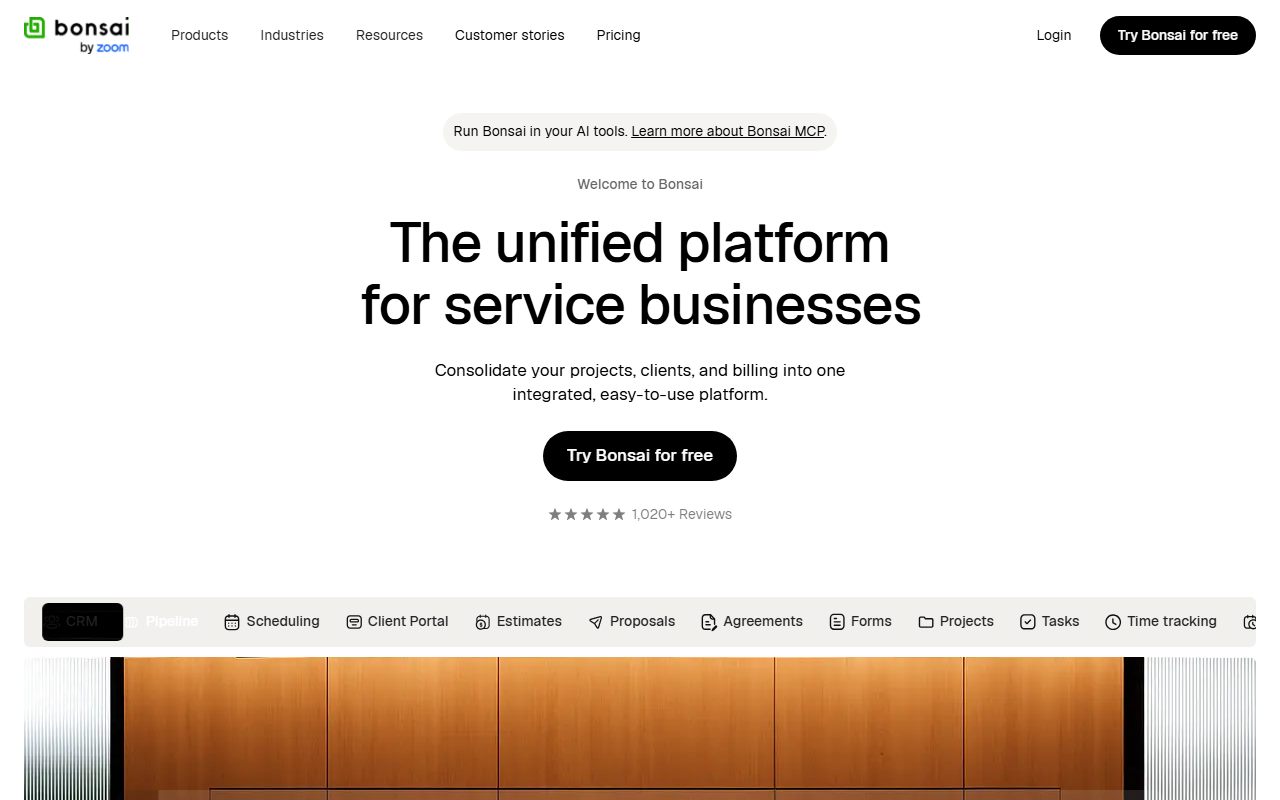
The page describes a freelance operations suite rather than an invoicing tool. Proposals, contracts, forms, scheduling, a client portal, time tracking, tasks, a CRM and invoicing all sit in one product. For the contract half of a freelancer's paperwork, nothing else in this blog's cluster competes.
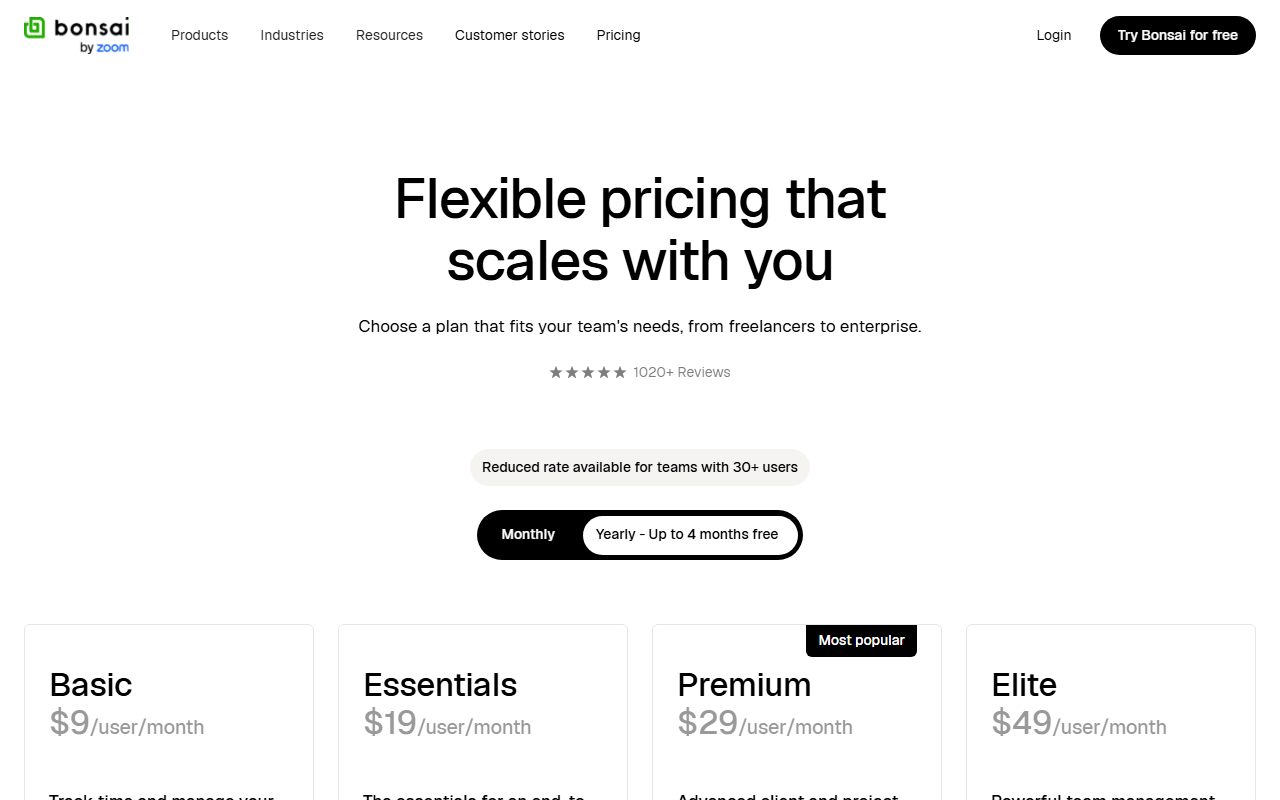
The pricing detail that matters most is easy to miss. Basic, at $9 per user per month annually, lists time tracking, tasks, projects and a CRM, but not invoices, proposals or contracts. Those arrive on Essentials at $19 annually or $25 monthly. For the job this category is named after, Essentials is the entry price.
The trial is 7 days against 30 at FreshBooks and Harvest, and the page does not print its processing fees. Both count against it.
Visit Bonsai
We have no affiliate relationship with this vendor. Link goes to the official site.
Where it is strong
- **Proposals, contracts, e-signatures, invoices and a client portal in one tier**, Essentials, which no other tool in this cluster matches (pricing page, October 10, 2026).
- **Unlimited clients and unlimited projects on every tier**, stated as unlimited rather than as a count (pricing page, October 10, 2026).
- **Annual billing is 40 percent below monthly on Basic** ($9 against $15) and the page describes yearly billing as up to four months free (pricing page, October 10, 2026).
- **Time tracking, tasks and a CRM are included from Basic**, so the operations half of the job does not need a second tool (pricing page, October 10, 2026).
- **QuickBooks, Xero, Zapier, Calendly and Google integrations arrive on Premium**, which keeps the books in an accountant's tool of choice (pricing page, October 10, 2026).
Where it falls short
- **Basic does not include invoicing, proposals or contracts.** The headline $9 price buys time tracking and a CRM; the invoicing tier is $19 annually or $25 monthly (pricing page, October 10, 2026).
- **The trial is 7 days** and the FAQ says card details are entered when choosing a plan afterwards, against 30-day no-card trials at FreshBooks and Harvest (pricing FAQ, October 10, 2026).
- **Processing fees are not printed on the pricing page.** The Payments page states 2.9% plus $0.30 for cards and ACH as low as 1 percent, with no cap or exact ACH rate (October 10, 2026).
- **Removing Bonsai branding is a Premium feature** at $29 annually, so a client on Essentials sees the vendor's name on the paperwork (pricing page, October 10, 2026).
- **The feature table is partly unreadable.** Checkmarks are images without text, storage tiers of 10, 100, 500 and 500 GB are unlabelled, and scheduling is listed as one event type without saying on which plans (pricing page, October 10, 2026).
What this review is based on, and what it cannot tell you
Documentation only. Everything below comes from the Bonsai pricing page, its feature table, its pricing FAQ and its Payments page, read on October 10, 2026. No Bonsai account was opened, no trial was started, and nothing here describes the product in use.
That is the third of the three positions this blog allows itself, set out in what I will and will not claim. A documentation review reads the price list carefully so that the day you need a contract signed by Friday, the price is not a surprise.
One limit of this reading is worth stating up front. Parts of the Bonsai feature table use image checkmarks with no text, so the editors could not map every row to a tier. Where that happens below, the sentence says so rather than guessing.
What Bonsai is
Bonsai is a freelance operations suite sold per user per month, in which proposals, contracts, invoices, time, tasks and clients live in one record.
The shape is the opposite of Wave. Wave starts at the invoice and runs forward into the books. Bonsai starts at the proposal, runs through the signed contract, and arrives at the invoice last. The pricing page's own ordering of features follows that chain.
It is also different from FreshBooks, which has proposals and e-signatures on its Plus tier but sells the invoice and the accounting underneath it. Bonsai's accounting is integration-based: QuickBooks and Xero on Premium, rather than its own double-entry ledger on the page.
So the question for a freelancer is whether the paperwork before the work is where the time goes. If you write proposals, negotiate scope and get signatures before every engagement, Bonsai's shape fits. If a job starts with an email and ends with an invoice, you would be paying for a chain you do not use.
Who Bonsai is best for
Read from the pricing page's feature bullets, Bonsai is shaped for these people:
- A designer, developer or consultant who sends a proposal and a contract before every project and wants the invoice generated from that record.
- A freelancer with many concurrent clients and projects, since both are listed as unlimited on every tier.
- Someone who collects intake forms and questionnaires from clients, which Essentials includes alongside the client portal.
- A person who tracks time and tasks against projects and wants that in the same tool as the contract, available from Basic.
- A small studio that will grow to two or three seats, priced per user with no minimum below Elite.
- Anyone who keeps the books in QuickBooks or Xero and wants Bonsai to feed them, which Premium's integrations cover.
Who should skip it
Three profiles the page argues against:
- Invoice-only freelancers. Wave gives unlimited invoices away and Harvest includes invoicing on its free plan; Bonsai's invoicing tier is $228 a year by the editors' arithmetic.
- Anyone who needs weeks to evaluate. The trial is 7 days.
- Freelancers whose clients must never see a vendor's logo on the paperwork, unless they pay for Premium.
What each tier includes, as of October 2026
Four tiers, all per user per month, all with printed prices.
Basic lists time tracking, task management, unlimited projects, a CRM, a service library, iOS and Android apps and unlimited clients. It does not list invoices, proposals or contracts.
Essentials adds invoices and payments, proposals and contracts, all templates, forms and questionnaires, scheduling, a client portal, expense tracking and income tracking.
Premium, marked most popular on the page, adds project insights, workload management, a Gantt view, a deals pipeline, custom fields and properties, client tasks and messaging, profit and productivity reports, removal of Bonsai branding, and integrations with QuickBooks, Xero, Zapier, Calendly and Google.
Elite adds custom permissions, timesheet locking, markup on expenses and custom data import, and requires three users.
The comparison table also lists scheduling as one event type and storage of 10, 100, 500 and 500 GB without labelling the tiers. The editors read those as ascending by tier but the page does not say so.
- The line that defines the entry price: invoicing and contracts begin on Essentials, not Basic (pricing page, October 10, 2026).
- The line that moves people to Premium: branding removal and the accounting integrations.
- What every tier states as unlimited: clients, projects, tasks, time tracking and invoices where included.
- What the page does not map to tiers: storage amounts, white-label branding and custom domain, because the checkmarks are images.
How the pricing is structured
Per user per month, with annual billing roughly a third below monthly.
Basic is $15 per user per month billed monthly or $9 billed annually. Essentials is $25 or $19. Premium is $39 or $29. Elite is $59 or $49 and requires a minimum of three users. The page describes the yearly option as up to four months free, and notes a reduced rate for teams of 30 or more without printing it.
Editorial arithmetic from those figures, October 10, 2026: one freelancer on Essentials pays $228 a year annually or $300 on monthly billing, a difference of $72. On Premium the figures are $348 against $468. A two-person studio on Essentials annually is $456.
There are no separate add-on prices on the page. Additional users are simply additional seats at the tier rate. Onboarding services are mentioned for teams of ten or more with no price.
Against the cluster on the same date: Essentials at $19 annually sits between Wave Pro at roughly $15.83 a month on its $190 annual price and FreshBooks Plus at a regular $43. Harvest Teams is $9 per seat annually but is a timer with invoicing rather than a contracts tool.
The fee the pricing page does not print
This is the paragraph that costs Bonsai most of a point on value.
The pricing page states that Bonsai Payments fees vary by method and points to a help article. The help article returned a 403 error on October 10, 2026 and could not be read. The public Payments page states 2.9 percent plus $0.30 for card payments and that ACH transfers are as low as 1 percent, with payments handled by Stripe Payments Company.
As low as is a floor, not a rate. The editors cannot tell you what a $4,000 bank transfer costs on Bonsai, whether there is a cap, or whether international cards carry a surcharge, because the vendor does not publish those figures on the pages that could be reached.
FreshBooks prints 2.9 percent plus $0.30 and 1 percent ACH on its pricing FAQ. Wave prints a full table including the $1 minimum on bank payments. If the fee schedule matters to you, and on large invoices it matters more than the subscription, ask Bonsai in writing before the 7-day trial ends.
Ease of use: what the score is built from
A 3.9, from structure, with two deductions.
The case for the score is the single record. A proposal that becomes a contract that becomes an invoice, with the client portal showing all three, removes the retyping that produces most billing disputes. The pricing page lists all of that on one tier, Essentials.
The first deduction is the 7-day trial. The pricing FAQ describes full access for seven days, after which you choose a plan and enter card details. Seven days is enough to send one proposal and not enough to see one paid.
The second deduction is the page itself. Unlabelled storage tiers, image-only checkmarks, and a footnote about features expected in 2025 sitting under a table that says 2026 are small signs of a page nobody has proofread recently.
Features: the widest table in the cluster
A 4.4, the highest feature score this blog has given in invoicing, and the reason is breadth.
No other product read here lists contracts as a first-class document. FreshBooks has proposals and e-signatures on Plus. Wave and Harvest have neither. Bonsai lists proposals, contracts, forms, questionnaires, scheduling, a client portal, a CRM, tasks, time tracking, expenses, income tracking and invoicing, most of it on Essentials.
Premium adds a Gantt view, workload management, a deals pipeline and profit reports, which are small-agency features more than solo features, plus the accounting integrations that a solo freelancer with an accountant will actually want.
The deduction is for what the page withholds or does not explain: branding removal on Premium only, one event type for scheduling with no tier stated, and no native double-entry ledger, which FreshBooks lists on Plus.
Value: good on paper, with the real entry price doubled
A 3.5, and the arithmetic drives it.
The headline $9 is not the price of invoicing. Essentials at $19 annually is, and that is $228 a year for one person. For that you get the whole chain, which is a fair trade if you use the chain. If you use only the invoice, Wave charges $0 and Harvest's free plan includes invoicing for two projects.
The missing fee schedule costs a further fraction. A tool priced on a subscription and paid partly through processing fees should print both; this page prints one.
The annual discount is genuine and large. $72 a year on Essentials is the page's own figure once you subtract, and it is the first thing to take if you are staying.
Support: not described
A 3.2, and provisional.
The pricing page does not describe support channels, hours or response targets for any tier. It mentions onboarding services for teams of ten or more. The vendor does not publish, on that page, what a single Essentials user receives when something breaks.
The score reflects that silence and the short trial, which together leave a first-time buyer with little stated recourse. If a later version of this review can cite a help centre page on support channels, the score will be revisited.
What verified users report
Nothing is quoted here.
The editors did not open G2, Capterra, Trustpilot or the app stores for this review on October 10, 2026, and no third-party score is reproduced. Any badges or testimonials on the Bonsai pricing page are the vendor's selection and carry no weight in the four scores.
The scores above come from the pricing page, the feature table, the FAQ and the Payments page only. That is a thin base and the label says so.
Limits stated by the vendor
The page is specific about prices and tiers and vague about everything that costs money afterwards.
Stated: four tiers with monthly and annual prices. Stated: three-user minimum on Elite. Stated: 7-day trial, card at plan selection. Stated: unlimited clients and projects. Stated: payments through Stripe.
Not stated: processing fee caps or the exact ACH rate. Not stated: support channels. Not stated: which tiers carry which storage amount. Not stated: whether scheduling's one event type applies to every tier. Not stated: a free plan, because there is none.
How to decide to cancel a tool you already pay for is the test this blog applies at renewal, and with a 7-day trial the first renewal arrives before most freelancers have sent a second invoice.
Alternatives worth reading the price list of
Three, all read on this blog within the same week.
FreshBooks is the nearest competitor on paperwork. Plus at a regular $43 per month has proposals, e-signatures and retainers plus double-entry reports and bank reconciliation. Choose FreshBooks if the accounting matters more than the contract. Choose Bonsai if the contract matters more than the ledger, and you will take the $228 annual price over FreshBooks' $516.
Wave is the price alternative. Unlimited invoices at $0, Pro at $190 a year, no contracts at all. Choose Wave if the job starts at the invoice. Choose Bonsai if it starts at the proposal. FreshBooks vs Wave works through the two cheaper options in detail.
Harvest is the hours alternative. Free for two projects with invoicing included, $9 per seat annually beyond that. Choose Harvest if the timer is the product. Choose Bonsai if time tracking is one feature among the paperwork.
All four sit in order in the best invoicing tools for freelancers.
Buy it if, skip it if
Conditions, not conclusions, because a documentation review is not entitled to conclusions.
- Take Essentials annually if every engagement starts with a proposal and a signed contract and you want the invoice to follow from it. That is $228 a year on the published terms.
- Take Premium if your clients must not see Bonsai's branding or your accountant lives in QuickBooks or Xero.
- Skip Basic for invoicing, because it does not include invoicing.
- Skip it if you need the fee schedule in writing before signing, or more than seven days to decide.
- Do not rely on this post if you want to know what Bonsai is like to use. Nobody here has used it, and the label says so.
Bottom line
On the published terms as of October 10, 2026, Bonsai has the widest feature table in this blog's invoicing cluster and the only one that treats contracts as a first-class document.
The product the page describes is a freelance operations suite whose real entry price for invoicing is $19 per user per month annually, not the $9 on the headline tier. The hazards are a 7-day trial, an unpublished fee schedule, and a pricing page that has not been proofread.
If a later post on this blog carries the paid and in use label for Bonsai, it will say which tier, since when, and what the ACH fee on the first large invoice actually was. Until then this is a reading of a price list on one date. There is no affiliate link on this page and no commission attached to it.
Sources
Read on October 10, 2026. Where a figure is missing above, the vendor does not publish it on these pages.
- Bonsai pricing page, tier prices, feature bullets, comparison table, trial terms and FAQ: www.hellobonsai.com/pricing
- Bonsai Payments page, card fee, ACH floor and Stripe disclosure: www.hellobonsai.com/payments
- Bonsai help centre, payment fees article, returned 403 and was not read: help.hellobonsai.com
- This blog's scope and labels: what I will and will not claim
- This blog's editorial policy: editorial policy and about
Visit Bonsai
We have no affiliate relationship with this vendor. Link goes to the official site.