 My
MyBest scheduling tools for freelancers, from the price lists
Three booking tools and one suite that includes booking, four pricing pages, read on October 10, 2026. Calendly is the pick for most freelancers because one event type is free for ever and the paid step is $10 per seat on yearly billing. Cal.com is the pick for anyone who needs several event types or SMS reminders at $0. Acuity is the pick for session businesses that sell packages and need text reminders and intake forms, from $27 a month annually on the tier that has them. Bonsai is the pick if the booking page should sit inside the same tool as the contract and the invoice. No account was opened at any of the four; this guide grades documentation, and says so.
Our picks
- Best for most freelancers: Calendly
- Best for several event types at $0: Cal.com
- Best for session businesses: Acuity Scheduling
- Best when booking should live with the contract: Bonsai
This is a ranking built from pricing pages, not from use. On this blog that is the documentation review label, the third of the three honest positions, and it is the weakest of the three. What it can do is read four price lists side by side more carefully than anyone does on the afternoon a client asks for a link to book a call.
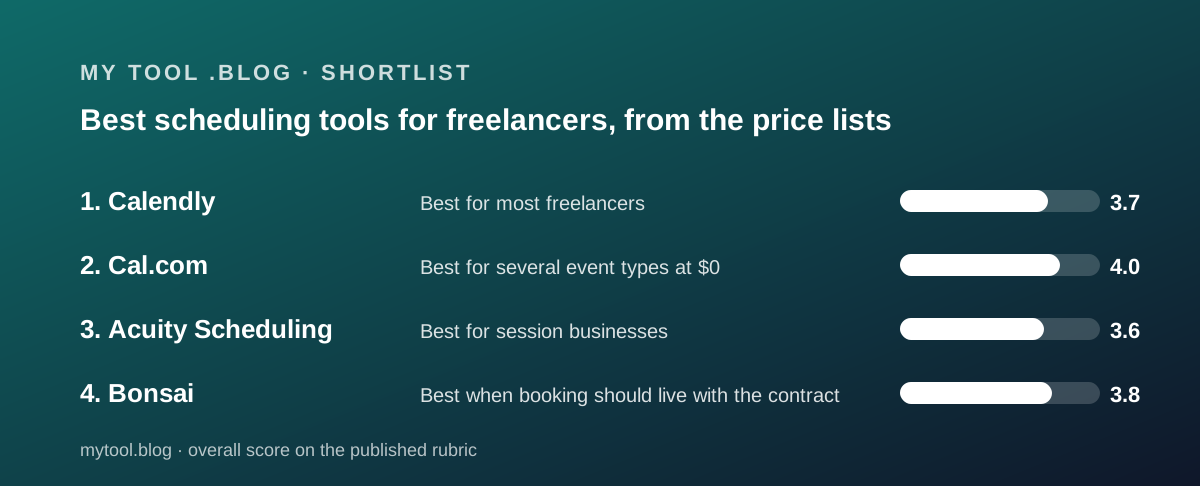
The four tools were chosen because they are the four an independent worker is most likely to be offered, and because each answers a different question about what a booking is. Calendly says a booking is a meeting. Acuity says it is an appointment you pay for. Cal.com says it is a link that should not cost anything. Bonsai says it is one step between the proposal and the invoice.
The best scheduling tools at a glance
- Calendly - best for most freelancers: one event type and one calendar free for ever, Standard $10 per seat per month on yearly billing for unlimited event types, reminders and payments. Full review.
- Cal.com - best for several event types at $0: unlimited event types and calendars, email and SMS notifications, Stripe and PayPal on the free plan; Teams $12 per user per month yearly. Full review.
- Acuity Scheduling - best for session businesses: no free plan, Starter $16 a month annually, Standard $27 with text reminders, a waitlist, packages and intake forms. Full review.
- Bonsai - best when booking should live with the contract: scheduling listed on Essentials at $19 per user per month annually alongside proposals, contracts and invoices; 7-day trial. Full review.
The table below is the whole guide in nine rows. Every figure is from the vendor's own pricing page as of October 10, 2026, and where a vendor does not publish a figure the cell says so.
- Free plan: Calendly yes, 1 event type and 1 calendar · Cal.com yes, unlimited event types, 1 user · Acuity no · Bonsai no.
- Cheapest paid tier, yearly billing: Calendly Standard $10 per seat · Cal.com Teams $12 per user · Acuity Starter $16 per month · Bonsai Basic $9 per user, but scheduling is on Essentials at $19.
- Monthly-billing price printed: Calendly no, did not render · Cal.com no · Acuity yes, $20, $34, $61 · Bonsai yes, $15, $25, $39, $59.
- Unit of pricing: Calendly seat · Cal.com user · Acuity calendar · Bonsai user.
- SMS or text reminders named: Calendly no · Cal.com yes, on Free · Acuity yes, on Standard · Bonsai not on the pricing page.
- Payments on booking: Calendly Stripe and PayPal from Standard · Cal.com Stripe and PayPal on Free · Acuity Stripe, Square, PayPal, Venmo on every tier · Bonsai through Bonsai Payments, 2.9% plus $0.30 on cards.
- Packages, memberships, waitlist: Calendly no · Cal.com no · Acuity yes, Standard · Bonsai not named.
- Trial: Calendly 14 days, no card · Cal.com 14 days on paid tiers · Acuity 7 days, no card · Bonsai 7 days.
- Trustpilot, October 10, 2026: Calendly 4.1 from 696 · Cal.com 4.7 from 427 · Acuity 3.6 from 676 · Bonsai not opened for its review.
How we graded
We did not run tests of our own; grades come from documentation, pricing pages and verified user reports checked on October 10, 2026, and Trustpilot was the only third-party source opened for this cluster. Five questions decided the order.
Where does the first useful feature sit? For a freelancer that is the second event type, a reminder, and a payment on booking. A tool that puts those on $0 ranks above one that puts them on a paid seat, and a tool that names them on a tier ranks above one that does not mention them.
What is the unit of pricing? A seat, a user and a calendar behave differently as a one-person business becomes a two-person one. We did the arithmetic for one, two and three hosts.
What does the page refuse to print? The monthly price, the payment fee, the SMS allowance and the support channel are the four lines most often missing, and every missing line costs a fraction of a point. What a tool costs besides its price is the longer version of this question.
Can you evaluate before paying? A free plan with no expiry, a 14-day trial and a 7-day trial are three different answers, and the cluster has all three.
What do verified users say, and about what? We separated complaints about support and billing from complaints about the product doing the wrong thing, because a chatbot is a bad afternoon and a time-zone error is a lost client.
Best for most freelancers: Calendly
One booking link, one calendar, unlimited meetings, free for ever, and the links your clients already know how to use.
Price: Free for one event type and one calendar; Standard $10 per seat per month shown on yearly billing with a Save 17% label; Teams $16 with Save 20%; the monthly figures did not render on our visit (pricing page, October 10, 2026). Trial: 14 days, no card. Payments: Stripe and PayPal from Standard. Trustpilot: 4.1 from 696.
Strengths first. The Free plan is a complete product for a freelancer with one kind of call, and it is described as always free. Standard adds unlimited event types, six calendar connections, reminders, HubSpot and Mailchimp and payments for $120 a year by the editors' arithmetic. Seats are for hosts only; invitees never pay. The 14-day trial is on the Teams Plus experience with no card.
Limits next. The second event type costs the whole seat. The pricing page does not mention SMS, packages, a waitlist or intake forms by name, prints no payment fee, describes no support channel, and did not show its monthly price. Trustpilot is polarised at 56 percent five-star and 30 percent one-star, with the chatbot the most common complaint.
Why it sits at #1. It is the tool most freelancers can use at $0 and the one whose paid step is the smallest, and its complaints are about support rather than about bookings landing in the wrong slot. Cal.com's free plan is more generous on paper, but it leaves more terms open, and Calendly's links carry a familiarity no price list can show.
Read our full Calendly review. Deciding between the two paid options? Read Calendly vs Acuity.
Best for several event types at $0: Cal.com
Unlimited event types, unlimited calendars, SMS and email reminders and payments on booking, all on the free plan for one user.
Price: $0 for one user with no usage limits; Teams $12 per user per month yearly with a Save 25% label; Organizations $28; no monthly figures shown (pricing page, October 10, 2026). Trial: 14 days on paid tiers. Payments: Stripe and PayPal on Free. Trustpilot: 4.7 from 427.
Strengths first. The free plan lists what Calendly charges a seat for: unlimited event types and calendars, email and SMS notifications, more than a hundred integrations, a mobile app, Stripe and PayPal, two-way Salesforce and HubSpot sync, and a one-click Calendly import. Teams at $144 per user per year adds round-robin, routing forms, analytics and branding removal. The Trustpilot split is 87 percent five-star.
Limits next. The page prints no SMS allowance, no payment fee, no monthly price and no support channel below Enterprise. Cal.com branding stays on the free page. And the open-source story has split: the GitHub repository now describes a self-hosted community edition called Cal.diy under the MIT licence, separate from the hosted product, with no promise that the two match.
Why it sits at #2. On the printed terms it is the best value in the cluster and would top a ranking of price lists alone. It sits second because the terms a free plan most needs to state, SMS volume and payment fees, are the ones its page leaves open, and because Calendly's familiarity with clients is worth something a page cannot show. A reading that finds those terms published and generous would move it up.
Read our full Cal.com review.
Best for session businesses: Acuity Scheduling
Intake forms, deposits, text reminders, a waitlist, packages and memberships, each named on a tier, priced per calendar rather than per person.
Price: Starter $16 a month annually or $20 monthly for one calendar; Standard $27 or $34 for up to six calendars with text reminders, waitlist and packages; Premium $49 or $61 with a HIPAA BAA and logo removal (pricing page, October 10, 2026). Trial: 7 days, no card. Free plan: none. Trustpilot: 3.6 from 676.
Strengths first. No other page in this cluster names packages, memberships, gift certificates, a waitlist and text reminders on a specific tier. Deposits run through Stripe, Square, PayPal or Venmo on every tier. Both billing prices are printed for every plan, which neither Calendly nor Cal.com managed on the day. A studio with up to six rooms pays one Standard price.
Limits next. There is no free plan and the useful tier is $324 a year by the editors' arithmetic, nearly three times Calendly Standard. The trial is 7 days. Processor fees are not printed. The page contradicts itself on time-zone conversion. And the Trustpilot sample, nine tenths of it from the last year, is the lowest in the cluster, with time-zone errors, a clunky calendar view and the Squarespace migration the recurring complaints.
Why it sits at #3. For a coach, tutor or therapist it is the only page here that describes the business, and in a session-only guide it would be first. It sits third in a freelancer guide because most independent workers book meetings rather than packages, because its entry price is the highest, and because its recent reviews describe bookings going wrong rather than support going slowly.
Read our full Acuity review. The paid pair is set side by side in Calendly vs Acuity.
Best when booking should live with the contract: Bonsai
A booking page as one feature inside a suite that also sends the proposal, gets the contract signed and raises the invoice.
Price: Basic $9 per user per month annually or $15 monthly, without scheduling; Essentials $19 or $25 with scheduling, invoices, proposals and contracts; Premium $29 or $39; Elite $49 or $59 (pricing page, October 10, 2026). Trial: 7 days. Free plan: none. Payments: 2.9 percent plus $0.30 on cards through Bonsai Payments.
Strengths first. For a freelancer who already needs contracts and invoices, the scheduling line on Essentials costs nothing extra, and the client books from the same portal that holds the signed agreement. Unlimited clients and projects are stated on every tier.
Limits next. The pricing page lists scheduling as one event type without saying on which plans the limit applies, names no SMS reminders and no payment on booking separate from invoicing, and the editors could not map every row of its feature table because the checkmarks are images. As a scheduler alone it is the least described tool here, and $228 a year is a high price for a booking page.
Why it sits at #4. It is not a scheduling tool; it is a suite with a booking page in it, and this guide ranks it on the booking page. If you need the rest of the suite, read the Bonsai review and the best invoicing tools for freelancers instead, where it ranks on what it is for.
Also compared, and why they are not ranked here
Harvest. This blog's free-plan pick for time tracking and invoicing, with a 30-day trial and a Teams tier at $9 per seat annually. It has no public booking page on its pricing page, so it is not a scheduler and is ranked in the invoicing guide instead. The Harvest review has the terms.
FreshBooks and Wave. Both invoicing tools, both read on this blog in the same week, neither with a booking page on its pricing page. They appear here only because their fee tables are the standard this guide holds scheduling vendors to: Wave prints every processing fee including the $1 minimum on bank payments, and FreshBooks prints 2.9 percent plus $0.30 on its FAQ. None of the three schedulers above prints a fee at all.
Schedulers with no public pricing. Several booking tools aimed at agencies publish only a contact-sales page. Without a printed figure there is nothing for a documentation review to read, and they were excluded on that ground.
How to choose a scheduling tool
Count your event types first. One, and Calendly Free is the answer and this guide is over. Two or more, and the question becomes whether you will pay $120 a year for Calendly Standard, $0 for Cal.com with its open terms, or $324 for Acuity's named features.
Decide whether you sell meetings or sessions. A meeting ends with a follow-up email; a session ends with a payment and a rebooking. If the second describes your week, read Acuity's page before anyone else's, because it is the only one that names packages, deposits and text reminders on a tier.
Find the four missing lines. Monthly price, payment fee, SMS allowance, support channel. Only Acuity printed both billing prices; nobody printed a fee; only Cal.com and Acuity named SMS; nobody described support below the top tier. Ask in writing for whichever your business depends on, and keep the reply.
Read the reviews for what went wrong, not how many stars. Calendly's one-star reviews are about the chatbot and billing. Acuity's are about time zones and calendars out of sync. The second kind costs clients; the first costs patience. The journal entry of October 7 is this blog's earlier reading of the Calendly page and the same method applied to FreshBooks.
Write the renewal on a calendar before the trial ends. All three paid tools start billing when the trial does or when you choose a plan. How to decide to cancel a tool you already pay for is the test for month eleven: count the event types you used, the reminders that went out and the deposits collected. If the answer is one, none and none, the free plan was the right size all along.
Frequently asked
What is the best free scheduling tool for a freelancer? On the printed terms, Cal.com, which lists unlimited event types, SMS and email reminders and Stripe and PayPal at $0 for one user. Calendly's Free plan is one event type and one calendar. Acuity and Bonsai have no free plan (pricing pages, October 10, 2026).
How much does a scheduling tool cost per year? On yearly billing for one person: Calendly Standard $120, Cal.com Teams $144, Acuity Starter $192 or Standard $324, Bonsai Essentials $228, all by the editors' arithmetic from the October 10, 2026 pricing pages.
Which scheduling tool sends text reminders? Acuity names text reminders on Standard and Premium. Cal.com lists SMS notifications on its free plan without an allowance. Calendly's and Bonsai's pricing pages do not mention SMS.
Which lets clients pay when they book? All three schedulers: Calendly through Stripe and PayPal from Standard, Cal.com through Stripe and PayPal on Free, Acuity through Stripe, Square, PayPal and Venmo on every tier. None prints the processing fee.
Can I move from Calendly to another tool? Cal.com's pricing page lists a one-click Calendly import. Acuity's page does not mention an importer. What the import carries over is not stated on the page.
Bottom line
If you want one answer: start on Calendly Free, and the day you need a second event type, read the Cal.com page and the Calendly Standard page side by side and decide whether $120 a year buys you anything the $0 plan does not.
If you sell sessions, go straight to Acuity Standard and ask for the processing fee in writing before the 7-day trial ends. If you already need contracts and invoices, the booking page in Bonsai Essentials costs nothing extra.
Every figure above was read on October 10, 2026 and will be rechecked; the date at the top of this page is the one to trust. There is no affiliate link on this page and no commission attached to it.
Best for most freelancers: Calendly
One event type, one calendar connection and unlimited one-on-one meetings on a Free plan described as always free. Standard, shown at $10 per seat per month on yearly billing, adds unlimited event types, six calendars, reminders, HubSpot and Mailchimp and Stripe and PayPal payments; the monthly figure did not render on our visit. A 14-day no-card trial. The page does not name SMS, packages or intake forms, prints no payment fee and describes no support channel. Trustpilot 4.1 from 696 reviews, 30 percent one-star, mostly about the chatbot (pricing page and Trustpilot, October 10, 2026).
Visit Calendly
We have no affiliate relationship with this vendor. Link goes to the official site.
Best for several event types at $0: Cal.com
Unlimited event types and calendars, email and SMS notifications, more than a hundred integrations, Stripe and PayPal payments, Salesforce and HubSpot sync and a Calendly import, all on a free plan for one user with no usage limits. Teams is $12 per user per month yearly with round-robin, routing forms and branding removal, and a 14-day trial. The page prints no SMS allowance, payment fee, monthly price or support channel below Enterprise, and the GitHub repository now describes a separate MIT-licensed community edition called Cal.diy. Trustpilot 4.7 from 427, 87 percent five-star (pricing page, GitHub and Trustpilot, October 10, 2026).
Visit Cal.com
We have no affiliate relationship with this vendor. Link goes to the official site.
Best for session businesses: Acuity Scheduling
No free plan. Starter at $16 a month annually or $20 monthly for one calendar; Standard at $27 or $34 for up to six calendars with text reminders, an appointment waitlist, packages, memberships and gift certificates; Premium at $49 or $61 with a HIPAA BAA and the logo removed. Custom intake forms and deposits through Stripe, Square, PayPal or Venmo on every tier. A 7-day no-card trial. Processor fees are not printed and the page contradicts itself on time-zone conversion. Trustpilot 3.6 from 676, nine tenths from the past year, with time-zone and calendar-sync complaints (pricing page and Trustpilot, October 10, 2026).
Visit Acuity Scheduling
We have no affiliate relationship with this vendor. Link goes to the official site.
Best when booking should live with the contract: Bonsai
A scheduling line inside a freelance suite: Essentials at $19 per user per month annually or $25 monthly lists scheduling alongside invoices, payments, proposals, contracts, forms and a client portal, with unlimited clients and projects. Basic at $9 does not include it. A 7-day trial, no free plan, card fees of 2.9 percent plus $0.30 on the Payments page. The pricing page lists scheduling as one event type without saying on which plans, names no SMS reminders, and parts of its feature table are image checkmarks the editors could not map (pricing page, October 10, 2026).
Visit Bonsai
We have no affiliate relationship with this vendor. Link goes to the official site.
How we chose
We did not run tests of our own; grades come from documentation, pricing pages and verified user reports checked on October 10, 2026, and for this cluster Trustpilot was the only third-party source opened. Each tool had to offer a public booking page a client can use without an account, publish a pricing page with at least one printed figure, and be in reach of a single independent worker rather than only a sales team. We read what the free tier or cheapest tier includes, where the first useful feature for a freelancer sits, what the unit of pricing is, whether SMS, payments and intake forms are named, the trial and the fee statements, and the Trustpilot picture. Commission plays no part: none of these four carries an affiliate link on this blog as of publication.
Frequently asked
What is the best free scheduling tool for a freelancer?
On printed terms, Cal.com: its free plan for one user lists unlimited event types and calendars, email and SMS notifications and Stripe and PayPal payments, per the pricing page on October 10, 2026. Calendly's Free plan is one event type and one calendar. Acuity and Bonsai have no free plan.
How much does a scheduling tool cost per year for one person?
By the editors' arithmetic from the October 10, 2026 pricing pages, on yearly billing: Calendly Standard $120, Cal.com Teams $144, Acuity Starter $192 or Standard $324 for the tier with text reminders, Bonsai Essentials $228 including contracts and invoicing.
Which scheduling tool sends text message reminders?
Acuity names text reminders on its Standard and Premium tiers, and Cal.com lists SMS notifications on its free plan without stating an allowance, per both pricing pages on October 10, 2026. Calendly's and Bonsai's pricing pages do not mention SMS or text reminders.
Can clients pay when they book?
Yes on all three schedulers: Calendly through Stripe and PayPal from Standard, Cal.com through Stripe and PayPal on Free, and Acuity through Stripe, Square, PayPal and Venmo on every tier, per the pricing pages on October 10, 2026. None of the three prints its processing fee.
Is Calendly or Acuity better for a freelancer?
Calendly for meetings, with a free plan and Standard at $10 per seat per month yearly. Acuity for sessions, with packages, text reminders and intake forms named on Standard at $27 a month annually. The two are set side by side in the Calendly vs Acuity comparison on this blog.
Can I import my Calendly setup into another tool?
Cal.com's pricing page, checked October 10, 2026, lists a one-click Calendly import on its free plan, though it does not say what the import carries over. Acuity's pricing page does not mention an importer from Calendly or any other tool.