 My
My
Acuity Scheduling
A booking tool priced per calendar rather than per seat, with text reminders, packages and a waitlist printed on the middle tier and no free plan
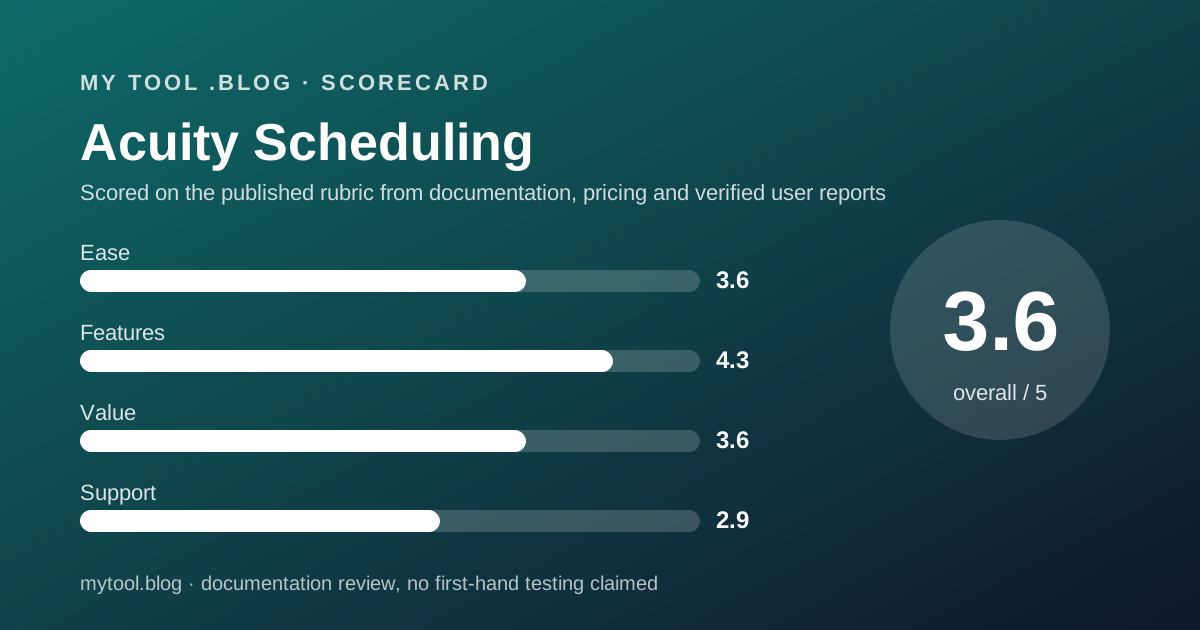
Scored on the published rubric, from documentation, pricing and verified user reports.
Best for: A freelancer who sells sessions rather than meetings, a coach, tutor, therapist or consultant who needs intake forms, deposits, packages and text reminders, and who will pay $27 a month annually for the Standard tier where those features live.
Verdict
What this is based on: the Acuity Scheduling pricing page, its feature comparison table and FAQ, and its home page, read on October 10, 2026. No Acuity account was opened for it. That is the documentation review label, the third of the three honest positions on this blog, and it means the editors can report what the page promises and nothing about the product in use.
The page describes a product built for appointments with clients rather than meetings with contacts. Intake forms, deposits, packages, memberships, gift certificates, a waitlist and text reminders are all named on the plan cards, which is more than Calendly's page says about any of them. The unit of pricing is the calendar, one per staff member or location, not the seat.
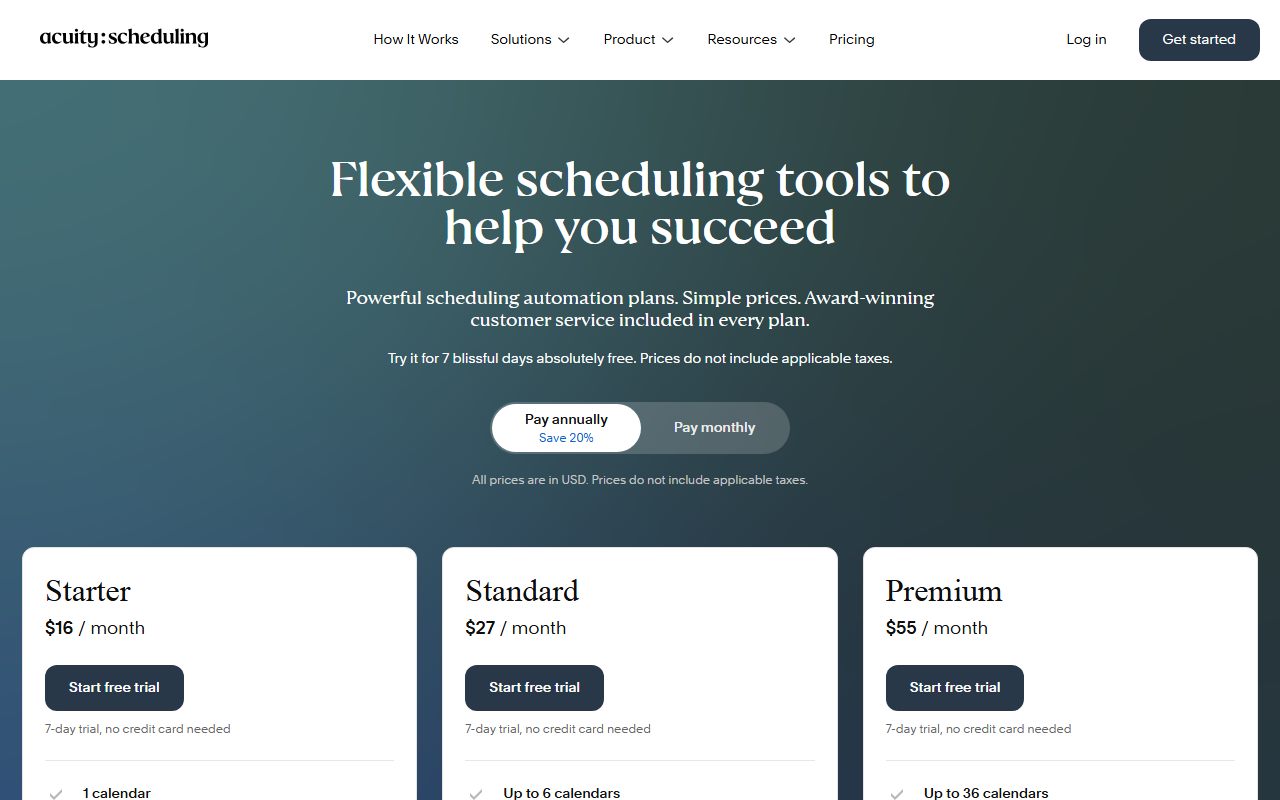
The pricing detail that matters most is where the useful features sit. Starter at $16 a month annually is one calendar with the base set. Text reminders, the waitlist and packages all arrive on Standard at $27 annually or $34 monthly. For the job this category is named after, Standard is the entry price.
There is no free plan, the trial is 7 days, the processor fees are not printed, and the Trustpilot picture since the Squarespace migration is the weakest in this blog's scheduling cluster.
Visit Acuity Scheduling
We have no affiliate relationship with this vendor. Link goes to the official site.
Where it is strong
- **Text reminders, a waitlist, packages, memberships and gift certificates are named on the Standard tier**, so a session-based freelancer can see them before paying (pricing page, October 10, 2026).
- **Deposits and payments on every tier**, through Stripe, Square, PayPal or Venmo, with custom intake forms included from Starter (pricing page, October 10, 2026).
- **Priced per calendar, not per seat**, so a solo practitioner with one calendar pays one price whatever the client count (pricing page, October 10, 2026).
- **Annual billing is 20 percent below monthly** on every tier, by the page's own label and figures: $16 against $20, $27 against $34, $49 against $61 (October 10, 2026).
- **A HIPAA business associate agreement on Premium**, which the other two tools in this cluster offer only on their organisation tiers or not at all on the pages read (pricing page, October 10, 2026).
- **No setup, cancellation or support fees**, stated in the FAQ, with cancellation at any time (pricing page, October 10, 2026).
Where it falls short
- **No free plan.** The FAQ states that Acuity does not offer free scheduling and points to the 7-day trial instead (pricing page, October 10, 2026).
- **The useful tier is Standard, not Starter.** Text reminders, the waitlist and packages are absent from the $16 tier and arrive at $27 annually (pricing page, October 10, 2026).
- **Processor fees are not listed.** The page names four processors and no rates, so the cost of collecting a deposit cannot be read from it (October 10, 2026).
- **The Acuity logo stays on your booking page until Premium** at $49 a month annually (pricing page, October 10, 2026).
- **The Trustpilot picture is the weakest in the cluster**: 3.6 from 676 reviews, with complaints about time-zone errors, a clunky calendar view, slow AI-first support and the Squarespace migration (October 10, 2026).
- **The page contradicts itself on time-zone conversion**, listing it on the Starter card but only on Standard and Premium in the comparison table (October 10, 2026).
What this review is based on, and what it cannot tell you
Documentation only. Everything below comes from the Acuity Scheduling pricing page, its feature comparison table, its FAQ and its home page, read on October 10, 2026. No account was opened, no trial was started, and nothing here describes the product in use.
That is the third of the three positions this blog allows itself, set out in what I will and will not claim. A documentation review reads the price list carefully so that the week a client asks to book a package of six sessions, the price of the tier that sells packages is not a surprise.
One limit of this reading is worth stating up front. The page's plan cards and its comparison table disagree on one feature, automatic time-zone conversion, and the editors have reported the disagreement rather than resolved it.
What Acuity Scheduling is
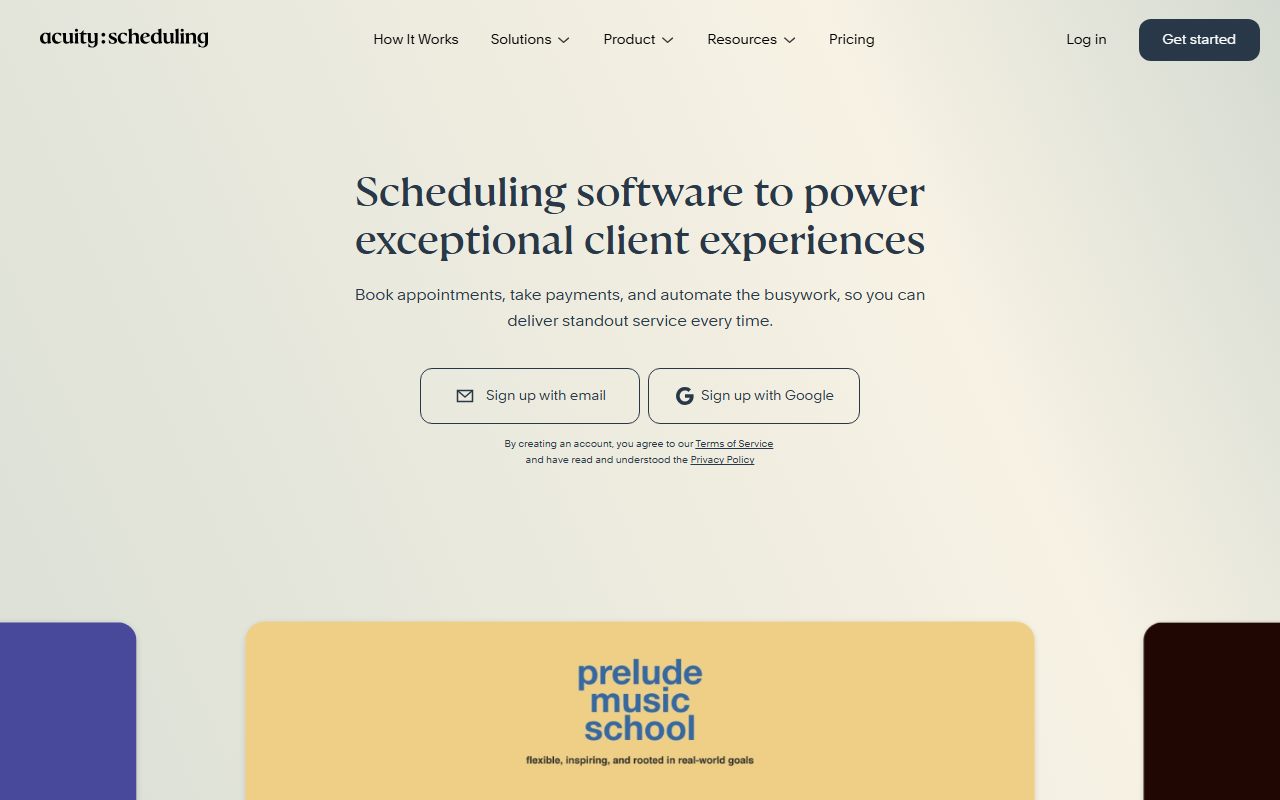
Acuity is an appointment booking tool sold per calendar per month, owned by Squarespace, in which a client picks a service, fills a form, pays a deposit and receives reminders.
The shape is different from Calendly, whose page is about meetings and whose unit is the seat. Acuity's page is about appointments and its unit is the calendar: one per staff member or location. A solo practitioner has one calendar and one price regardless of how many clients book.
It is also different from Bonsai, which includes scheduling as one line inside a contracts suite. Acuity's scheduling is the whole product, with payments, forms, packages and reminders attached to the appointment.
So the question for a freelancer is whether you sell time in sessions. A tutor, coach, therapist, photographer or consultant who books and charges by the appointment fits the page. A designer who takes a discovery call and then invoices for the project would be paying for packages and waitlists they never use.
Who Acuity is best for
Read from the pricing page's feature bullets, Acuity is shaped for these people:
- A coach, tutor or therapist who sells sessions in packages, since packages and memberships are named on Standard.
- Anyone who collects an intake form before the first appointment, which custom client forms cover from Starter.
- A practitioner who takes deposits, with Stripe, Square, PayPal or Venmo on every tier.
- Someone whose clients miss appointments without a text, since text reminders arrive on Standard.
- A small studio with up to six rooms or staff, each on its own calendar, under one Standard price.
- A health or wellness professional who needs a HIPAA BAA, which Premium lists at $49 a month annually.
Who should skip it
Three profiles the page argues against:
- Meeting-only freelancers. Calendly's Free plan and Cal.com's Free plan both cost $0; Acuity's cheapest tier is $192 a year by the editors' arithmetic.
- Anyone who needs weeks to evaluate. The trial is 7 days.
- Freelancers whose clients must never see a vendor's logo, unless they pay for Premium at $49 a month annually.
What each tier includes, as of October 2026
Three tiers plus Enterprise, all per calendar per month, all with printed prices.
Starter lists online self-scheduling, payments and deposits, Google Meet, Zoom and GoToMeeting integrations, confirmation, reminder and follow-up emails, custom client forms, the mobile admin app and the Acuity logo on your page. The card also lists automatic time-zone conversion; the comparison table does not.
Standard adds up to six calendars, text reminders, an appointment waitlist, packages and memberships, and gift certificates.
Premium adds up to 36 calendars, the AI booking assistant, a HIPAA business associate agreement, removal of the Acuity logo, multiple time zones, and custom API and CSS access.
Enterprise offers unlimited calendars, VIP account management, unlimited scheduling instances, additional APIs and a centralised dashboard, with pricing through sales.
- The line that defines the entry price: text reminders, the waitlist and packages begin on Standard, not Starter (pricing page, October 10, 2026).
- The line that moves people to Premium: logo removal and the HIPAA BAA.
- What every tier states: deposits, intake forms, video integrations and email reminders.
- What the page does not map cleanly: time-zone conversion, listed on the Starter card but only on Standard and Premium in the table.
How the pricing is structured
Per calendar per month, with annual billing 20 percent below monthly.
Starter is $20 a month billed monthly or $16 billed annually. Standard is $34 or $27. Premium is $61 or $49. The page labels the annual option as Save 20% and the figures bear it out. Prices exclude applicable taxes.
Editorial arithmetic from those figures, October 10, 2026: one practitioner on Standard pays $324 a year annually or $408 on monthly billing, a difference of $84. Starter annually is $192; Premium annually is $588. A two-room studio on Standard pays the same $324, because calendars up to six are included.
There are no add-on prices on the page. The FAQ states there are no setup, cancellation or support fees and that you can cancel at any time. Billing follows your sign-up date; the page's example is that signing up on the 15th puts the next invoice on the 15th of the following month.
Against this blog's scheduling cluster on the same date: Acuity Standard at $27 annually costs more than Calendly Standard at $10 per seat and Cal.com Teams at $12 per user, but neither of those pages names text reminders, packages or a waitlist. The comparison is worked through in Calendly vs Acuity.
The fee the pricing page does not print
This is the paragraph that costs Acuity part of a point on value.
The page names four payment processors, Stripe, Square, PayPal and Venmo, and states that Acuity itself charges no setup, cancellation or support fees. It prints no processing rate for any of the four and does not say whether Acuity adds a platform fee on top of the processor's.
The editors tried to reach a help-centre article on fees on October 10, 2026 and could not. So the cost of collecting a $150 deposit through an Acuity booking is not quotable here, and for a session-based business that collects every booking by card, it matters more than the subscription.
What a tool costs besides its price is this blog's list of the lines to find before signing. Ask Acuity in writing for the rate on your processor before the 7-day trial ends.
Ease of use: what the score is built from
A 3.6, from structure and from the verified-review picture, with two deductions.
The case for the score is that the page is readable. Three tiers, two prices each, a feature table, a FAQ with answers that loaded, and a clear unit of pricing. A session-based freelancer can find their tier in a minute, which is more than the Calendly page allowed on the same day.
The first deduction is the 7-day trial. One week is enough to build a booking page and not enough to see a package sold and a reminder sent.
The second deduction is the review picture. Trustpilot's most consistent criticisms in the past year are an unintuitive backend, a calendar view described as hard to use, and time-zone errors that put clients in the wrong slot. Those are ease complaints, and they are recent.
Features: the most printed in the cluster
A 4.3, the highest feature score in this blog's scheduling cluster, and the reason is what the page names.
Calendly's page says reminders without a channel; Acuity's says text reminders on a named tier. Calendly's page does not mention a waitlist, packages, memberships, gift certificates or intake forms; Acuity's names all five. Cal.com's page prints SMS and payments but not packages. For a freelancer who sells sessions, Acuity's page describes the business.
The deductions are for what sits behind the top tier: logo removal and the HIPAA BAA on Premium only, and the AI booking assistant, which the page describes without pricing separately or explaining what it does for a solo practitioner.
The time-zone contradiction also costs a fraction, because a feature a page cannot place consistently is a feature a buyer cannot rely on.
Value: fair for sessions, poor for meetings
A 3.6, and the arithmetic drives it.
For a freelancer who uses packages, text reminders, deposits and intake forms, $324 a year on Standard buys the whole appointment business in one tool. Against a missed-appointment rate that text reminders reduce, that is a defensible trade, and the per-calendar unit means client volume never raises the bill.
For a freelancer who books meetings, it is the worst value in the cluster: $192 a year for Starter against $0 at Calendly and Cal.com.
The missing fee schedule costs a further fraction, for the reason given above. The annual discount is genuine and large: $84 a year on Standard is the page's own figure once you subtract.
Support: not described, and the reviews point one way
A 2.9, the lowest support score in this cluster, and provisional.
The pricing page does not describe support channels, hours or response targets for any tier. The FAQ states there are no support fees, which is a statement about price rather than availability. Enterprise lists VIP account management.
The Trustpilot picture lowers the score. Reviewers in the past year describe support as slow, AI-first and drawn out over repeated emails, with some issues left unresolved. Several describe login lockouts and reformatted phone numbers during the migration to Squarespace accounts, and slower feature development since. Some reviewers report prompt, helpful service, and both are reported here.
If a later version of this review can cite a help-centre page on support channels per plan, the score will be revisited.
What verified users report
On October 10, 2026, Trustpilot listed 676 reviews for acuityscheduling.com with a TrustScore of 3.6, 606 of them posted in the previous twelve months. The split was 43 percent five-star, 17 percent four-star, 14 percent three-star, 8 percent two-star and 18 percent one-star.
The praise clusters around straightforward booking for clients and owners, highly customisable services and calendars including multi-room setups, automated reminders that save admin time, and Google Calendar sync. The complaints cluster around an unintuitive interface and calendar view, time-zone errors, calendars that fall out of sync, difficult setup of multiple reminders and integrations, slow AI-first support, and the Squarespace migration.
A sample of 606 reviews in one year is the largest and most recent in this cluster, and its 3.6 is the lowest. G2, Capterra and the app stores were not opened for this review.
Limits stated by the vendor
The page is specific about tiers and silent about everything that costs money after the subscription.
Stated: three tiers with monthly and annual prices. Stated: one, six and 36 calendars. Stated: 7-day trial, no card, billing from plan selection. Stated: no setup, cancellation or support fees. Stated: four processors.
Not stated: processing rates or any Acuity platform fee. Not stated: support channels. Not stated: a free plan, because there is none. Not stated consistently: which tier includes time-zone conversion.
How to decide to cancel a tool you already pay for is the test this blog applies at renewal. For Acuity the test is whether you sold a package or sent a text reminder last month. If not, Starter or a free competitor is the right size.
Alternatives worth reading the price list of
Two, both read on this blog in the same week.
Calendly is the meetings alternative. One event type and one calendar at $0 forever, Standard at $10 per seat per month on yearly billing for unlimited event types, reminders and payments. Choose Calendly if you book meetings and your clients already expect its links. Choose Acuity if you sell sessions with forms, deposits and packages. Calendly vs Acuity works the two through in detail, and the Calendly review has its terms.
Cal.com is the price alternative. Unlimited event types and calendars, email and SMS notifications and Stripe and PayPal payments at $0 for one user, Teams at $12 per user per month yearly. Choose Cal.com if you want most of Acuity's booking flow without the subscription and can live without packages. Choose Acuity if packages, memberships and a waitlist are the business. The Cal.com review has the terms.
All three sit in order in the best scheduling tools for freelancers. For the invoicing side of the same freelance desk, the best invoicing tools for freelancers covers Wave, Harvest, Bonsai and FreshBooks.
Buy it if, skip it if
Conditions, not conclusions, because a documentation review is not entitled to conclusions.
- Take Standard annually if you sell sessions in packages, need text reminders and a waitlist, and run up to six calendars. That is $324 a year on the published terms.
- Take Premium if you need a HIPAA BAA or your clients must not see the Acuity logo.
- Skip Starter for a session business, because it lacks text reminders, packages and the waitlist.
- Skip it if you book meetings rather than appointments, need the fee schedule in writing, or need more than seven days to decide.
- Do not rely on this post if you want to know what Acuity is like to use. Nobody here has used it, and the label says so.
Bottom line
On the published terms as of October 10, 2026, Acuity has the most completely described feature set in this blog's scheduling cluster and the only one that names packages, memberships, a waitlist and text reminders on a specific tier.
The product the page describes is an appointment business in a box whose real entry price is $27 a month annually on Standard, not the $16 on the headline tier. The hazards are a 7-day trial, an unpublished fee schedule, a page that contradicts itself on one feature, and the lowest recent Trustpilot score of the three tools read.
If a later post on this blog carries the paid and in use label for Acuity, it will say which tier, since when, and what the processor charged on the first deposit. Until then this is a reading of a price list on one date. There is no affiliate link on this page and no commission attached to it.
Sources
Read on October 10, 2026. Where a figure is missing above, the vendor does not publish it on these pages.
- Acuity Scheduling pricing page, tier prices, feature bullets, comparison table, trial terms and FAQ: www.acuityscheduling.com/pricing
- Acuity Scheduling home page, Squarespace ownership, processor logos: acuityscheduling.com
- Acuity help centre, fee article not reachable on the day: support.acuityscheduling.com
- Trustpilot listing for acuityscheduling.com, 676 reviews, TrustScore 3.6
- This blog's scope and labels: what I will and will not claim
- This blog's editorial policy: editorial policy and about
Visit Acuity Scheduling
We have no affiliate relationship with this vendor. Link goes to the official site.