 My
Best e-signature tools for freelancers, by price
Documentation guide, not a bake-off. Three price lists were read on October 15, 2026 from the rendered pages, and no account was opened on any of them. This is the third of the three honest positions on this blog. The top pick for one person is SignWell, because it is the cheapest paid step of the three at $10 a month billed yearly and the only one whose page prints a single price per tier. Dropbox Sign is the pick if your files already live in Dropbox or Google Drive and you want 30 days to test paid features. PandaDoc is the pick if what you send is a proposal rather than a contract, and its free five-document tier is the most generous of the three. All three cap their free routes at three to five documents a month, and all three put the sixth template behind a team-sized plan. Those two numbers decide most of these purchases.
Our picks
- Best for one person signing contracts: SignWell
- Best if your files already live in Dropbox or Drive: Dropbox Sign
- Best free tier, and best when the document is a proposal: PandaDoc
The three at a glance
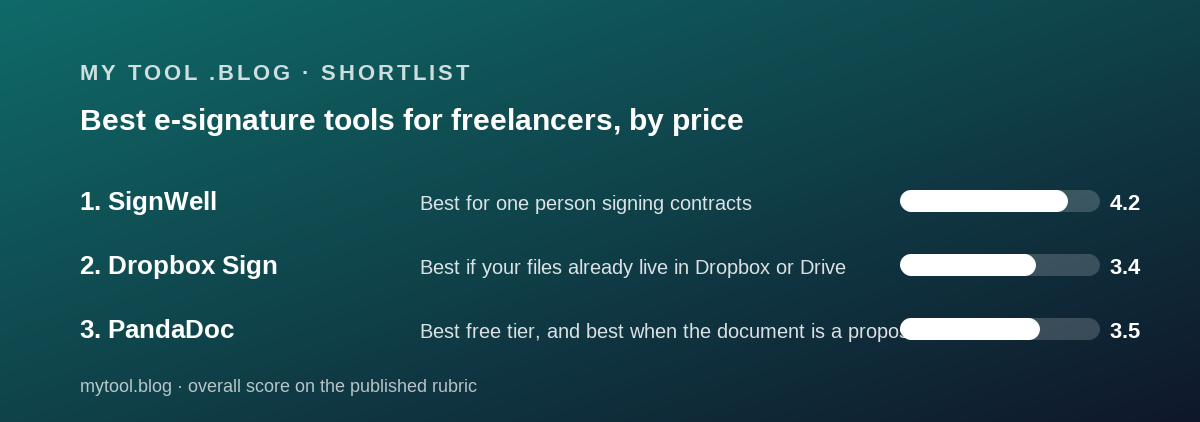
One line each, then the method, then the reasoning in full.
SignWell is the cheapest and clearest: $10 a month billed yearly for one sender, unlimited documents, five templates. Read the SignWell review.
Dropbox Sign is the one that sits beside your files: $15 USD a month billed yearly, five templates, a 30-day trial of paid features. Read the Dropbox Sign review.
PandaDoc is the one that builds the proposal: free for five documents a month, then $19 USD a seat. Read the PandaDoc review.
For the two cheapest side by side, SignWell against Dropbox Sign works both price lists through row by row.
How we picked, and what that does not cover
We did not run tests of our own. Grades come from pricing pages, feature tables, footnotes and pricing FAQs read on October 15, 2026, plus public review profiles read the same day. No account was opened on any of the three services.
Entry price for one sender carries the most weight. Nearly every reader of this blog is one person who needs one person to send documents, so a per-seat list price for a team of five is not the number that matters.
What the free route actually allows comes second. A free tier that sends three documents a month is a working tool for a freelancer who signs a contract a quarter. A free tier that only previews features is not.
How many numbers the page prints comes third. A price list that shows one figure per tier can be planned from. One that shows four, with a coupon layered over two billing periods, cannot be.
Support in writing comes fourth. We score what the page commits to in text, not what its marketing copy implies. None of the three publishes a response-time commitment at any price.
One method note worth repeating. All three pages draw their prices after the page loads, so an ordinary machine read returns a pricing page with no prices on it. Everything here was read from the rendered page instead.
Why SignWell sits first
Because it is cheaper at both steps and prints the fewest numbers to misread.
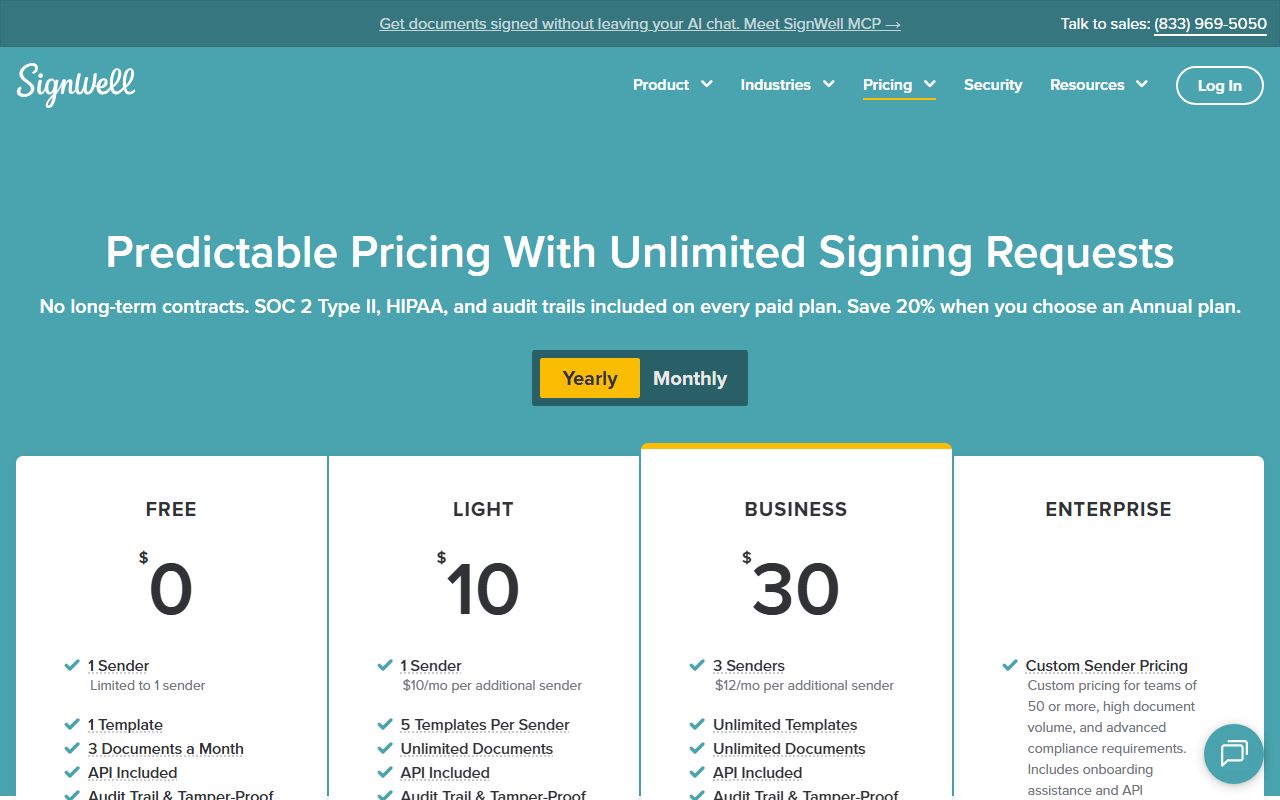
Light is $10 a month on the yearly toggle and $12 monthly, for one sender, unlimited documents and five templates per sender. That is $120 a year by the editors' arithmetic at the yearly rate.
The unit is the strongest thing about it. Two separate FAQ answers state that paid plans include unlimited documents and that there is no charge based on how many people sign. A busy month and a quiet month cost the same.
Support is the second surprise. The page states that help is available by email, phone or over a Zoom call, is included on every plan, and needs no enterprise contract. Most price lists in this category reserve a phone number for a quote.
The free tier is a tier rather than a trial: three documents a month, one template, one sender, with an FAQ promise that you are not billed unless you upgrade.
Two deductions keep it off a perfect score. The page claims a 20 percent annual saving that its own prices make 16.7 percent. And every yes and no in its fifty-row feature table is an icon, so the detail cannot be quoted or shared.
Why Dropbox Sign sits second
Because it costs 50 percent more than the top pick for the same one sender and five templates, and because its page is the hardest of the three to read.
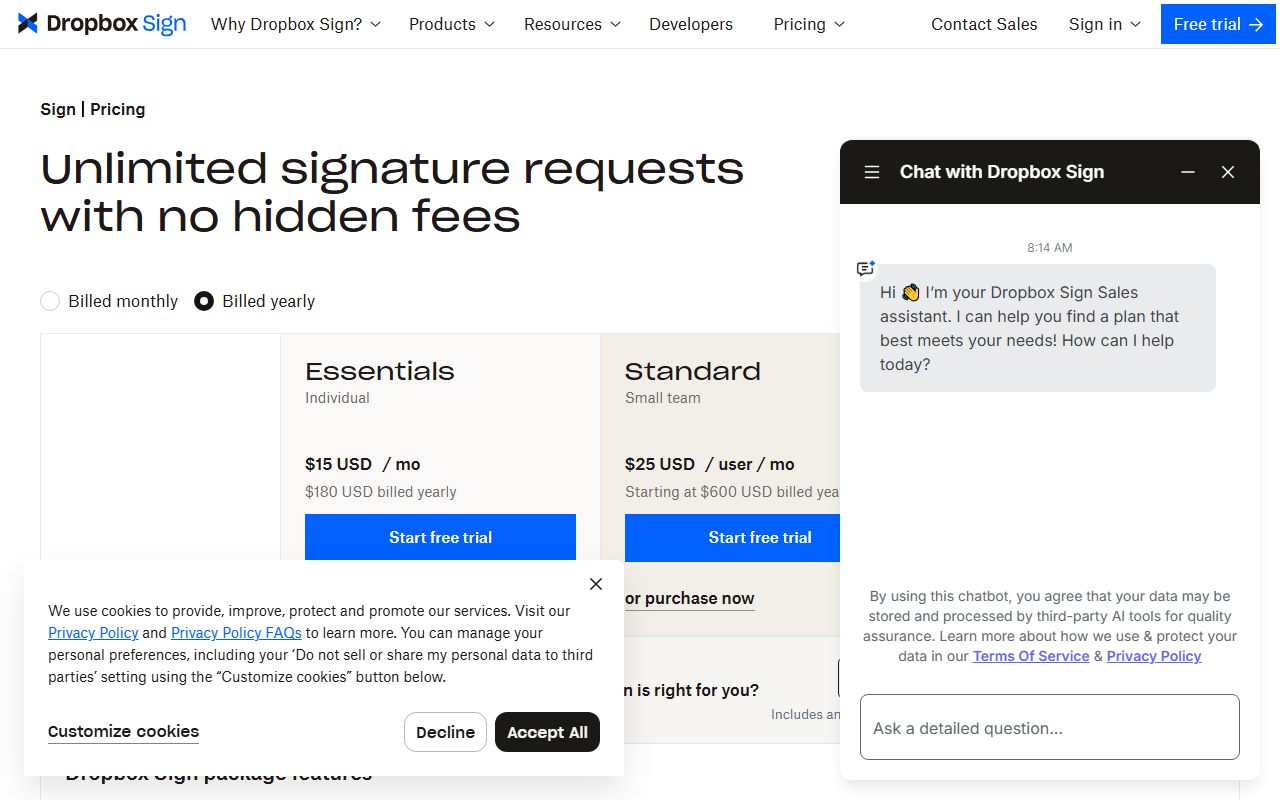
Essentials is $15 USD a month billed yearly, which the card gives as $180 USD a year, or $20 USD a month billed monthly. One user, five templates, uncapped signature requests.
What it offers that the top pick does not is a stated 30-day trial of paid-only features, with the FAQ confirming no charge if you end it inside the window.
The other advantage is proximity. Google Drive, Microsoft Word and HubSpot are named against every package, so the file you sign is the file already in the drive you use. For many freelancers that removes the slow step.
The readability problem is real. Each paid card holds four figures at once: a yearly rate, a yearly total, a monthly rate and a struck-through coupon rate, with nothing saying which a new buyer pays.
The coupon figures also disagree with the offer terms on the same page. Essentials at $120.60 USD against $180 USD is 33 percent off; Standard at $420 USD against $600 USD is exactly 30. The terms promise 30.
And the free plan is never described on the pricing page. The three-document monthly limit appears only on a separate feature page, which then refers to a Pro plan, a name the pricing page does not sell.
Why PandaDoc sits third, and when it should sit first
Third for a freelancer who only needs a signature. First of the three if what you send is a proposal.
The free tier is the most generous of the three: $0 USD, five documents a month, up to five templates, three deal rooms, the full editor, real-time tracking and 24/7 email and chat support, with no credit card required.
Starter is $19 USD a seat a month and Business $49 USD, both quoted billed annually. Editorial arithmetic for one seat: $228 a year and $588 a year.
What that buys is not a signing tool. The comparison table carries pricing tables, a product catalogue, payment collection, configure-price-quote, approval workflows, deal rooms, a contract repository and AI data extraction.
If you pitch with proposals and want the client to pay from inside the document, nothing else in this guide competes. If you send a one-page contract, you are paying twice the top pick for features that will stay closed.
Two cautions sit in the footnotes. Seven paid-card features are asterisked as requiring usage credits or being add-ons, and no credit pack price appears on the page.
The fallback rate is the one to settle in writing. The FAQ states that where your order form has no per-unit price, you will be charged up to $5 per document created, and that API document creation pauses outright when credits run out.
Also compared, and why one did not make the cut
Bonsai is in the running for a different reason: it is not an e-signature tool but a freelance suite that includes contracts next to invoicing and proposals.
For a reader who signs two contracts a month, one suite subscription can be cheaper than a signing tool plus an invoicing tool. Read the Bonsai review before adding a second bill.
Docusign and Adobe Acrobat Sign were not read for this guide and are therefore not ranked in it. Leaving them out is an admission of scope, not a judgement on the products.
One piece of category context from the same day. Trustpilot's own suggestion panels listed Docusign at 1.3 from 1.3K reviews and airSlate SignNow at 4.3 from 3.2K, while PandaDoc sat at 2.1 from 691 and SignWell at 3.1 from six.
Scores running from 1.3 to 4.3 on samples of two to 3,200 cannot rank anything. They are printed so nobody has to pretend they were consulted.
What the three free tiers actually give you
All three vendors publish a free route, and the differences between them are larger than the prices suggest.
SignWell Free is three documents a month, one template, one sender, at $0. The FAQ adds that creating an account puts you on the free plan and that you are not billed unless you upgrade.
Dropbox Sign's free account is also three documents a month, but the pricing page does not say so. That figure appears only on a separate feature page, which calls the paid step a Pro plan.
PandaDoc Free is five documents a month at $0 USD with no credit card required, plus up to five templates, three deal rooms, the full editor and 24/7 email and chat support.
PandaDoc is the most generous of the three on paper, and it is also the only one that states plainly that unused documents do not roll over into the next period.
The other two say nothing about rollover, which is worth assuming works the same way until a vendor tells you otherwise in writing.
For a freelancer who signs a contract a quarter, any of the three free tiers is the whole requirement, and the right move is to stay on it.
How to decide to cancel a tool you already pay for is the test to run at renewal: count last quarter's documents before you count features.
What none of the three pages tells you
Three gaps shared by all three price lists, worth settling before money changes hands.
No response-time commitment. All three name support channels. None of them commits to answering inside a stated number of hours, on any tier, at any price.
No downgrade terms. None of the three says what happens to documents already sent, or to templates above the lower plan's limit, if you move down a tier.
Feature tables that cannot be quoted. On all three pages, most per-tier answers are icons rather than words, so the comparison you read on screen is not one you can save, share or check later.
How to choose, as one person
Four questions, in the order that saves the most money.
How many templates do you need? Count the kinds of work you sell and the contract variants each needs. All three entry plans stop at five, and every upgrade past five is priced as a team plan.
How many documents a month do you really send? Under three and the free tiers cover you at all three vendors. Under five and PandaDoc's free tier does. Above that, you are buying.
Where do the files already live? If the answer is Dropbox or Google Drive, the extra $60 a year for Dropbox Sign buys a step you will skip every week.
Is the document persuading or confirming? A contract confirms a decision already made. A proposal makes it. Only PandaDoc is built for the second job.
One more line to settle before you pay, from what a tool costs besides its price: ask each vendor in writing what happens to documents already sent if you downgrade. None of the three pages answers it.
Bottom line
On the published terms as of October 15, 2026, a freelancer who needs signatures and nothing else should start free and move to SignWell Light at $120 a year when the three-document cap gets in the way.
A freelancer whose client files live in Dropbox or Google Drive, and who wants to try the paid features first, should pay the extra $60 a year for Dropbox Sign Essentials and use the 30-day trial properly.
A freelancer who pitches with proposals should start on PandaDoc's free tier and expect Business at $588 a year to be the version worth paying for, after settling the usage-credit price in writing.
None of these tools was used by anyone here, and the label at the top says so. There are no affiliate links on this page and no commission attached to any of them.
The rest of the same desk is covered elsewhere on this blog: invoicing in the best invoicing tools for freelancers, FreshBooks against Wave, hours in Harvest, and bookings in Calendly.
Sources
All three price lists read on October 15, 2026 from the rendered pages: www.signwell.com/pricing/, sign.dropbox.com/products/dropbox-sign/pricing and www.pandadoc.com/pricing/.
Supporting pages read the same day: the Dropbox Sign free document signing page, and Trustpilot listings for signwell.com, sign.dropbox.com, hellosign.com and pandadoc.com.
Where a figure is missing above, the editors could not read it on the vendor's page on that date. Scope and labels: what I will and will not claim. Method: editorial policy.
Best for one person signing contracts: SignWell
The cheapest paid step of the three, at $10 a month billed yearly for one sender, unlimited documents and five templates per sender. The page bills by sender rather than by envelope and says so twice. Support is listed as email, phone and Zoom, included on every plan including the free one. The free tier is a real tier: three documents a month, one template, with an explicit promise of no billing unless you upgrade. The one number that fails checking is the claimed 20 percent annual discount, which the printed prices make 16.7 percent.
It sits first because it is cheaper at every step than the other two and prints the fewest numbers to misread.
Visit SignWell
We have no affiliate relationship with this vendor. Link goes to the official site.
Best if your files already live in Dropbox or Drive: Dropbox Sign
Essentials is $15 USD a month billed yearly, given as $180 USD a year, for one user and five templates. Its two advantages over the cheaper pick are a stated 30-day trial of paid-only features and named integrations with Google Drive, Microsoft Word and HubSpot on every package. Its disadvantage is readability. Each paid card prints four figures at once, and the coupon rate works out to 33 percent off on Essentials against 30 percent on Standard, under offer terms that name only 30. The free plan is never described on the pricing page.
Second because it costs 50 percent more than the top pick for the same one sender and five templates, and because its page is the hardest of the three to read.
Visit Dropbox Sign
We have no affiliate relationship with this vendor. Link goes to the official site.
Best free tier, and best when the document is a proposal: PandaDoc
Free is $0 USD with five documents a month, up to five templates, three deal rooms and 24/7 email and chat support, with no credit card required. That is the most generous free route of the three. Starter is $19 USD a seat a month billed annually and Business $49 USD, which is where pricing tables, payment collection and deal rooms arrive. The cautions are a second currency called usage credits with no published pack price, a fallback rate of up to $5 per document, and monthly seat prices that were not in the page markup when it was read.
Third for a freelancer who only needs signatures, because the entry seat costs roughly twice the top pick. First of the three if you need proposals and payment links in the document.
Visit PandaDoc
We have no affiliate relationship with this vendor. Link goes to the official site.
How we chose
Grades come from vendor pricing pages, feature tables, footnotes and pricing FAQs read on October 15, 2026, plus public review profiles read the same day. We did not run tests of our own and no account was opened on any of the three services. Four criteria carry the ranking: the entry price for one sender; what the free route actually allows; how many prices and contradictions the page prints; and what support is promised in writing rather than implied.
Frequently asked
What is the cheapest e-signature tool for a freelancer?
Of the three price lists read on October 15, 2026, SignWell Light at $10 a month billed yearly. Editorial arithmetic: $120 a year for one sender and unlimited documents. Dropbox Sign Essentials is $180 USD a year and PandaDoc Starter $228.
Can I use an e-signature tool for free?
Yes, up to a point. All three publish a free route: three documents a month at SignWell and Dropbox Sign, five at PandaDoc. None of them rolls unused documents into the next month, and PandaDoc states that explicitly.
Are electronic signatures legally binding?
All three pages say their signatures are enforceable and name the laws they comply with: ESIGN, UETA and eIDAS at SignWell, the US ESIGN Act of 2000 and eIDAS at PandaDoc, and eIDAS at Dropbox Sign. This is a reading of vendor pages, not legal advice.
How many templates do I actually need?
Count the kinds of work you sell and the contract variants each one needs. All three entry plans stop at five, and all three upgrades are priced as team plans, so crossing that line is the most expensive decision in this category.
Do the people signing have to pay or register?
No, on all three. SignWell says recipients do not need an account and signers are always unlimited and free. Dropbox Sign's FAQ answer is no, nothing, ever. PandaDoc sells by seat for senders only.
Which one has a free trial of paid features?
Dropbox Sign, at 30 days, and PandaDoc, at 14 days. SignWell publishes no trial length and offers a permanent free tier instead. Both PandaDoc and Dropbox Sign state that the trial itself carries no charge.
Should I just use the contract tool inside my invoicing app?
Often yes. Bonsai bundles contracts with invoicing and proposals, which can be cheaper than two subscriptions. Read the Bonsai review against these three before adding a second bill for a feature you may use twice a month.
Did you test these tools?
No. Every figure above comes from vendor pricing pages, feature tables and FAQs read on October 15, 2026, plus public review profiles read the same day. No account was opened and no document was sent on any of the three.