 My

SignWell
An e-signature tool priced per sender rather than per document, with a three-document free tier and a $10 a month Light plan that lifts the document cap entirely
Scored on the published rubric, from documentation, pricing and verified user reports.
Best for: A one-person business that signs a handful of client contracts a month and wants the document cap gone for $120 a year rather than a seat licence built for a sales team.
Verdict
What this is based on: the SignWell pricing page, its four plan cards, its yearly and monthly toggle, its full feature table, its forty-odd feature tooltips and its pricing FAQ, read on October 15, 2026 from the rendered page rather than a summary. No SignWell account was opened for it. That is the documentation review label, the third of the three honest positions on this blog, and it limits this post to what the price list promises.
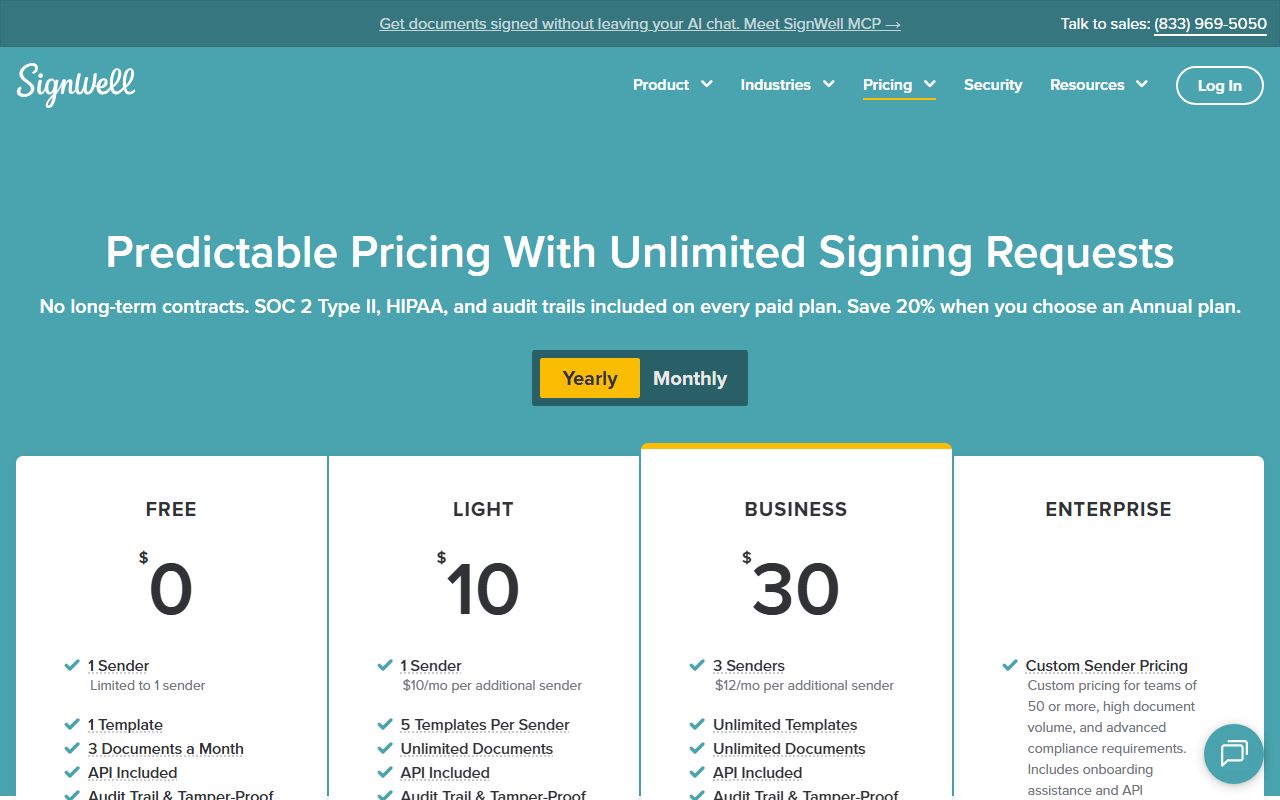
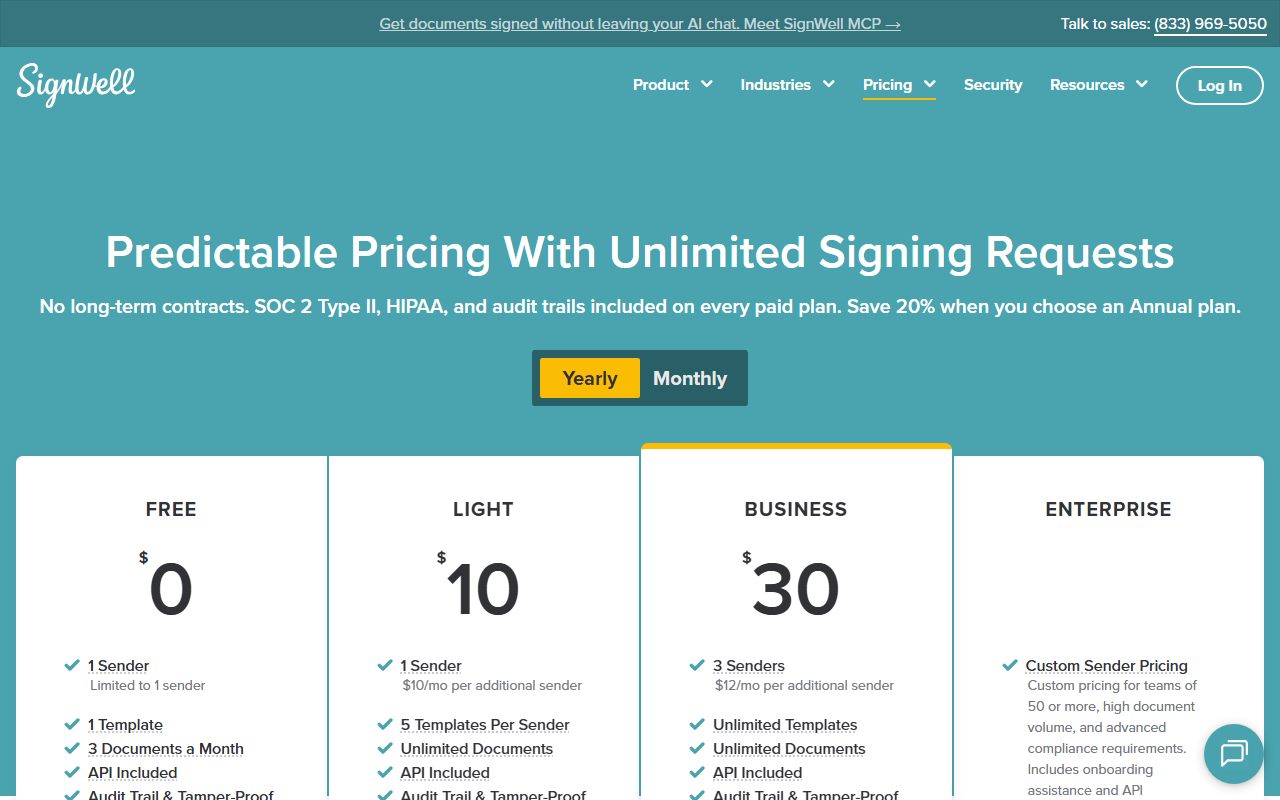
The page sells four tiers. Free is $0 and capped at three documents a month, one template and one sender. Light is $10 a month billed yearly or $12 billed monthly, with unlimited documents and five templates. Business is $30 or $36 for three senders. Enterprise is quoted.
What makes this the clearest price list in the signing category is the unit. SignWell charges for senders, not envelopes, and says so in two separate FAQ answers. Signers never pay and never need an account.
The deduction is small but real: the page claims a 20 percent annual saving, and its own printed figures work out to 16.7 percent.
Visit SignWell
We have no affiliate relationship with this vendor. Link goes to the official site.
Where it is strong
- **The cheapest paid step in this category on the price lists read for this blog.** Light is $10 a month on the yearly toggle, which is $120 a year for one sender with no document cap (pricing page, October 15, 2026).
- **Pricing is per sender, not per document or per envelope.** The FAQ states it twice: all paid plans come with unlimited documents, and there is no charge based on the number of people who sign (October 15, 2026).
- **The free tier is a real tier, not a trial.** It is listed at $0 with three documents a month, one template and one sender, and the FAQ says you will not be billed unless you upgrade (October 15, 2026).
- **Support is not tiered.** The page states that support is available by email, phone or Zoom call, is included on every plan, and needs no enterprise contract (October 15, 2026).
- **SOC 2 Type II, HIPAA support and audit trails are named as included on every paid plan** in the line directly under the page headline, with the SOC 2 report described as available on request (October 15, 2026).
- **The API has a published per-document rate instead of a sales call.** The API tooltip gives $0.85 per document, dropping to $0.20 at high volume, with no monthly minimum and the first 25 API documents each month free on the API plan (October 15, 2026).
Where it falls short
- **The claimed annual discount does not match the printed prices.** The header says save 20 percent on an annual plan and the FAQ repeats a 20 percent yearly discount, but $10 against $12 and $30 against $36 are both 16.7 percent by the editors' arithmetic (October 15, 2026).
- **The feature table cannot be read as text.** Every yes and no in it is drawn as an icon, so only the rows carrying a number or a phrase can be quoted, and a buyer comparing tiers from a screen reader or a saved copy gets almost nothing.
- **All four plan cards print the same fifteen-item checklist.** Free, Light, Business and Enterprise each list API Included, Bulk Send, Custom Branding, Dedicated Support and eleven more, with the actual availability carried only by the icon beside each line (October 15, 2026).
- **No trial length is published,** because the model is a free tier instead. If you want to try a paid-only feature such as conditional field rules before paying, the page does not offer a route.
- **Five templates per sender on Light is a low ceiling** for anyone who works from more than a handful of contract shapes, and lifting it means the $30 Business step, a tripling of the bill (October 15, 2026).
- **The public review record is too thin to lean on.** Trustpilot listed signwell.com at 3.1 from six reviews on October 15, 2026, split 33 percent five-star and 50 percent one-star. Six reviews is not a sample.
At a glance
| Free tier | $0, capped at 3 documents a month, 1 template, 1 sender |
|---|---|
| Paid entry price | Light, $10 per month billed yearly or $12 billed monthly |
| Pricing note | Light is $10 a month on the yearly toggle and $12 a month on the monthly toggle, for one sender and unlimited documents (pricing page, checked October 15, 2026) |
| Second paid tier | Business, $30 per month billed yearly or $36 billed monthly |
| Top tier | Enterprise, custom sender pricing, aimed at teams of 50 or more |
| Unit of pricing | Sender. Documents and signers are unlimited on paid plans |
| Extra senders | Light $10 a month each yearly or $12 monthly; Business $12 each yearly or $15 monthly |
| Senders included | Free 1, Light 1, Business 3 |
| Templates | Free 1, Light 5 per sender, Business unlimited |
| Annual discount | Claimed as 20 percent in the header and FAQ; the printed figures give 16.7 percent |
| Contract terms | No long-term contracts and no cancellation fee, per the FAQ |
| API rate | $0.85 per document, down to $0.20 at high volume, no monthly minimum |
| API documents without the API plan | 3 a month on Free, 15 on Light, 25 on Business |
| SMS delivery | 50 credits a month on Business; custom on Enterprise |
| Compliance named | ESIGN, UETA, eIDAS, GDPR, SOC 2 Type II report, HIPAA BAA, 21 CFR Part 11 controls |
| Support channels | Email, phone and Zoom, stated as included on every plan |
| Trial | None printed; a free tier is offered instead |
What this review is based on, and what it cannot tell you
Documentation only. Everything below comes from the SignWell pricing page as it rendered on October 15, 2026: four plan cards, the yearly and monthly toggle, the full feature table, the tooltip text behind each feature name, and the pricing FAQ.
No account was opened and no document was sent. That is the third of the three honest positions this blog allows itself, and the weakest of them.
What it can do is read a price list slowly enough to notice where the page disagrees with itself.
One method note. The prices here are not in the page source as plain text beside a currency symbol, and the yes and no answers in the feature table are icons.
So the figures below were read from the rendered page. Where only an icon carried the answer, this review says so rather than guessing.
What SignWell is
SignWell is an e-signature service sold by the number of people who send documents, with the documents themselves uncapped on every paid plan.
That sentence is the whole product. The headline reads predictable pricing with unlimited signing requests, and the FAQ answers the two questions a freelancer has: no per-document billing, and no charge to the people who sign.
The shape differs from the tools already covered here. FreshBooks and Wave start from money coming in. Harvest starts from hours. Calendly starts from the meeting.
SignWell starts from the moment a client says yes and a signature is needed before work begins. For contracts bundled with the rest of the admin, Bonsai is the comparison, handled lower down.
Who SignWell is best for
Read from the plan cards and the feature table, the page is shaped for these people:
- A freelancer who signs client contracts and nothing else, since one sender is what Light includes and extra senders cost extra.
- Anyone whose document volume swings month to month, because paid plans count senders, not documents.
- A sole trader who works from a few standard agreements, which fits the five templates per sender on Light.
- Someone who needs the compliance names on paper: ESIGN, UETA, eIDAS, GDPR, a SOC 2 Type II report and a HIPAA BAA, all listed on paid plans.
- A developer embedding signing into their own app, given a published API rate rather than a quote.
Who should skip it
Three profiles the page argues against:
- Anyone who needs more than five templates on a single-sender budget, because the next step is $30 a month for three senders.
- A freelancer who wants the contract, the proposal and the invoice in one subscription, which is the Bonsai case rather than this one.
- Anyone who wants to try a paid feature before buying, since there is no trial length printed anywhere on the page.
What each tier includes, as of October 2026
Four tiers on the cards, with a yearly and monthly toggle above them.
Free is $0. The card prints one sender, limited to one sender, one template and three documents a month.
Light is $10 a month on the yearly toggle and $12 on the monthly one. The card prints one sender, five templates per sender and unlimited documents, with additional senders at $10 or $12 a month each depending on the toggle.
Business is $30 a month yearly and $36 monthly. The card prints three senders, unlimited templates and unlimited documents, with additional senders at $12 or $15 each.
Enterprise is custom sender pricing, described as being for teams of 50 or more, high document volume and advanced compliance requirements, including onboarding assistance and API implementation support.
- Table rows that carry a number: documents a month, three on Free; templates, one on Free and five per sender on Light; senders included, one, one and three; SMS delivery, 50 credits a month on Business.
- Table rows that carry a phrase: integrations, native plus 9,000 or more through Zapier; API documents, 25 free a month then pay per document.
- Rows where the answer is an icon only: every remaining row, which on October 15, 2026 was most of fifty-odd lines.
- Named on every paid plan, in the line under the headline: SOC 2 Type II, HIPAA and audit trails.
How the pricing is structured
Per sender a month, with two prices per tier and no document meter anywhere.
The toggle is the first thing to set. Yearly gives $10 and $30 for Light and Business; monthly gives $12 and $36.
Extra senders are priced separately and not at the base rate. On Light an extra sender is $10 yearly or $12 monthly; on Business it is $12 or $15. So the fourth sender on Business costs more than the second on Light.
Editorial arithmetic from the published yearly rates on October 15, 2026: Light is $120 a year for one sender and $240 for two. Business is $360 for three and $504 for five.
The one number that does not survive checking is the discount. The header and the FAQ both say 20 percent for annual billing.
Twelve dollars reduced by 20 percent is $9.60, not $10. The printed pair gives 16.7 percent. Both readings sit on the same page.
The feature table a text reader cannot use
This is what keeps the features score below four, and it is a documentation problem rather than a product one.
The comparison table runs to roughly fifty rows in seven groups. Ten of those rows carry a number or a phrase. The rest answer yes or no with an icon and no text alternative.
The plan cards repeat the problem in a tighter space. Free, Light, Business and Enterprise each print the same fifteen-line checklist, from API Included through to Dedicated Support.
Because that list is identical under all four prices, the only thing separating a $0 plan from a quoted one is the icon beside each line.
A buyer reading on screen is fine. A buyer saving the page, sharing it with a partner or using assistive technology gets four identical lists and three different prices.
What a tool costs besides its price is this blog's list of lines to settle before signing. A feature table you cannot quote belongs on it.
Ease of use: the score is about the price list, not the app
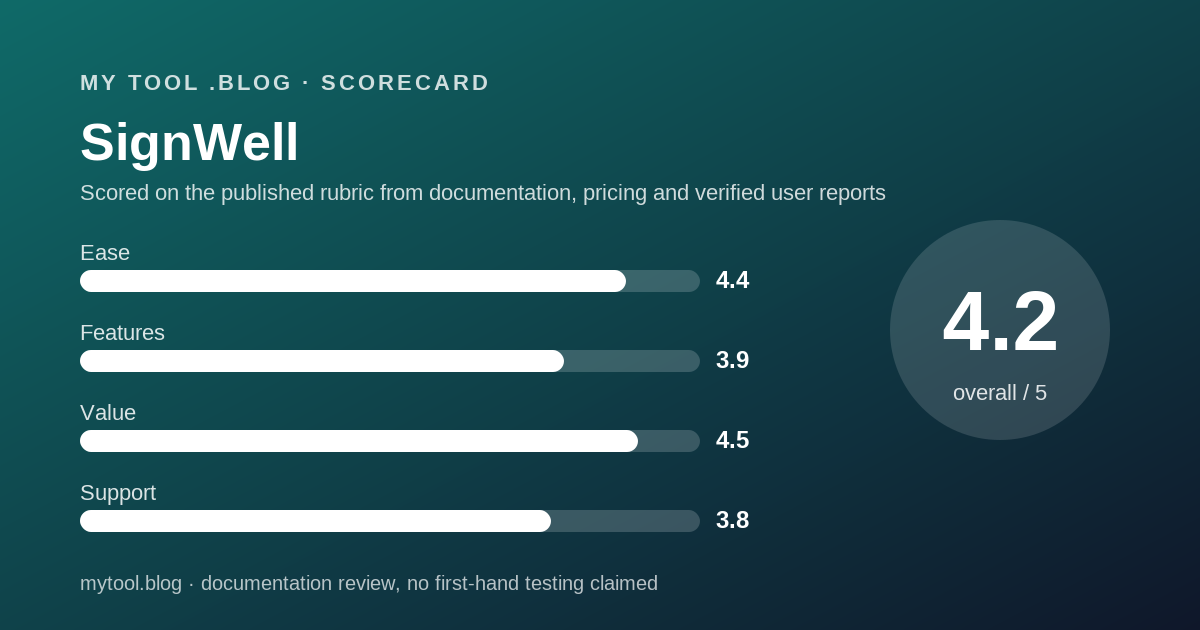
A 4.4, the highest this blog has given a price list in this category, earned on structure and reduced on one bad number.
The case for it is that the page answers the three questions in order. What is counted: senders. What happens if you send more documents: nothing. What happens if you add a person: a printed per-sender rate, different on each tier, in the same card.
The FAQ then clears the ground that competitors leave muddy. No contracts. No cancellation fee. Recipients do not need accounts and are never charged. A single document can hold multiple files, signers and signing steps.
The deduction is the 20 percent claim against 16.7 percent of actual discount. It is a small sum and an avoidable one, and it is the kind of error that makes a careful buyer recheck everything else on the page.
Nothing here judges the app. No account was opened, and the label at the top says so.
Features: enough for a contract, short of a proposal
A 3.9, which is a verdict on scope rather than on quality.
The signing side is complete on paper. Audit trail, documents sealed with an Adobe-trusted certificate, multiple signers, signing order, signing links, bulk send, in-person signing, data validation, conditional field rules and one-time passcodes.
The developer side is unusually open for the price. A full REST API is listed on every plan including Free, with a published per-document rate, SDKs, a CLI, webhooks, embedded signing and a Model Context Protocol server.
The gaps are everything past the signature. No proposal builder, no pricing table, no payment collection, no CRM pipeline.
If what you send is a quote with line items and a payment button, this is the wrong tool and a proposal platform is the category to price instead.
The template ceiling is the other deduction. Five per sender on Light binds anyone who sells more than a few kinds of work.
Value: the cheapest way off a free tier in this category
A 4.5, and it is the clearest number in this review.
At the yearly rate, $120 a year buys one sender, unlimited documents, unlimited signers, an audit trail, a tamper-evident seal and support by email, phone or Zoom.
Among the price lists read for this blog on October 15, 2026, nothing paid in this category starts lower.
The free tier is worth something real too: three documents a month, one template, one sender, and an FAQ promise that you are not billed unless you upgrade.
The value falls off at the Business step. Going from five templates to unlimited means paying for two senders you may not have, $120 a year to $360.
How to decide to cancel a tool you already pay for is the renewal test here. Count last quarter's documents. Under three a month and the free tier is the right size.
Support: promised generously, with almost no public record
A 3.8, built from what the page promises and held down by how little anyone else has said.
The promise is unusual. Help is listed as available by email, phone or Zoom call, included on every plan, with no tiers and no enterprise contract required.
Most price lists in this category reserve a phone number for a quoted plan.
The public record is almost empty. On October 15, 2026 Trustpilot listed signwell.com at 3.1 from six reviews on a claimed profile: 33 percent five-star, nothing at four or three, 17 percent two-star and 50 percent one-star.
Six reviews cannot carry a score, and this review does not treat it as one. It is reported because leaving it out would be worse.
The vendor's own claim on the page is more than 80,000 businesses. That is a vendor figure on a vendor page, reported here as such.
Limits stated by the vendor, and limits the page leaves open
The page is specific about what is counted and quiet about a few commercial details.
Stated: four tiers, two prices each on the middle two, per-sender rates for additions, a three-document monthly cap on Free, one and five templates on Free and Light.
Also stated: 50 SMS credits a month on Business, a 25-document monthly API allowance there, and an $0.85 to $0.20 per-document API range.
Stated plainly in the FAQ: no yearly contract, no cancellation fee, no per-envelope charge, no charge for signers, and no billing until you upgrade.
Not stated: any trial length for paid-only features, what happens to sent documents if you downgrade from Light to Free, or a price for SMS credits past the 50 included.
One caveat to read before relying on it. The 21 CFR Part 11 row says compliance is a shared responsibility that SignWell does not certify on your behalf.
Alternatives worth reading the price list of
Three on this blog, plus two this post did not open.
Bonsai is the bundle. Choose Bonsai if you want contracts, proposals and invoices under one subscription. Choose SignWell if your invoicing is settled and the contract is the only gap.
FreshBooks and Wave are the other half of the same desk rather than rivals. A signature tool does not get you paid.
So read FreshBooks or Wave first if money coming in is still handled by hand. The best invoicing tools for freelancers ranks that group, and FreshBooks against Wave works two of them through.
Hours and bookings sit beside contracts for most readers here. Harvest prices the hours and Calendly prices the meeting. Neither overlaps with signing.
Two price lists in this category were not read for this post and are therefore not compared: Docusign and Adobe Acrobat Sign.
Buy it if, skip it if
Conditions, not conclusions, because a documentation review is not entitled to conclusions.
- Start on the free tier if you send fewer than three documents a month. It is a plan, not a trial, and the FAQ says you will not be billed.
- Take Light if the three-document cap is the only thing in your way. That is $120 a year at the yearly rate for one sender and no document limit.
- Check the discount at checkout if you are buying annually, because the page's 20 percent claim and its own prices give different answers.
- Skip to Business only if you genuinely need more than five templates, since the step also buys two senders you may not want.
- Do not rely on this post if you want to know what SignWell is like to use. Nobody here has used it, and the label says so.
Bottom line
On the published terms as of October 15, 2026, SignWell has the clearest price list and the cheapest paid step of the signing tools read for this blog: $10 a month billed yearly for one sender, unlimited documents and unlimited signers.
The unit is the reason. Charging for senders instead of envelopes means a freelancer's bill does not move when a good month arrives, and the FAQ states that twice rather than burying it.
Two things keep the score off the top. The claimed 20 percent annual discount is 16.7 percent on the page's own numbers. And a comparison table whose answers are all icons is not a document a buyer can take away, check or share.
This is a reading of a price list on one date. There is no affiliate link on this page and no commission attached to it.
Sources
Read on October 15, 2026. Where a figure is missing above, the editors could not read it on the vendor's pricing page on that date.
- SignWell pricing page, four plan cards, yearly and monthly toggle, full feature table, feature tooltips and pricing FAQ: www.signwell.com/pricing/
- SignWell pricing page, rendered markup read directly for sender counts, template limits, SMS credits and API allowances, same date
- Trustpilot listing for signwell.com, TrustScore 3.1, 6 reviews, claimed profile, star distribution, same date
- This blog's scope and labels: what I will and will not claim
- This blog's editorial policy: editorial policy and about
Buy it if
- You send between one and thirty contracts a month from one desk. Light removes the cap for $120 a year at the yearly rate, which is the cheapest route off a free tier in this category on the lists read here.
- You want the bill to be predictable. Senders are the only thing counted, so a busy month and a quiet month cost the same.
- You work from five or fewer contract templates, which is the Light ceiling.
- You want a signing tool you can leave. The FAQ states no contracts and no cancellation fee, and monthly billing is offered at $12.
Skip it if
- You need more than five templates and cannot justify $360 a year. Business is the only step up and it triples the bill for three senders you may not need.
- You want the contract to sit beside the invoice. Bonsai bundles contracts with invoicing and proposals, and the invoicing guide covers that side of the desk.
- You want to compare tiers feature by feature before paying. The comparison table's answers are icons, so the detail is only visible on screen.
Frequently asked
How much does SignWell cost?
Per the pricing page on October 15, 2026: Free is $0, Light is $10 a month billed yearly or $12 monthly, and Business is $30 yearly or $36 monthly. Editorial arithmetic at the yearly rate: Light is $120 a year, Business $360.
Does SignWell have a free plan?
Yes, and it is a plan rather than a trial. The card lists $0 with three documents a month, one template and one sender. The FAQ adds that creating an account starts you on the free plan and you are not billed unless you upgrade.
Does SignWell charge per document or per envelope?
No. Two FAQ answers on October 15, 2026 say paid plans include unlimited documents and unlimited signing requests, and that there is no charge based on how many people sign. The page bills by senders on the account instead.
Do the people who sign need a SignWell account?
No. The FAQ states recipients do not need to create an account and can sign from any desktop or mobile device. A separate tooltip adds that document signers are always unlimited and free on both paid plans.
Is the SignWell annual discount really 20 percent?
The page says 20 percent twice, in the header and in the FAQ. The printed prices disagree. $10 against $12 and $30 against $36 are both a 16.7 percent reduction by the editors' arithmetic on October 15, 2026. Check the figure at checkout.
How many templates does the Light plan include?
Five per sender, per both the plan card and the comparison table on October 15, 2026. Free includes one. Business and Enterprise are listed as unlimited. Templates are documents you set up once and reuse.
What does the SignWell API cost?
The API tooltip gives $0.85 per document, falling to $0.20 at high volume, with no monthly minimum and the first 25 API documents a month free once the API plan is added. Without that plan the monthly API allowance is 3 on Free, 15 on Light and 25 on Business.
Is SignWell a good fit for a one-person business?
On published terms, yes, provided five templates is enough. One sender is what Light includes, documents are uncapped, and support is stated as included on every plan. The caution is the thin public review record: six Trustpilot reviews as of October 15, 2026.
Sources
- SignWell pricing page: four plan cards, yearly and monthly toggle, full feature table, feature tooltips and pricing FAQ - checked October 15, 2026
- SignWell pricing page, rendered markup read directly for the sender counts, template limits, SMS credits and API document allowances - checked October 15, 2026
- Trustpilot listing for signwell.com: TrustScore 3.1, 6 reviews, claimed profile, star distribution - checked October 15, 2026
Update history
- October 15, 2026 - First published as a documentation review. All prices, tier contents, template and sender limits and API rates read from the rendered SignWell pricing page on this date; Trustpilot figures from the same day.
Visit SignWell
We have no affiliate relationship with this vendor. Link goes to the official site.