 My
My
PandaDoc
A proposal and document platform with a genuinely free five-document tier, a $19 USD annual seat price, and a usage-credit system that can bill up to $5 per document
Scored on the published rubric, from documentation, pricing and verified user reports.
Best for: A freelancer whose client documents are proposals and quotes rather than plain contracts, who can live inside five documents a month for free, or who will pay $228 a year for Starter to lift that cap.
Verdict
What this is based on: the PandaDoc pricing page, its four plan cards, its monthly and annual toggle, its full plan comparison table, its footnotes, its vendor-placed review badges and its pricing FAQ, read on October 15, 2026 from the rendered page rather than a summary. No PandaDoc account was opened for it. That is the documentation review label, the third of the three honest positions on this blog.
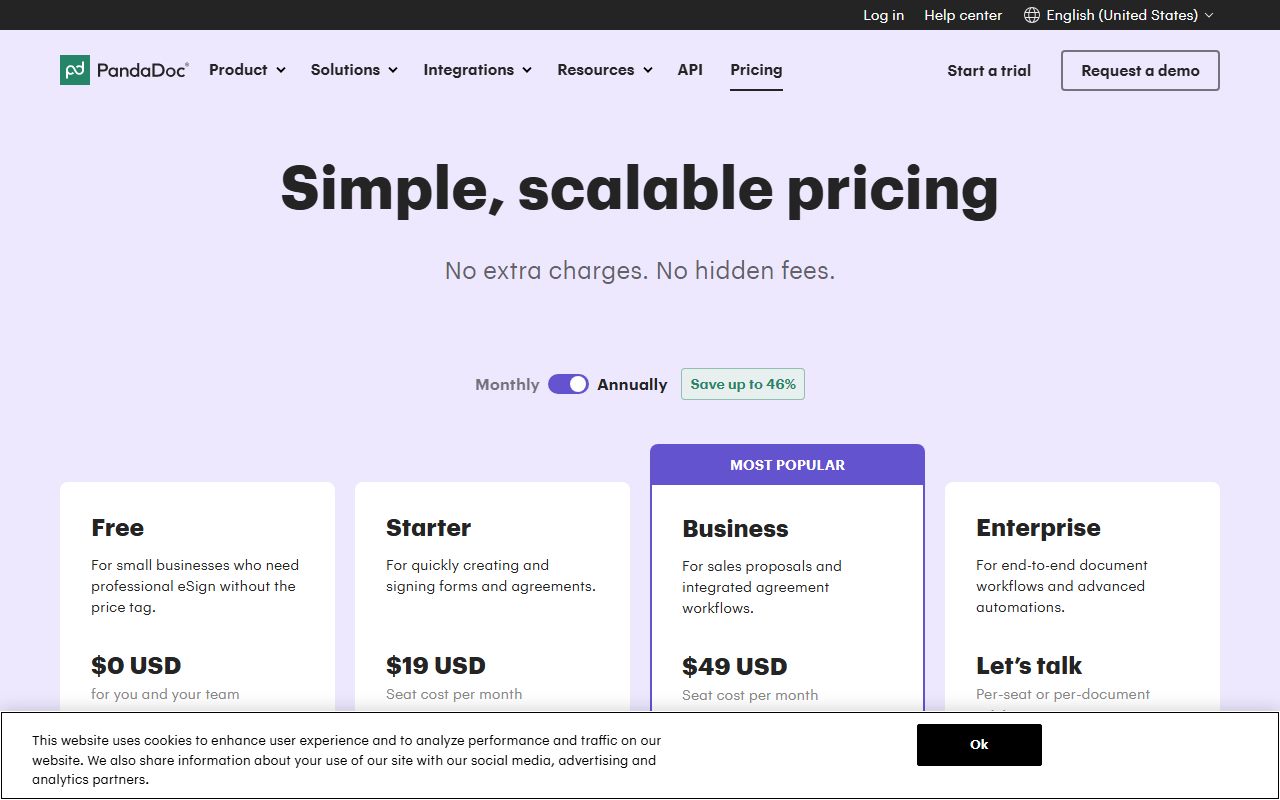
Four tiers. Free is $0 USD and capped at five documents a month. Starter is $19 USD a seat a month. Business is $49 USD. Enterprise is per-seat or per-document by quote.
The feature spread is the widest of the signing tools read for this blog, because the product is not really a signing tool. It builds proposals, quotes, pricing tables and payment collection, with the signature at the end.
Two things keep the score down. The monthly prices are not in the page markup, so the headline saving of up to 46 percent cannot be checked. And a second currency runs through the product called usage credits.
Visit PandaDoc
We have no affiliate relationship with this vendor. Link goes to the official site.
Where it is strong
- **A free tier that is a plan, not a trial.** The card reads $0 USD for you and your team with no credit card required, and lists five documents a month, the full editor, real-time tracking and 24/7 email and chat support (October 15, 2026).
- **24/7 email and chat support is printed on the free tier,** which is more than either cheaper rival in this category promises at any price (October 15, 2026).
- **Starter lifts the cap rather than raising it.** The card reads unlimited document uploads and e-signatures, and the comparison table gives unlimited for documents created in the interface (October 15, 2026).
- **The scope goes past signing.** Business adds custom quotes and sales agreements, CRM integrations, a content library, deal rooms, approval workflows, web forms and bulk send, per the card (October 15, 2026).
- **The trial length is stated and so is the billing promise.** The FAQ says the free trial is valid for 14 days and that you are only charged when you decide to continue (October 15, 2026).
- **Overage rates are published per plan rather than hidden.** The FAQ gives $3.50 per extra document on Starter Monthly, $2 on Starter Annual and $2.60 on Business Monthly (October 15, 2026).
Where it falls short
- **The monthly prices are not in the page markup.** The toggle offers monthly and annual and the header promises savings of up to 46 percent, but only the annual figures render, so that percentage cannot be checked against any printed number (October 15, 2026).
- **Seven features on the paid cards carry an asterisk** meaning they require usage credits or are a paid add-on, including API, CRM integrations, web forms, bulk send, CPQ and workflow automation. None of those credit packs has a price on the page (October 15, 2026).
- **The usage-credit fallback can reach $5 a document.** The FAQ states that if your order form has no per-unit price you will be charged up to $5 per document created, and that API document creation pauses outright when credits run out (October 15, 2026).
- **Two security features are annual-only.** Qualified Electronic Signature and recipient verification are marked annual plan only in the comparison table, so monthly buyers lose them (October 15, 2026).
- **The review badges on the pricing page are stale and flattering.** They show Capterra 4.5 from 1197 reviews and Trustpilot 4 from 560 reviews, both dated 02/01/2025, while Trustpilot itself showed 2.1 from 691 reviews on October 15, 2026.
- **Documents do not roll over.** The FAQ confirms unused documents do not carry into the next billing period, which matters most on the five-a-month free tier (October 15, 2026).
What this review is based on, and what it cannot tell you
Documentation only. Everything below comes from the PandaDoc pricing page as it rendered on October 15, 2026, plus the Trustpilot listing for pandadoc.com read the same day.
That covers four plan cards, the monthly and annual toggle, the full plan comparison table, the asterisk footnotes, the three review badges and the pricing FAQ. No account was opened.
This is the third of the three honest positions this blog allows itself, and the weakest of them.
One method note that changed a conclusion. A first machine read returned a pricing page with no prices on it, because they are drawn after the page loads.
The rendered page was read instead. In it, only the annual figures exist as text; the monthly ones are not in the markup until the toggle is used.
So this review says the monthly price could not be read, not that the vendor fails to publish one.
What PandaDoc is
PandaDoc is a document platform sold per seat, in which the signature is the last step rather than the product.
The comparison table makes that clear. It has sections for creating documents, collaborating, sending and signing, selling and getting paid, storing and managing, tracking, an AI assistant and integrations.
Pricing tables, a product catalogue, payment collection, configure-price-quote and deal rooms are all rows in it. A pure signing tool has none of those.
The shape is different again from the rest of the desk covered here. FreshBooks and Wave handle money coming in, and FreshBooks against Wave works the two through.
Harvest handles hours. Bonsai bundles contracts with invoicing. PandaDoc handles the document that persuades the client to say yes.
Who PandaDoc is best for
Read from the plan cards and the comparison table, the page is shaped for these people:
- A freelancer who pitches with proposals, since pricing tables, a content library and deal rooms are the paid rows.
- Anyone who wants a payment button inside the document, listed as collect payments in the selling section.
- A sole trader sending five or fewer documents a month, which the free tier covers at no cost.
- A buyer who wants support hours in writing, given 24/7 email and chat printed on the free card.
- Anyone needing US or EU data residency, which appears as its own row rather than a sales conversation.
Who should skip it
Three profiles the page argues against:
- A freelancer who only needs signatures. Starter is $228 a year by the editors' arithmetic, well above the cheapest paid step in this category.
- Anyone on a fixed budget who needs the API, bulk send or web forms, all asterisked as usage credits or add-ons with no price shown.
- A buyer who wants to compare monthly against annual before deciding, since the monthly figures could not be read on the page.
What each tier includes, as of October 2026
Four tiers on the cards, under a toggle offering monthly or annual and a badge reading save up to 46 percent.
Free is $0 USD for you and your team, with no credit card required. The card lists five documents a month, the rich media editor, real-time tracking, 24/7 email and chat support, limited API access and AI assistants in beta.
Starter is $19 USD a seat a month. The card adds unlimited document uploads and e-signatures, and lists API with an asterisk.
Business is $49 USD a seat a month and marked most popular. It adds custom quotes and sales agreements, CRM integrations, custom branding and a content library, deal rooms, approval workflows, web forms and bulk send.
Enterprise has no figure. The card reads let us talk, with per-seat or per-document pricing.
- Rows that carry a number: documents created in the interface, five a month shared on Free and unlimited above; templates, up to five on Free; deal rooms, up to three on Free.
- Rows that carry a phrase: API documents on Free are included in the same five with no separate limit; Enterprise document volume is custom, talk to sales.
- Rows marked annual plan only: Qualified Electronic Signature and recipient verification.
- Rows marked optional or requiring usage credits: web forms, bulk send, automations, Salesforce, the API, single sign-on, team workspaces, HIPAA compliance and premium support.
How the pricing is structured, and the number that cannot be checked
Per seat a month, quoted annually, with a second currency running underneath called usage credits.
The visible figures are simple. $0, $19 and $49 a seat a month, plus a quote. The card and the comparison table agree on both paid numbers.
Editorial arithmetic from those rates on October 15, 2026: Starter is $228 a year for one seat and $684 for three. Business is $588 for one seat and $1,764 for three. A footnote adds that prices exclude any applicable taxes.
What cannot be checked is the saving. The toggle offers monthly, the badge says save up to 46 percent, and no monthly figure was present in the page markup when it was read.
The monthly plans certainly exist. The overage FAQ names Starter Monthly and Business Monthly and gives different per-document rates for each.
So the only honest statement is this: the editors could not read PandaDoc's monthly price on the pricing page on October 15, 2026, and the 46 percent claim has no printed figure to measure it against.
The second currency: usage credits and the $5 ceiling
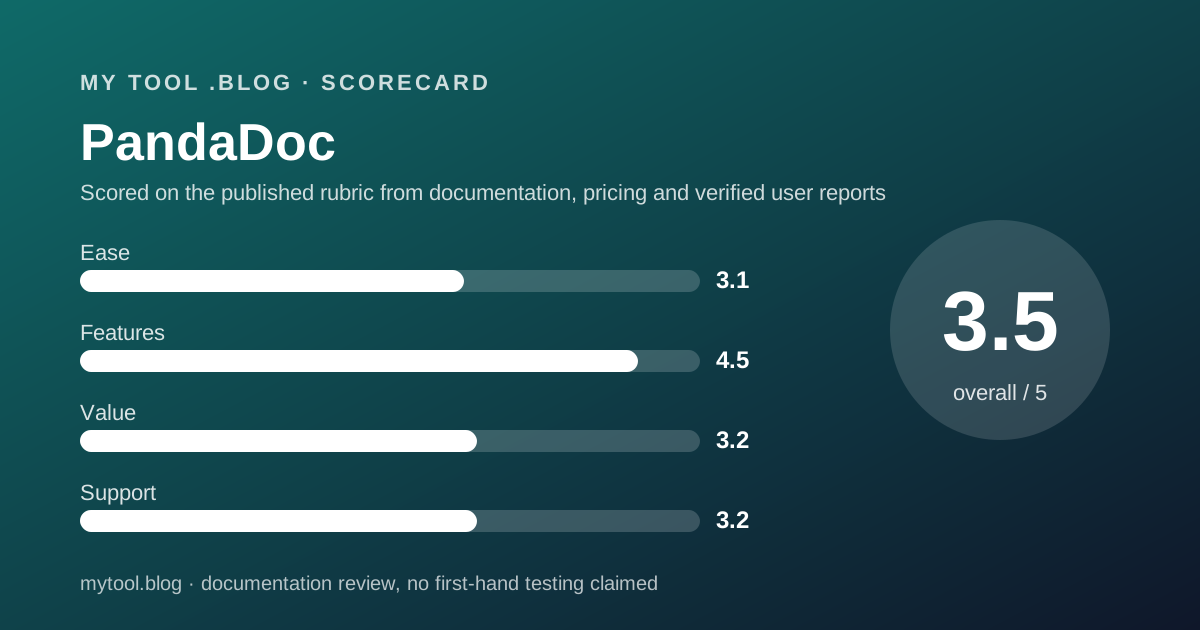
This is the part of the price list a freelancer should read twice, and it is the main reason the ease score sits at 3.1.
A usage credit is spent when a document is created through an integration or automated workflow. The FAQ lists the API, Zapier, Make, forms and bulk send.
Starter and Business include trial credits for first-time customers only. After that, credits are bought in a recurring pack whose price is not on the page.
When the credits run out, two things happen. API document creation pauses until you add credits or upgrade. Everything else keeps running and bills as overage.
The overage rate comes from your order form. If the order form has no per-unit price, the FAQ says you will be charged up to $5 per document created.
What a tool costs besides its price is this blog's list of lines to settle before signing. An unpriced second currency with a $5 ceiling belongs at the top of it.
Ease of use: the score is about the price list, not the app
A 3.1, the lowest this blog has given a price list in this category.
The case for it is the comparison table, which is genuinely thorough. Nine sections, well over a hundred rows, with numbers where numbers exist and a plain phrase where a limit is custom.
The FAQ is also unusually candid. It admits documents do not roll over, names the overage rates per plan, and spells out what pauses when credits run out.
The first deduction is that the headline price cannot be compared. A page offering monthly and annual that only renders one of them is a page you cannot plan from.
The second is the asterisk. Seven card features, including the API and bulk send, are credits or add-ons, and no credit price appears anywhere.
The third is the badges, covered below. Nothing here judges the app. No account was opened, and the label at the top says so.
Features: the widest spread in this category
A 4.5, and the comparison table is the reason.
No other price list read for this blog on October 15, 2026 covers document generation, a content library, approval workflows, deal rooms, pricing tables, payment collection, configure-price-quote, a contract repository and AI data extraction in one subscription.
The tracking section alone runs to real-time notifications, audit trail, recipient analytics, auto reminders, expiration alerts and automated reports.
Compliance is specific: SOC 2 Type II, GDPR, eIDAS, the US ESIGN Act of 2000, US or EU data residency, SMS verification and knowledge-based authentication with ID verification.
Two deductions. Much of the useful automation is asterisked rather than included. And two security features are gated by billing period rather than by price.
For a freelancer whose documents are plain contracts, most of this breadth is weight rather than value.
Value: excellent at zero, questionable at $19
A 3.2, and the split is sharp.
The free tier is one of the better free offers in this category. Five documents a month, the full editor, tracking, up to five templates, three deal rooms and 24/7 email and chat support, with no card required.
For a freelancer who sends a contract or two a month, that is the entire requirement at no cost.
Starter is harder to justify as a signing tool. $228 a year by the editors' arithmetic buys unlimited interface documents, and the API that might make it worth the money sits behind credits.
Business at $588 a year is where the proposal features arrive, and that is the version of PandaDoc worth paying for. It is also three times the price of a one-seat signing subscription elsewhere in this category.
The renewal test in how to decide to cancel a tool you already pay for is simple here. If no proposal, pricing table or payment button was used last quarter, the free tier is the right size.
Support: generous on paper, poor in the public record
A 3.2, and the two halves point in opposite directions.
The page promises more than its rivals. The free card lists 24/7 email and chat support, and the table lists a 24/7 help centre knowledge base and 24/7 web ticket and email support, with premium support as an option.
The public record is worse than any other product read for this blog. On October 15, 2026, Trustpilot listed pandadoc.com with a TrustScore of 2.1, rated Poor, across 691 reviews, 90 of them in the last twelve months, on a claimed profile.
The distribution was 61 percent five-star, 9 percent four, 3 percent three, 3 percent two and 24 percent one. Trustpilot weights recent reviews, which is how a majority-five-star profile scores 2.1.
Trustpilot also flagged the profile as asking customers to review and as not having replied to negative reviews.
The badges on PandaDoc's own pricing page tell a different story. Capterra shows 4.5 from 1197 reviews and Trustpilot 4 from 560, both tagged as of 02/01/2025. The G2 badge reads 4.7 from 3,324 reviews, tagged as of 06/11/2026.
That G2 date is worth reading twice. The page gives no format. Read day-first it falls in November 2026, which had not arrived when we read the page on October 15, 2026. Read month-first it is June, four months stale.
Three of the six badges also point somewhere other than their label. A GetApp link is labelled Capterra, a Gartner link is labelled Trustpilot, and a TrustRadius link is labelled Capterra while showing 9.1 out of 10 on a five-star row.
Limits stated by the vendor, and limits the page leaves open
The page is unusually frank about caps and unusually quiet about the price of lifting them.
Stated: four tiers, two seat prices, a five-document monthly cap on Free, five templates and three deal rooms on Free, a 14-day trial, per-plan overage rates, a $5 per-document fallback, and no rollover of unused documents.
Stated in the footnotes: prices exclude applicable taxes, and seven card features need credits or are paid add-ons.
Not stated: the price of a usage credit pack, or how many credits a pack contains. Not stated: the monthly seat prices, which were not in the markup read here. Not stated: the Enterprise price, or the figure behind save up to 46 percent.
One vendor claim for context. PandaDoc's own Trustpilot blurb says join 50,000 or more businesses. That is a vendor figure on a vendor-written profile, reported as such.
Alternatives worth reading the price list of
Three on this blog, plus two this post did not open.
Bonsai is the closest comparison in spirit. Choose Bonsai if proposals, contracts and invoices should arrive on one freelance-sized bill. Choose PandaDoc if the document itself needs pricing tables and a payment button.
FreshBooks and Wave are not rivals but the other half of the desk. Read FreshBooks or Wave first if invoicing is still manual, and the best invoicing tools for freelancers ranks that group.
Harvest is the hours comparison. Choose Harvest if what you need priced is time rather than documents.
Two price lists in this category were not read for this post and are therefore not compared: Docusign and Adobe Acrobat Sign.
Buy it if, skip it if
Conditions, not conclusions, because a documentation review is not entitled to conclusions.
- Start on the free tier if five documents a month covers you. No card is required and the editor is not crippled.
- Take Starter if the five-document cap is the only obstacle and you do not need the API. That is $228 a year by the editors' arithmetic.
- Take Business if you sell with proposals, quotes and payment links. That is $588 a year for one seat and the version of the product worth the money.
- Ask for the monthly price and the credit pack price in writing if you are comparing, because neither was readable on the page.
- Do not rely on this post if you want to know what PandaDoc is like to use. Nobody here has used it, and the label says so.
Bottom line
On the published terms as of October 15, 2026, PandaDoc has the widest printed feature set and one of the better free tiers of the document tools read for this blog.
It is also priced for a sales team. For a freelancer who only needs a signature, $228 a year buys breadth that will stay closed, and the automation that would justify it sits behind an unpriced credit system with a $5 per-document ceiling.
The page deserves credit for frankness about caps and overage, and criticism for two things: a monthly price that does not exist in its own markup, and two review badges dated January 2025 sitting above a current Trustpilot score of 2.1.
This is a reading of a price list on one date. There is no affiliate link on this page and no commission attached to it.
Sources
Read on October 15, 2026. Where a figure is missing above, the editors could not read it on the vendor's pricing page on that date.
- PandaDoc pricing page, four plan cards, monthly and annual toggle, full plan comparison table, footnotes, review badges and pricing FAQ: www.pandadoc.com/pricing/
- PandaDoc pricing page, rendered markup read directly to confirm that only the annual price nodes exist, same date
- Trustpilot listing for pandadoc.com, TrustScore 2.1, 691 reviews, 90 in the last twelve months, star distribution and profile flags, same date
- This blog's scope and labels: what I will and will not claim
- This blog's editorial policy: editorial policy and about
Visit PandaDoc
We have no affiliate relationship with this vendor. Link goes to the official site.