 My
My
Dropbox Sign
The tool formerly called HelloSign, sold in three packages whose pricing page prints four different numbers per plan and whose cheapest team tier has a hidden two-seat floor
Scored on the published rubric, from documentation, pricing and verified user reports.
Best for: A freelancer whose client files already live in Dropbox or Google Drive, who wants five reusable templates and a real 30-day trial, and who will stay on the one-user Essentials package rather than step up.
Verdict
What this is based on: the Dropbox Sign pricing page, its three package cards, its monthly and yearly toggle, its coupon banner and offer terms, its package feature table and its pricing FAQ, plus the vendor's free document signing page, all read on October 15, 2026 from the rendered pages rather than a summary. No Dropbox Sign account was opened for it. That is the documentation review label, the third of the three honest positions on this blog.
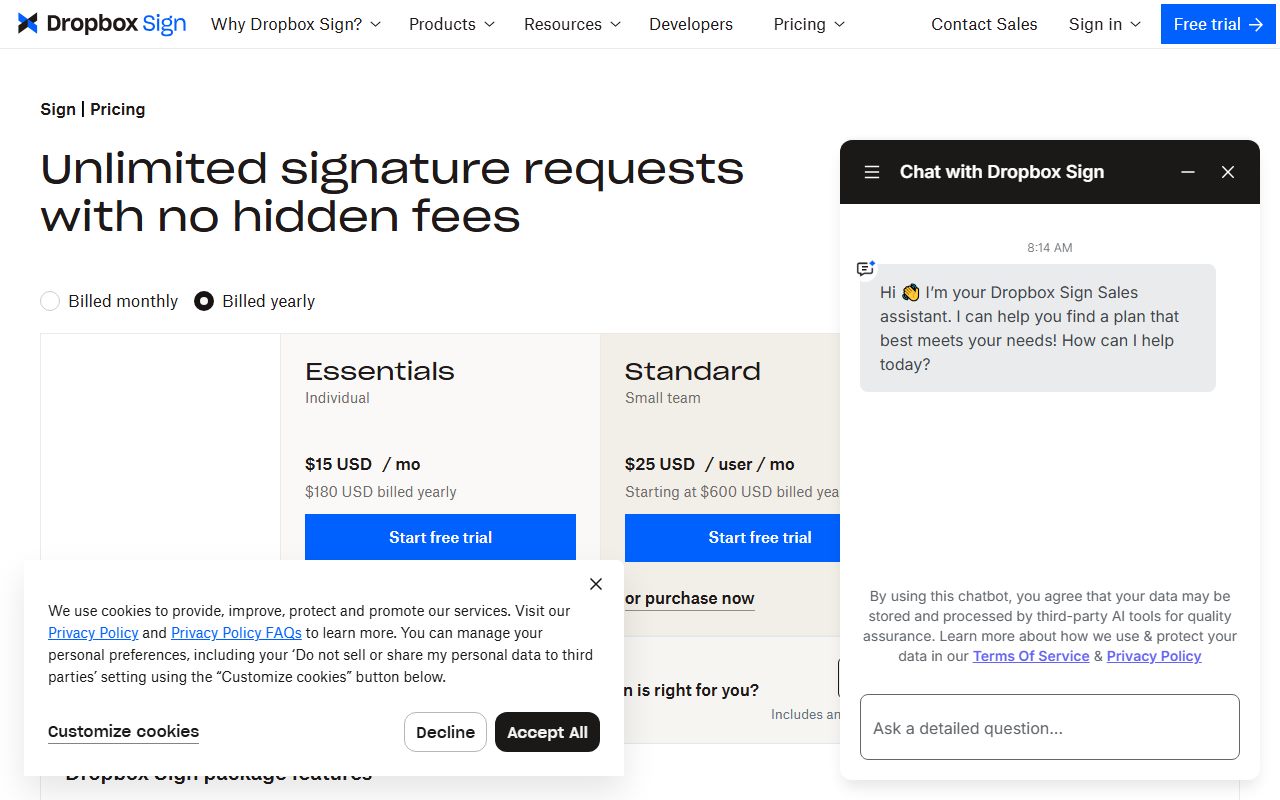
The page sells Essentials for an individual, Standard for a small team and Premium by quote. Essentials is $15 USD a month billed yearly, $180 USD a year, one user, five templates.
The problem is arithmetic. Each paid card carries four figures at once: a yearly rate, a yearly total, a monthly rate and a struck-through coupon rate. Two of those coupon figures imply different discounts on the same page.
The other finding matters more to a one-person business. Standard is quoted at $25 USD per user a month but its yearly total starts at $600 USD, which is two seats, not one.
Visit Dropbox Sign
We have no affiliate relationship with this vendor. Link goes to the official site.
Where it is strong
- **A 30-day trial of paid-only features, stated in the FAQ.** The page says a 30-day trial gives access to features only available on paid plans and that ending it inside 30 days means no charge (October 15, 2026).
- **Signature requests are uncapped on every paid package.** The page headline is unlimited signature requests with no hidden fees, and the feature table repeats it as a row with no number against it (October 15, 2026).
- **Signers never pay and never register.** The FAQ answer is blunt: no, nothing, ever. It adds that both parties receive a copy once signing finishes (October 15, 2026).
- **The integration list is named rather than implied.** Google Drive, Microsoft Word and HubSpot are printed against all three packages, with Salesforce listed as a paid add-on from Standard up (October 15, 2026).
- **Security and compliance are specific.** The page names SOC 2 Type II, ISO 27001, eIDAS and GDPR, two-factor authentication, and AES 256-bit encryption at rest (October 15, 2026).
- **Senders and non-senders are defined in writing.** Two FAQ answers set out who counts as a sender and who does not, which is the row the whole bill hangs on (October 15, 2026).
Where it falls short
- **Each paid card prints four prices at once.** Essentials shows $15 USD a month, $180 USD billed yearly, $20 USD a month, and a coupon rate of $10.05 USD a month or $120.60 USD a year. Nothing on the card labels which applies to a new buyer (October 15, 2026).
- **The two coupon prices imply different discounts.** $120.60 against $180 is 33 percent off; $420 against $600 is exactly 30 percent, by the editors' arithmetic. The offer terms on the same page promise 30 percent off the first year (October 15, 2026).
- **Standard's per-user price hides a two-seat floor.** The card says $25 USD per user a month and starting at $600 USD billed yearly. At twelve months that total is two users, and the feature table gives Standard's user count as 2 or more (October 15, 2026).
- **Essentials caps templates at five,** against 15 on Standard and unlimited on Premium. Stepping up from five templates therefore costs $600 USD a year rather than $180 (October 15, 2026).
- **Support is listed as Email on both buyable packages.** Only Premium adds what the table calls email and paid options, and Premium has no published price (October 15, 2026).
- **The free plan is not described on the pricing page.** The only route is a link reading try our free plan. The vendor's free signing page gives three free documents a month and then refers to a Pro plan, a name that does not exist on the pricing page (October 15, 2026).
What this review is based on, and what it cannot tell you
Documentation only. The figures below come from the Dropbox Sign plans and pricing page as it rendered on October 15, 2026, plus the vendor's free document signing page read the same day.
That covers three package cards, the monthly and yearly toggle, the coupon banner and its offer terms, the package feature table and the pricing FAQ. No account was opened.
This is the third of the three honest positions this blog allows itself, and the weakest of them.
One method note. Each card holds several price nodes at once, and the browser only shows the ones matching the toggle and the coupon state.
The markup was read directly to separate them, which is the only way to say which figure belongs to which billing choice. Where the page does not label a figure, this review says so.
What Dropbox Sign is
Dropbox Sign is the e-signature product Dropbox bought as HelloSign and renamed, sold in three packages with sending uncapped on all of them.
The pitch is proximity. The feature table names Google Drive, Microsoft Word and HubSpot against every package, so the document you sign is the document already sitting in the drive you use.
That is a real argument for a freelancer. The slow part of getting a contract signed is rarely the signature. It is finding the right version of the file.
The shape differs from the tools already covered here. FreshBooks and Wave start from money coming in. Harvest starts from hours. Calendly and Cal.com start from the meeting.
Who Dropbox Sign is best for
Read from the package cards and the feature table, the page is shaped for these people:
- A freelancer already storing client work in Dropbox or Google Drive, since those integrations are named on the cheapest package.
- Anyone who wants to test paid features before committing, which the 30-day trial allows.
- A sole trader working from five or fewer agreement templates, the Essentials ceiling.
- Someone who sends in bursts, because signature requests carry no monthly number on any package.
- A buyer who needs named compliance: SOC 2 Type II, ISO 27001, eIDAS and GDPR are all printed.
- A sender whose signers are not in English, given 22 languages for both sides.
Who should skip it
Three profiles the page argues against:
- A one-person business that needs more than five templates, because the next package starts at two seats.
- Anyone who needs a firm number today, given four figures on each paid card.
- A freelancer who wants contracts, proposals and invoices in one bill, which is the Bonsai case rather than this one.
What each package includes, as of October 2026
Three packages, with a monthly and yearly toggle above them and a coupon banner across the top.
Essentials, labelled Individual, is one user with five templates. The card prints $15 USD a month on the yearly toggle and $180 USD billed yearly.
Standard, labelled Small team, is 2 or more users with 15 templates. The card prints $25 USD per user a month and starting at $600 USD billed yearly. A footnote adds that 5 or more users means contacting sales.
Premium, labelled Large team, is 5 or more users with unlimited templates and no price at all. The card reads get a custom quote.
- Rows that carry a number: users, 1, 2 or more, 5 or more; templates, 5, 15, unlimited; select integrations, listed as a paid add-on from Standard.
- Rows that carry a phrase: integrations, Google Drive, Microsoft Word, HubSpot and more on all three; customer support, Email on the first two and email and paid options on Premium.
- Rows where the answer is an icon only: roughly twenty-five, from unlimited signing and tamper-proof documents through to single sign-on, data residency, multi-teams and performance dashboards.
- Footnoted as an extra cost: select integrations, described as an add-on where you contact sales for details.
How the pricing is structured, and why it is hard to read
Per user a month, in two billing periods, with a coupon layered over both. That is three variables on one card.
Essentials holds four figures: $15 USD a month and $180 USD billed yearly on the annual toggle, $20 USD a month on the monthly one, and a coupon rate of $10.05 USD a month or $120.60 USD a year.
Standard holds the same four shapes: $25 USD per user a month, starting at $600 USD billed yearly, $30 USD per user monthly, and a coupon rate of $17.50 USD per user or starting at $420 USD a year.
Editorial arithmetic from those published figures on October 15, 2026. Essentials at $20 monthly is $240 a year, so annual billing is 25 percent below monthly.
Standard at $30 per user monthly for two users is $720 a year, against $600 billed yearly, which is 16.7 percent below.
So the size of the annual saving is not the same on the two packages, and the page does not say so anywhere.
The two coupon prices do not agree with the offer terms
This is the finding that costs the ease score most, and it is pure arithmetic rather than opinion.
The offer terms printed under the table say 15 percent off the first three months of an eligible monthly plan, or 30 percent off the first year of an eligible annual plan.
Standard matches. $420 USD against $600 USD is exactly 30 percent, and $17.50 against $25 is the same ratio.
Essentials does not. $120.60 USD against $180 USD is 33 percent off, and $10.05 against $15 is the same ratio again.
Separately, the banner at the very top of the page advertises 99 percent off HelloSign Enterprise for four months with a coupon code, under a product name the package cards no longer use.
What a tool costs besides its price is this blog's list of lines to settle before signing. A discount with two sizes on one page belongs on it, in writing, before you pay.
Ease of use: the score is about the price list, not the app
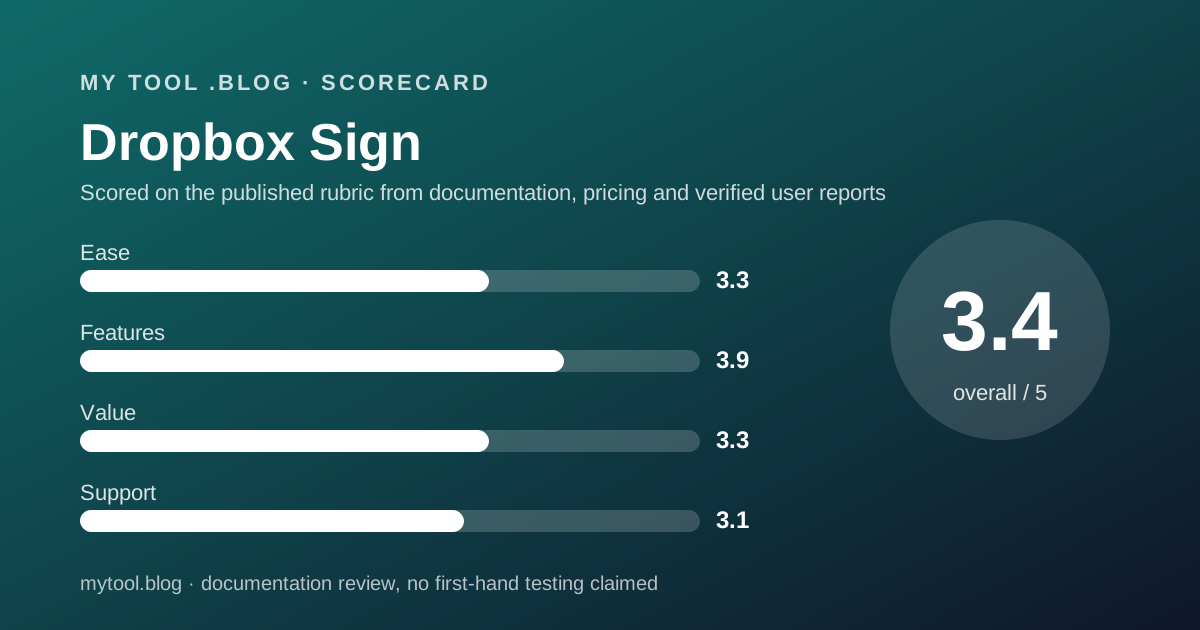
A 3.3, and every point of the deduction is about numbers rather than design.
The case for the score is that the FAQ does real work. It defines a sender, defines who is not a sender, explains templates, confirms automatic renewal and states plainly that signers are never charged.
The first deduction is four prices per card with no label saying which a new buyer pays.
The second is a coupon that is 30 percent on one package and 33 percent on another, against offer terms that name only one figure.
The third is the two-seat floor inside a per-user price. A card that says $25 per user and starting at $600 a year is telling you about two people without using the word two.
Nothing here judges the app. No account was opened, and the label at the top says so.
Features: broad, with the useful limits on the cheap package
A 3.9, earned on the signing feature set and reduced by where the ceilings sit.
The table lists roughly twenty-five feature rows across signing, fields, administration, security and reporting. Tamper-proof documents, audit trails, signer attachments, in-person signing, template links, data validation and 22 languages are all present as rows.
Security is specific in a way many price lists are not: SOC 2 Type II, ISO 27001, eIDAS, GDPR, two-factor authentication and AES 256-bit encryption at rest.
The deduction is that almost every row's per-package answer is an icon, so a text reader cannot tell which features Essentials actually has.
What can be read is the ceiling that matters most. Five templates on Essentials, 15 on Standard, unlimited on Premium.
Single sign-on, data residency, multi-teams and performance dashboards sit in the unpriced Premium column, which for a freelancer does not bite.
Value: fine at one seat, awkward at two
A 3.3, and the split is exactly at the Essentials ceiling.
For one person sending contracts, $180 USD a year buys uncapped sending, five templates, an audit trail and the integrations named above. That is a defensible price for the category.
Above that line the maths turns against a sole trader. The only way to get a sixth template is Standard, whose yearly total starts at $600 USD because it starts at two seats.
So a freelancer who outgrows five templates pays for a colleague they do not have. That is a 233 percent increase by the editors' arithmetic, for one more template.
The 30-day trial softens the entry, and the free account route gives three documents a month for nothing.
The renewal question is the one in how to decide to cancel a tool you already pay for. If last year's sending fits in three documents a month, the free account is the right size.
Support: email on both buyable packages
A 3.1, and the page itself sets the ceiling.
The customer support row reads Email for Essentials and Standard. Premium adds what the table calls email and paid options. No phone number, chat window or response-time commitment appears anywhere on the page.
The description above the table is warmer than the row: all customers have access to email and chat support. The row does not mention chat on any package, so the two statements do not match.
The public record is awkward to use. On October 15, 2026, Trustpilot's listing for sign.dropbox.com carried two reviews, which is not a sample.
The legacy profile for hellosign.com, the product's former name, carried a TrustScore of 1.5 from 33 reviews, unclaimed, with 76 percent of them at one star.
That profile is old, unclaimed and small, and Trustpilot notes the company has no history of asking for reviews. It is reported as context, not as a score.
Limits stated by the vendor, and limits the page leaves open
The page is specific about seats and templates and vague about the two things a cautious buyer wants.
Stated: three packages, four figures per paid card, user counts of 1, 2 or more and 5 or more, templates of 5, 15 and unlimited, a 30-day trial, automatic renewal, and no charge to signers.
Stated in the offer terms: the discount is first-period only, cannot combine with other promotions, is lost if you change plan, and previous charges are not refunded on cancellation unless legally required.
Not stated on the pricing page: what the free plan includes. The separate free signing page gives three documents a month, then refers to any Pro plan or above, a tier name the pricing page does not sell.
Not stated anywhere read here: the price of the select integrations add-on, or the Premium package price.
Alternatives worth reading the price list of
Three on this blog, plus two this post did not open.
Bonsai is the bundle. Choose Bonsai if contracts, proposals and invoices should arrive on one bill. Choose Dropbox Sign if invoicing is settled and the signature is the gap.
FreshBooks and Wave are the other half of the same desk. Read FreshBooks or Wave first if money coming in is still handled by hand.
The best invoicing tools for freelancers ranks that group. The journal entry on reading the FreshBooks and Calendly pricing pages explains the method used here.
Two price lists in this category were not read for this post and are therefore not compared: Docusign and Adobe Acrobat Sign.
Buy it if, skip it if
Conditions, not conclusions, because a documentation review is not entitled to conclusions.
- Start on the free account if three documents a month covers you. The pricing page will not tell you that limit; the free signing page does.
- Take Essentials if one sender and five templates is the shape of your work. That is $180 USD a year at the yearly rate.
- Use the 30-day trial if a paid-only feature is the reason you are buying, since the FAQ says ending inside 30 days means no charge.
- Get the coupon figure in writing if you buy annually, because the page shows 30 percent on one package and 33 percent on another.
- Do not rely on this post if you want to know what Dropbox Sign is like to use. Nobody here has used it, and the label says so.
Bottom line
On the published terms as of October 15, 2026, Dropbox Sign is a reasonable one-seat signing tool at $180 USD a year, sitting next to the drive most freelancers already keep client files in.
It is also the hardest price list in this category to read. Four figures per paid card, two coupon percentages against offer terms that name one, and a banner advertising a product name the cards no longer use.
The structural problem for a one-person business is the welded step. Five templates is the Essentials ceiling, and lifting it means a package whose yearly total starts at two seats.
This is a reading of a price list on one date. There is no affiliate link on this page and no commission attached to it.
Sources
Read on October 15, 2026. Where a figure is missing above, the editors could not read it on the vendor's pages on that date.
- Dropbox Sign plans and pricing page, three package cards, toggle, coupon banner and offer terms, feature table and FAQ: sign.dropbox.com/products/dropbox-sign/pricing
- Dropbox Sign pricing page, rendered markup read directly to separate yearly, monthly and coupon price nodes, same date
- Dropbox Sign free document signing page, three free documents a month: sign.dropbox.com/features/free-document-signing
- Trustpilot listings for sign.dropbox.com and the legacy hellosign.com profile, same date
- This blog's scope and labels: what I will and will not claim
Visit Dropbox Sign
We have no affiliate relationship with this vendor. Link goes to the official site.