 My

Qwilr
Unlimited proposals by hand on a one-seat plan, with a separate meter that only bills documents a robot made
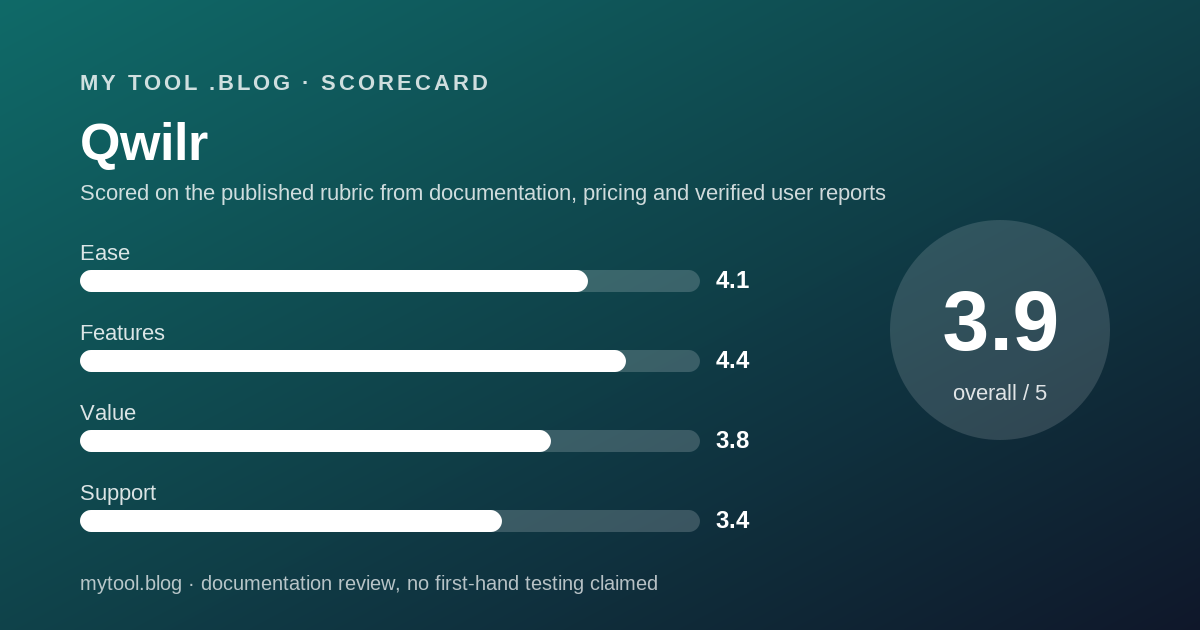
Scored on the published rubric, from documentation, pricing and verified user reports.
Best for: A freelancer who writes every proposal by hand, wants no cap on how many go out, and will never touch the automation credits.
Verdict
What this review is based on: the vendor's published pricing page, its three plan cards, its full feature comparison table, its credit-bundle list and its eleven pricing FAQ answers, read from the rendered page on October 25, 2026. No account was opened, free or paid. That is the documentation review label on this blog, the third of the three honest positions.
Qwilr sells proposals as web pages rather than documents, and its price list is the clearest of the three read for this cluster.
Starter is $35 USD per user per month billed annually, or $49 billed monthly. One seat is included. The Pages row of the comparison table reads Unlimited on all three plans, with the words no limits.
That is the important fact for one person. Nothing caps how many proposals you write and send by hand.
The second meter is narrower than it looks. The per-document charges sit under a heading about the API and automated document creation, and they bill documents generated by machine, not pages you typed.
Visit Qwilr
We have no affiliate relationship with this vendor. Link goes to the official site.
Where it is strong
- **Hand-written pages are not metered.** The Pages row reads Unlimited on Starter, Growth and Scale, described as as many shareable, link-based pages as you need, no limits (feature table, October 25, 2026).
- **The annual discount label survives checking.** The card says save 29 percent; $35 against the $49 monthly rate in the FAQ is 28.6 percent, by the editors' arithmetic (pricing page and pricing FAQ, October 25, 2026).
- **Seat minimums are printed on the cards, not discovered at checkout.** Starter includes 1 user, Growth states a minimum of 5 and Scale a minimum of 10 (pricing page, October 25, 2026).
- **The credit bundle arithmetic is all correct.** 250 documents at $2 is $500, 1,000 at $1.80 is $1,800, 2,000 at $1.60 is $3,200 and 5,000 at $1.50 is $7,500, every pair as printed.
- **The trial does not strand your live pages.** The FAQ says a 14-day Starter trial needs no card, and that pages stay live for 30 days after it expires even though account access stops.
Where it falls short
- **Paying monthly costs more and gets less.** Monthly is $49 against $35, and the free-documents row adds that Starter plans billed monthly do not include free documents at all (feature table, October 25, 2026).
- **The second tier is a five-seat annual commitment.** Growth is $55 USD per user per month, annual billing only, minimum five users, which is $3,300 a year by the editors' arithmetic.
- **Starter support is printed as help documents only.** That is the cell in the Support Provided row; chat support appears in the Scale column's feature list (feature table, October 25, 2026).
- **Every card says starting at.** With per-seat pricing, a per-transaction fee and a per-document credit meter, three separate things can move the bill (pricing page, October 25, 2026).
- **Taking payment on Starter costs an extra slice.** The QwilrPay application fee is 0.09 percent per transaction on Starter and 0 percent on both higher plans, on top of Stripe's own gateway fees.
At a glance
| Starting price | $35 USD per user per month billed annually, $49 monthly |
|---|---|
| Pricing note | From $35 USD per user per month billed annually, or $49 monthly, with one seat included on Starter (pricing page and pricing FAQ, checked October 25, 2026) |
| Free plan | None; 14-day Starter trial, no credit card |
| Seats included | Starter 1, Growth 5 minimum, Scale 10 minimum |
| Pages | Unlimited on all three plans |
| Automation credits | 40, 200 and 600 free documents a year by tier; $2.50 a document pay as you go |
| Payment fee | QwilrPay application fee 0.09% on Starter, 0% on Growth and Scale |
| Analytics retention | 60 days, 120 days, Unlimited by tier |
What this review is based on, and what it cannot tell you
One pricing page, read in a real browser engine on October 25, 2026, because the prices are drawn after load.
That read gave us three plan cards, a comparison table running from Pages down to professional services, the full credit-bundle list, and eleven FAQ answers covering currency, trials, seats, cancellation and payment fees.
What it did not give us is any feel for the editor. No account was opened, so nothing here describes building a page.
One limit is worth stating. Many cells in the comparison table are tick or cross icons with no text label, so we quote only the cells that print words or numbers.
Guessing a tick from its position in a grid is how reviews get features wrong.
The same method covered the e-signature cluster on this blog.
What Qwilr is
It is a proposal tool that refuses to pretend a proposal is paper. The output is a hosted web page with a link, not a PDF attachment.
The feature table lists a quote block the buyer can adjust, tiered plan options, an ROI calculator, embedded video and calendars, a one-click accept block, e-signature, and payment collection through QwilrPay.
PDF export exists as a row, so a client who files everything can still have a copy. The page is the primary object, though.
That matters for what a freelancer can see. Page analytics report where the reader spent time and what they clicked, and identity analytics show who opened it. Notifications fire on view, acceptance and stalling.
The one-seat plan does not cap your proposals
This is the strongest fact on the page and the reason it belongs in this cluster.
The first row of the comparison table is Pages, described as create as many shareable, link-based Qwilr pages as you need, no limits. All three columns read Unlimited.
The Included users row reads 1, 5 and 10. So Starter is a genuine one-person plan with no document ceiling.
Most proposal software at this price meters sends instead. A ten-a-month allowance is common at the bottom of the ladder and it is the thing that forces an early upgrade.
Here the upgrade pressure comes from seats and from automation, not from how hard you are working. For a freelancer in a busy quarter that is the right shape.
The per-document meter bills robots, not typing
This is the part of the page that is easiest to misread, and reading it wrong makes Qwilr look far more expensive than it is.
The credit rows sit under a heading that reads API and Automated Document Creation. The rows above them describe access to the Qwilr API and to what the vendor calls the Smart Proposal Engine.
Under that heading, free documents read 40 on Starter, 200 on Growth and 600 on Scale, described as a set number of documents included at no extra cost.
Pay as you go is $2.50 USD a document on all three plans. Bundles bring that down: 250 documents at $2 each for $500, and on the upper plans 1,000 at $1.80, 2,000 at $1.60 and 5,000 at $1.50.
Every one of those four pairs multiplies out exactly to the printed bundle price, by the editors' arithmetic. The page is being careful here.
One footnote catches the AI route. Creating pages from templates through the vendor's assistant connector draws on the same document automation credits.
Paying monthly is punished twice
This is the sharpest trade on the page, and it is printed plainly in two places.
The FAQ says Starter is $35 per user per month billed annually, or $49 billed monthly. By the editors' arithmetic that is $420 a year against $588, a difference of $168.
Then the free-documents row adds a footnote: Starter plans billed monthly do not include free documents.
So the monthly route costs 40 percent more per month and gives up the 40 included automation credits entirely. If those credits matter to you, the monthly option is strictly worse than paying upfront.
The card's claim of save 29 percent is the one annual-discount label in this cluster that survives a check. $35 against $49 is 28.6 percent, by the editors' arithmetic.
The step above Starter is a five-seat commitment
That is the ceiling a growing freelancer runs into, and it arrives abruptly.
Growth is $55 USD per user per month, annual billing only, minimum five users. By the editors' arithmetic that is $3,300 a year, whether or not five people exist.
Scale is $75 USD per user per month, annual billing only, minimum ten users, which comes to $9,000 a year on the same arithmetic.
What sits behind that wall includes custom branding, automations, identity verification, enhanced reporting, template-level settings and a dedicated success manager.
For one person, the honest reading is that Starter is the whole product and the rest is for sales teams. Plan on staying at $420 a year or on moving elsewhere, not on climbing this ladder.
How the seats behave if you do add someone
The FAQ is unusually specific here, and the detail is not in your favour.
Seats can be added at any time and are charged pro rata for the rest of the billing period. That is normal and fair.
Seat reductions take effect only at your next renewal and cannot be made mid-cycle. Removing a user frees the seat for somebody else but does not reduce the seat count until renewal.
On an annual plan paid upfront for twelve months, that means a subcontractor you add in month two is paid for through month twelve.
That asymmetry is worth pricing before you hire help for one project. The same habit shows up across subscription pricing and is collected in what a tool costs besides its price.
Taking money through the page costs a slice on the cheapest plan
Three numbers, and the pattern is the usual one.
The QwilrPay fees row reads 0.09 percent on Starter, 0 percent on Growth and 0 percent on Scale. The FAQ repeats it and calls it an application or platform fee that appears on the Stripe invoice.
Stripe's own gateway processing fee sits on top of that and is set by Stripe, not by the vendor.
Nine hundredths of a percent is small. On a $5,000 project it is $4.50, by the editors' arithmetic. It is not a reason to avoid the plan.
It is a reason to read the invoice once. A fee that only exists on the cheapest tier is a fee aimed at the smallest customer, and this blog's view on that is in how to decide to cancel a tool you already pay for.
Support on Starter is printed as help documents only
That is the weakest cell on the page for a one-person buyer.
The Support Provided row prints help documents only in the Starter column, and access to API support in both higher columns.
Further down, the Scale card's own feature list includes chat support, and the FAQ says Growth customers get a dedicated customer success manager while Scale adds professional services and priority chat.
There are separate rows further down named email support and help centre, but their cells are unlabelled icons. By the rule above, we do not report what we cannot read as words.
So the honest summary is this. Named, written support commitments on Starter amount to documentation. Anything more is implied by rows we could not verify, and should be asked about during the trial.
Two details that make the trial unusually fair
Both come from the FAQ, and both are better than the category norm.
The trial is 14 days of Starter with full access to all Starter features and no credit card required. You can decide at the end whether to stay on Starter or move up.
The second detail is the one that matters. When the trial expires, your pages remain live for 30 days even though your account access stops.
That means a proposal sent on day thirteen does not break in front of a client on day fifteen. A tool that lets your work die at the paywall costs you a deal, not a subscription.
Cancellation is treated the same way around: it takes effect at the end of the current billing period, after which pages are turned off.
What the page claims about reputation, and why that is not evidence
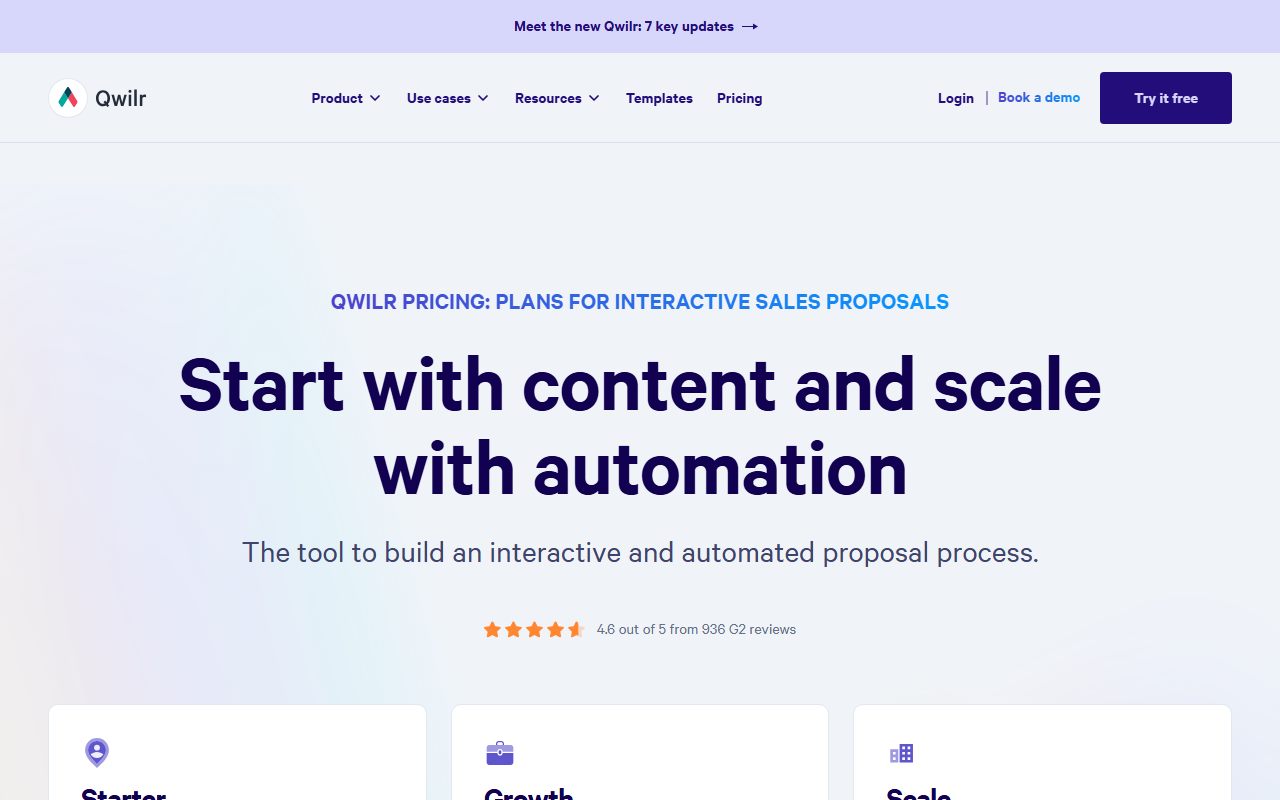
One figure, printed near the top: 4.6 out of 5 from 936 G2 reviews.
That is more specific than most vendor badges, because it names the source and the count. It is still the seller reprinting someone else's score.
We did not open G2 to check it. The G2 and Capterra profiles for this product were requested on October 25, 2026 and both returned a bot wall rather than a page, so there is no second reading to compare.
The footer is more informative than the badge. It lists comparison pages against seven named rivals, including PandaDoc, Proposify, Better Proposals, Docusign, HubSpot Quotes and GetAccept.
A vendor that publishes its own versus pages is telling you which deals it loses. That list is a useful shortlist, written by the one party guaranteed to be biased.
Alternatives worth reading the price list of
Three, by what they replace.
PandaDoc is the one with a real free tier, five documents a month at no cost, and it signs as well as proposes. It sits in the e-signature guide next to SignWell and Dropbox Sign.
Bonsai folds proposals, contracts, invoicing and time tracking into one subscription, which is the cheaper answer if you are currently buying three tools.
If the quote itself is the only problem and the invoice is handled, the invoicing guide and the FreshBooks review cover the half of the job that happens after the client says yes.
And if the answer is that no proposal tool earns its keep yet, how to decide to cancel a tool you already pay for is the test this blog uses.
Bottom line
The one plan in this cluster that does not punish a busy month.
$420 a year buys one seat, unlimited hand-built proposal pages, e-signature, payment collection, analytics and a 29 percent annual discount whose arithmetic actually checks out.
The costs are real but narrow. Support on Starter is documentation in writing. Payments carry a 0.09 percent house fee. Paying monthly costs $168 more and loses the automation credits. The next tier up is a five-seat annual commitment.
The per-document pricing that makes this page look expensive applies to machine-generated documents, not to the proposals you write. Read that section before you rule the product out.
Take the fourteen days, send one real proposal, and ask support a question in that window to find out what help documents only means in practice.
Sources
Qwilr pricing page, including the three plan cards, the full feature comparison table from Pages to professional services, the credit-bundle list and the eleven pricing FAQ answers. Read from the rendered page on October 25, 2026.
The monthly Starter rate of $49 comes from the FAQ answer titled how does annual pricing work, on the same page and date.
G2 and Capterra profiles for the product were requested the same day and returned no readable page. Unlabelled tick and cross icons in the comparison table were not interpreted.
All arithmetic described as the editors' is ours, from figures printed on that page. No account was opened.
Buy it if
- You send more proposals than a ten-a-month plan allows, since hand-built pages carry no printed ceiling on any tier here.
- Your proposal needs to behave like a web page, with an ROI calculator, embedded video, a quote block the client edits and a one-click accept button.
- You want the seat minimum before you commit, because this is the only one of the three price lists that prints a minimum on every card.
- You bill in Australian or New Zealand dollars, as the FAQ says prices are set in AUD for those markets with a currency toggle on the page.
Skip it if
- $420 a year is more than the job is worth to you. Rival price lists read the same day start at $156 a year for one seat, with signatures included at that step.
- You expect to hire soon, because the step above Starter is five seats on annual billing only.
- You want a free tier rather than a trial. For that, read the five-documents-a-month free plan on PandaDoc.
Frequently asked
How much does Qwilr cost for one person?
Starter is $35 USD per user per month billed annually, or $49 billed monthly, per the pricing FAQ read October 25, 2026. Editorial arithmetic: $420 a year on the annual rate against $588 on the monthly one.
Does Qwilr limit how many proposals I can send?
Not for pages you build yourself. The Pages row prints Unlimited on all three plans, read October 25, 2026. Only documents generated through the API or the automation engine draw on credits.
Does Qwilr have a free plan?
No. The free route is a 14-day trial of Starter with full access to Starter features and no credit card. After it expires your pages stay live for 30 days but account access ends.
What are Qwilr's document credits?
A meter on automated creation. Annual Starter includes 40 free documents, Growth 200 and Scale 600. Beyond that it is $2.50 a document, or $2 inside the 250-document bundle priced at $500.
Is Qwilr cheaper billed yearly?
Yes, by 28.6 percent on Starter, by the editors' arithmetic on $35 against $49. Growth and Scale are annual-billing-only, so the comparison does not exist for them. Annual plans are paid upfront for twelve months.
Does Qwilr charge a fee on payments I collect?
On Starter, yes. The QwilrPay application fee is 0.09 percent per transaction on Starter and 0 percent on Growth and Scale, charged on top of Stripe's gateway fees, read October 25, 2026.
Sources
- Qwilr pricing page, plan cards and full feature comparison table - checked October 25, 2026
- Qwilr pricing FAQ (annual pricing, trial, seats, QwilrPay fees, currency) - checked October 25, 2026
- Qwilr credit bundle list printed in the comparison table - checked October 25, 2026
Visit Qwilr
We have no affiliate relationship with this vendor. Link goes to the official site.