 My

Asana
A deep project tool whose free plan holds two seats and whose cheapest paid plan will not sell you one
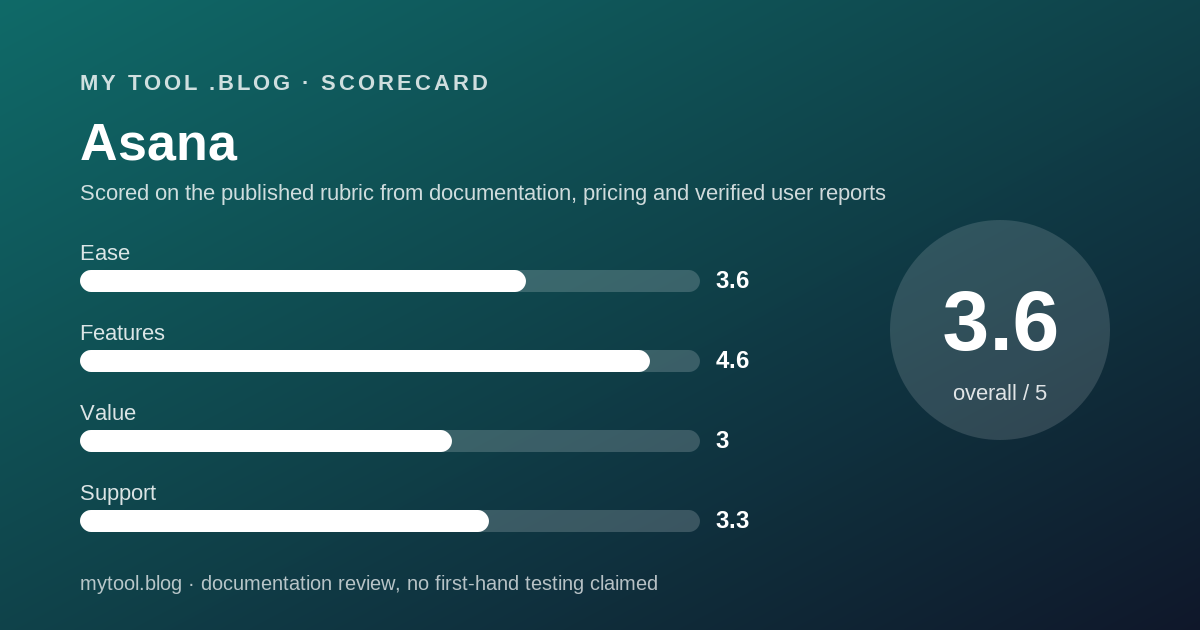
Scored on the published rubric, from documentation, pricing and verified user reports.
Best for: A freelancer who needs task dependencies and a timeline, and can absorb paying for a second seat nobody will sit in.
Verdict
What this review is based on: Asana's pricing page, its 130-row plan comparison table and its pricing FAQ, read from the rendered page on October 29, 2026. No account was opened. On this blog that is the documentation review label, the third of the three honest positions.
Asana has the deepest feature list in this cluster and the worst arithmetic for one person. Two numbers explain why.
The free Personal plan is capped at 2 seats, per the admin row of the comparison table. And the pricing FAQ states that the smallest plans sold are 2, 3, 4 and 5 seats.
So a solo freelancer cannot buy one seat of Starter. The floor is two, which by our arithmetic is US$21.98 a month billed annually, or US$263.76 a year.
Against that, Starter includes unlimited free guests, which is the row that makes client access cheap. The refund policy is one line long: Asana does not offer refunds.
Visit Asana
We have no affiliate relationship with this vendor. Link goes to the official site.
Where it is strong
- Starter includes unlimited free guests, so client access costs nothing extra
- Timeline, Gantt, task dependencies, forms and unlimited rules all arrive at the Starter price
- Personal keeps unlimited tasks, unlimited projects and unlimited storage with a 100MB file cap
- SOC 2 Type II, multi-factor authentication and 256-bit encryption are marked on every plan including the free one
- The seat-increment rules are published in full rather than left to the checkout page
Where it falls short
- The free Personal plan is capped at 2 seats, the tightest free ceiling in this cluster
- The smallest paid plan sold is 2 seats, so a solo freelancer pays for one seat nobody uses
- Asana states plainly that it does not offer refunds
- Timesheets, user rates and project budgets are a paid add-on on every plan and the page does not price it
- Time tracking is held back to Advanced at US$24.99 per user per month billed annually
- 24/7 support and the 99.9% uptime SLA start at Enterprise, which carries no published price
At a glance
| Starting price | US$0 (Personal, 2 seats), then US$10.99 per user per month billed annually on Starter |
|---|---|
| Pricing note | Personal US$0 for 2 seats; Starter US$10.99 per user per month billed annually or US$13.49 monthly; Advanced US$24.99 or US$30.49; Enterprise and Enterprise+ by quote (pricing page, checked October 29, 2026) |
| Free plan | Personal: 2 seats, unlimited tasks, projects, comments and messages, unlimited storage at 100MB per file |
| Paid tiers | Starter US$10.99 annually or US$13.49 monthly; Advanced US$24.99 or US$30.49; Enterprise and Enterprise+ unpriced |
| Seat minimum | 2 seats on any paid plan; plans sold at 2, 3, 4 and 5 seats, then in steps of 5 up to 30 users |
| Guests | Unlimited free guests from Starter upward; none on Personal |
| Time tracking | Advanced and above; timesheets, user rates and budgets are a separate Timesheets and Budgets add-on |
| AI allowance | 5 requests per user per month, capped at 50 per account on Starter and Advanced, 250 on Enterprise |
| AI overage | Prepaid packs at $0.50 per request valid for the billing cycle, or pay-as-you-go at $0.60 per request |
| Refunds | None. The pricing FAQ states Asana does not offer refunds |
| Support | Forum, Academy and Help Center on every plan; direct Asana Support from Starter; 24/7 from Enterprise |
What this review is based on, and what it cannot tell you
The source is Asana's own pricing page, read from the rendered page on October 29, 2026. That page carries five plan cards, a comparison table of about 130 rows and a pricing FAQ.
No account was opened and no plan was purchased. So this review can report what Asana charges and promises, and cannot report how the product behaves on a live client job.
Every number below is quoted from that page. Where a number is missing, this review says it is missing rather than filling the gap, per what this blog will and will not claim.
Arithmetic is labelled as ours wherever it appears.
What Asana is, and what Personal actually is
Asana sells structured work. Tasks sit in projects, projects roll into portfolios, and the paid tiers are organised around how much structure you are allowed to impose.
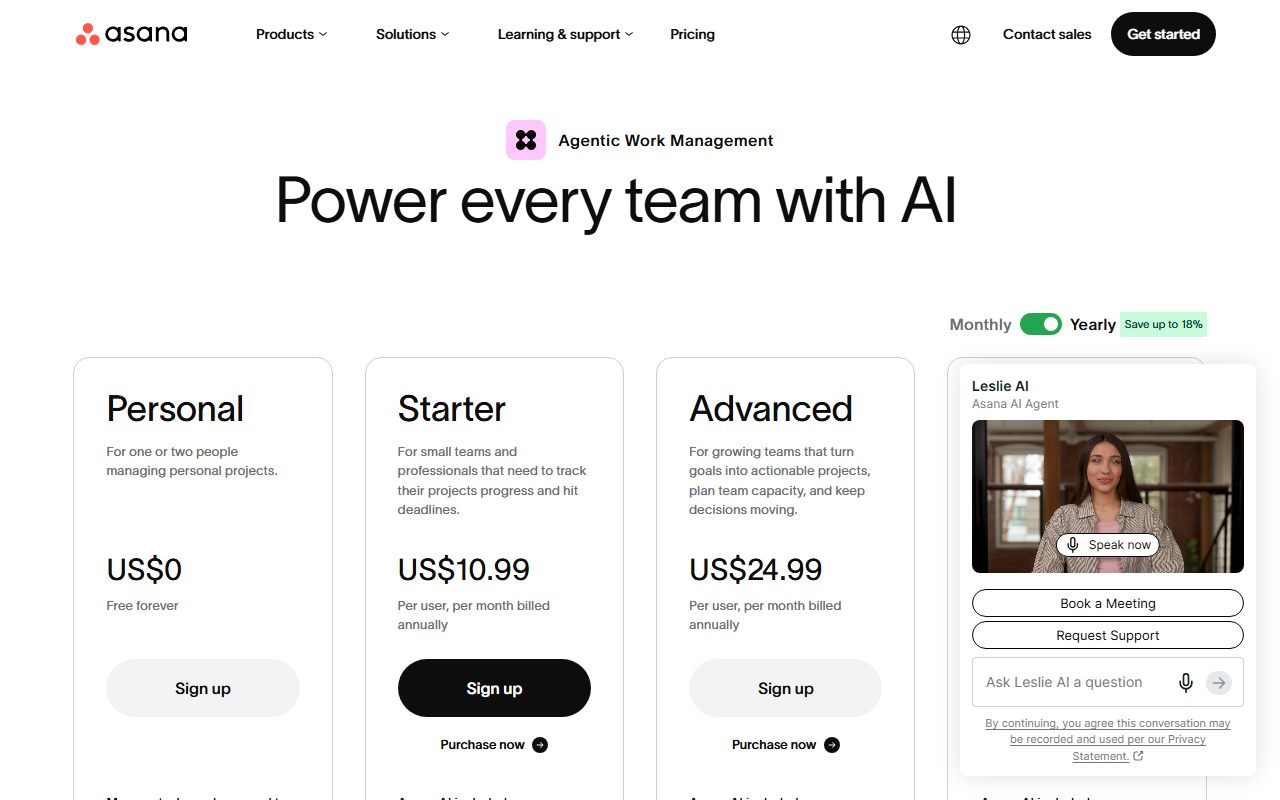
The free tier is called Personal and the plan card describes it as being for one or two people managing personal projects. That is an accurate description rather than marketing.
The admin row of the comparison table puts the Personal user limit at 2 seats, with the note that it covers up to 2 seats per project and team.
Personal does keep a surprising amount: unlimited tasks, unlimited projects, unlimited comments, unlimited messages, recurring tasks, CSV and PDF export and unlimited storage at 100MB per file.
What it does not keep is any way to plan in time. Timeline and Gantt are both marked off on Personal.
Who this fits
Asana earns its price when work has an order rather than just a list. That is a narrower group of freelancers than the marketing suggests.
- A freelancer running multi-stage jobs where one task genuinely blocks another
- Anyone who needs clients to see progress without buying them a seat
- A freelancer who already bills from FreshBooks and wants planning kept separate
- Anyone who sends intake forms, which arrive at the Starter price
- A freelancer whose hours already live in Everhour or Clockify
Who should skip Asana
Three groups will lose money here, and in each case the price list says so plainly.
- Anyone who wants to pay for exactly one seat, because the floor is two
- Anyone who needs hours and rates in the same tool, which is Advanced plus an unpriced add-on
- Anyone who wants the safety of a refund, because Asana states it does not give them
The two-seat floor is the whole story for a solo freelancer
This is the finding that changes the decision, and it is not on a plan card. It is in an FAQ answer about changing team size.
Asana states that at minimum it offers plans for smaller teams, naming 2, 3, 4 and 5 seat plans. Below two there is nothing to buy.
Our arithmetic on Starter: two seats at US$10.99 per user per month billed annually is US$21.98 a month, or US$263.76 for the year.
Billed monthly the same two seats are US$13.49 each, which is US$26.98 a month and US$323.76 a year.
Our arithmetic on Advanced: two seats at US$24.99 is US$49.98 a month, or US$599.76 a year, for a product one person will use alone.
The sticker price of US$10.99 is therefore never the price a freelancer pays. The real entry price is double it, and the page never puts the two facts side by side.
How the pricing is structured, and the annual discount checked
There are five tiers and two of them carry a published number.
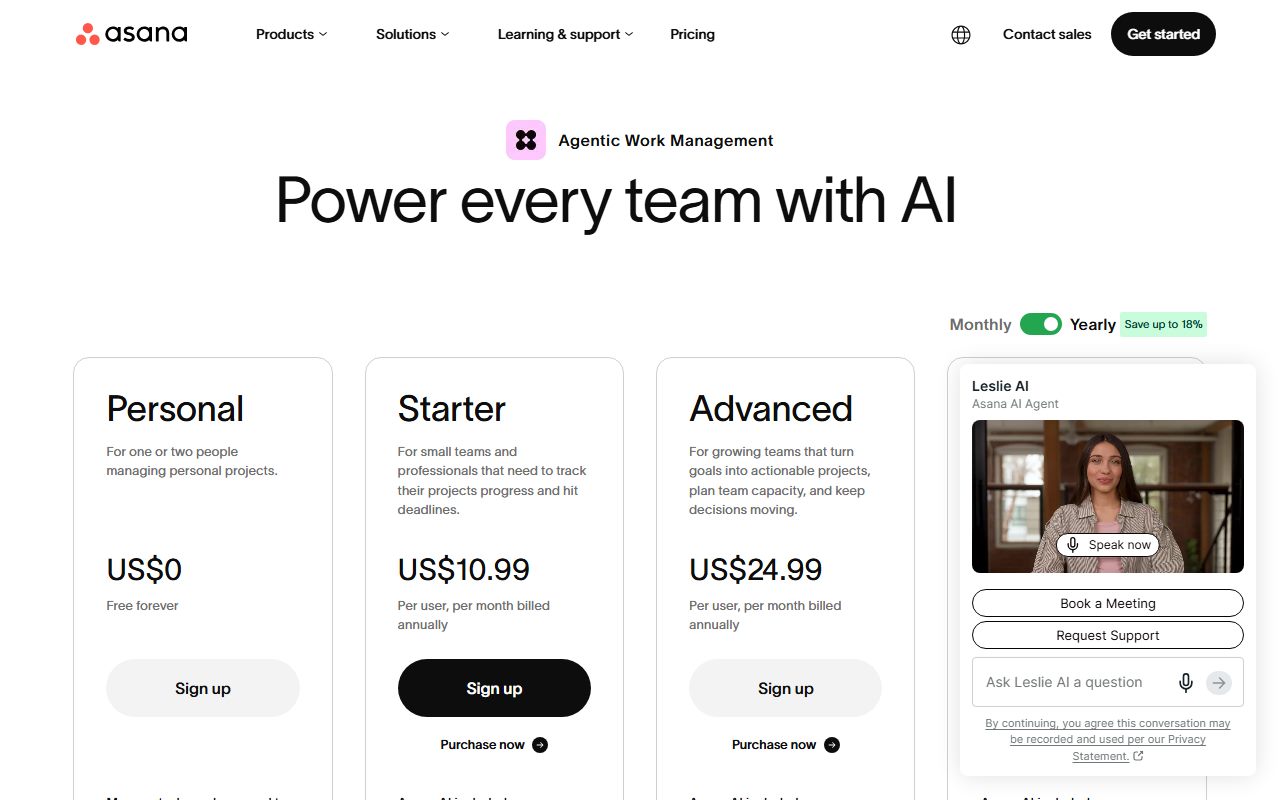
Starter is US$10.99 per user per month billed annually, or US$13.49 billed monthly. Advanced is US$24.99 billed annually, or US$30.49 billed monthly.
Enterprise and Enterprise+ carry no price. The plan cards send you to sales, and the comparison table still lists their features in full.
Our arithmetic on the annual discount: Starter at US$10.99 against US$13.49 is 18.5% below monthly, and Advanced at US$24.99 against US$30.49 is 18.0% below.
Those are real discounts and they are consistent, which is more than several vendors in best invoicing tools for freelancers manage.
Above five seats the FAQ sets the steps: increments of 5 up to 30 users, 10 between 30 and 100, 25 between 100 and 500, and 50 above that. A freelancer adding a sixth collaborator buys five seats.
Unlimited free guests is the row that would save a freelancer money
One row in the admin group is worth more to a freelancer than most of the feature list, and it is easy to scroll past.
Unlimited free guests is marked on from Starter upward and off on Personal. Comment-only projects appear on the same line of the table.
That means client access on Starter costs nothing. You pay for your own seats and invite as many clients as you like without the bill moving.
It is the opposite of the per-board guest counting used elsewhere in this cluster, and for a freelancer with six clients it can be the deciding row.
It also makes the two-seat floor easier to swallow. If the second seat is the price of free client access, the arithmetic is less silly than it first looks.
The AI allowance is metered, and the overage has two prices
Asana publishes its AI limits as numbers, which is unusually clear, and the numbers are small.
AI Teammates and Asana Dash are listed as 5 requests per user per month, capped at 50 requests per account, on both Starter and Advanced. Enterprise raises the account cap to 250.
AI Studio credits are separate: 50,000 per billing account per month on Starter, 75,000 on Advanced, 200,000 on Enterprise.
Extra requests have two prices. Prepaid usage packs are $0.50 per request and are valid for the full billing cycle. Pay-as-you-go is $0.60 per request, billed monthly in arrears.
Our arithmetic on the two-seat freelancer: 10 included requests a month, and 100 extra prepaid requests would add $50 to a US$21.98 monthly bill.
That is the kind of running cost worth reading before signing, the sort of thing covered in what a tool costs besides its price.
Timesheets are an add-on and the page does not price it
The resource management group of the comparison table has the clearest gap on the page.
Timesheets, user rates and project budgets all read Timesheets and Budgets add-on on Starter, Advanced, Enterprise and Enterprise+. They read as absent on Personal.
The page names the add-on and never prices it. On the version read October 29, 2026 no figure for it appears anywhere, including in the FAQ.
Time tracking itself is a different row, and that one is marked on from Advanced. So billable hours inside Asana start at US$24.99 per user per month billed annually.
For a freelancer that settles it. Hours belong in a cheaper dedicated timer, and the trade-offs between two of them are set out in Harvest against Clockify.
Support and the refund policy are both worth reading before you pay
The support group runs five rows deep and the free plan gets only the self-serve ones.
Personal gets the Asana Forum, Asana Academy, webinars, the Help Center and the Developer Guide. Direct Asana Support is marked on from Starter.
24/7 support, the 99.9% uptime SLA and weekend support for complex data migrations all start at Enterprise, which has no published price.
Then the refund answer, which is short enough to quote. Asana does not offer refunds, and cancelling retains paid features until the end of the subscription period.
Paired with annual billing, that means a freelancer who commits for a year and changes their mind in month two keeps access and loses the money. Worth weighing against how to decide to cancel a tool you pay for.
What Personal withholds, ranked by what a freelancer notices first
Taken from the comparison table checked October 29, 2026, ordered by how fast a solo user hits each wall.
- Timeline and Gantt, Starter: the free plan cannot show work against dates at all
- Task dependencies and start dates, Starter: nothing can be marked as blocked
- Unlimited free guests, Starter: on Personal there is no way to let a client look
- Custom fields, Starter: no rate, status or client field on a task
- Forms, Starter: no intake form, so briefs arrive by email
- Private projects and private teams, Starter: Personal access control is listed as project only
- Time tracking, Advanced: two full tiers above the free plan
Alternatives worth reading the price list of
Four comparisons are worth making before committing to two seats.
- Choose Clockify if the real need is hours rather than dependencies
- Choose Harvest if tracked time has to turn into an invoice
- Choose Everhour if you want hours attached to someone else's task list
- Otherwise choose Asana if the work genuinely has an order and clients need to watch it
What the pricing page does not tell you
Three things are missing from a page that is otherwise unusually numerate.
There is no trial length anywhere on it. Sign-up links invite you to start a free trial and the page read October 29, 2026 never says how long one runs.
The Timesheets and Budgets add-on has no price, despite appearing in three separate rows of the table.
And Enterprise and Enterprise+ carry no figure at all, which matters because 24/7 support and the uptime SLA live only there.
Buy it if, skip it if
Buy it if your work has real dependencies and your clients need to watch progress without paying for seats.
Skip it if you are one person who will stay one person, because the two-seat floor means the cheapest honest price is US$263.76 a year.
Bottom line
Asana is the most capable tool in this cluster and the one that treats a solo freelancer worst at checkout.
The feature case is strong. Timeline, Gantt, dependencies, forms, unlimited rules and unlimited free guests all arrive together at the Starter price, and the AI limits are published as numbers rather than adjectives.
The pricing case is weak for one person. A 2-seat free plan and a 2-seat paid floor mean the advertised US$10.99 is never what a freelancer pays, and there are no refunds if the year goes wrong.
So the honest recommendation is conditional. If dependencies and free client guests are worth US$263.76 a year, Asana is the right answer. If the job is a visual list, it is the most expensive way to get one.
Sources
Asana pricing page: five plan cards, the annual and monthly toggle and the US dollar prices, read from the rendered page on October 29, 2026.
Asana pricing page: the Compare all features table, roughly 130 rows across 13 groups, same reading.
Asana pricing FAQ: seat increments, refund policy, AI request purchasing and the nonprofit discount, same reading.
Buy it if
- You need task dependencies and a timeline and will use them on most jobs
- You give several clients view or comment access, because guests are free from Starter
- Two seats at US$263.76 a year is still cheaper than the tools you would otherwise stitch together
Skip it if
- You are one person and will stay one person, because the two-seat floor doubles the real price
- You want hours and rates in the same tool, which is Advanced plus a separately priced add-on
- You want the option of a refund, which Asana says in writing it does not give
Frequently asked
Is Asana free for a freelancer?
There is a free plan, but the comparison table checked October 29, 2026 caps Personal at 2 seats. It carries unlimited tasks and projects, and leaves out timeline, dependencies, forms, guests and direct support.
What does Asana cost for one person?
More than the sticker. Starter is US$10.99 per user per month billed annually, and the pricing FAQ says the smallest plans sold are 2 seats. By our arithmetic that is US$21.98 a month, or US$263.76 a year.
Can clients use Asana without a paid seat?
Yes, from Starter. The admin row of the comparison table marks unlimited free guests as included on Starter and above, and absent on Personal. Checked October 29, 2026.
Does Asana track time?
Time tracking is marked on from Advanced, which is US$24.99 per user per month billed annually. Timesheets, user rates and project budgets are listed as a separate Timesheets and Budgets add-on with no price on the page.
Does Asana refund an annual plan?
No. The pricing FAQ states that Asana does not offer refunds, and that cancelling keeps paid features until the end of the subscription period. Read October 29, 2026.
How much Asana AI is included?
On Starter and Advanced the table lists 5 requests per user per month, capped at 50 per account. Extra requests cost $0.50 prepaid or $0.60 pay-as-you-go. AI Studio credits run 50,000 a month on Starter and 75,000 on Advanced.
Sources
- Asana pricing page: five plan cards and the annual toggle - checked October 29, 2026
- Asana pricing page: Compare all features, 130 rows across 13 groups - checked October 29, 2026
- Asana pricing FAQ: seat increments, refunds, AI request purchasing, nonprofit discount - checked October 29, 2026
Visit Asana
We have no affiliate relationship with this vendor. Link goes to the official site.