 My

Everhour
One price and every feature included, as the page says, as long as you buy at least five seats you do not have
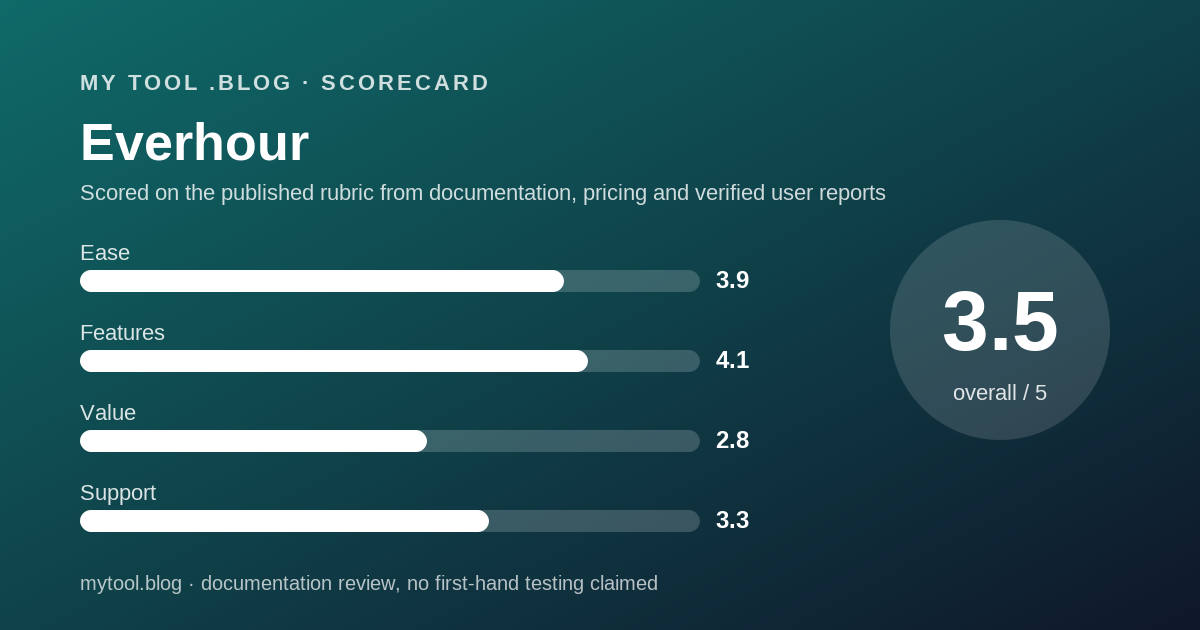
Scored on the published rubric, from documentation, pricing and verified user reports.
Best for: A five-person agency that wants time, budgets and invoicing in the tool its project management already lives in. Not a one-person business.
Verdict
What this review is based on: the vendor's pricing page, including the billing toggle values in the page source and the pricing FAQ beneath the cards, read on October 22, 2026. No account was opened. On this blog that is the documentation review label, the third of the three honest positions, and it is the weakest of the three.
The page opens with a promise: simple pricing, no upsells, no feature gating, no hidden limits, one price and every feature included. Two of those four claims do not survive the rest of the page.
The free plan is labelled limited features by the vendor itself, and the FAQ confirms it excludes integrations entirely. The paid plan carries a stated minimum of five seats, which the FAQ spells out: with two or three users you are still charged for five.
That single line is the whole review for a freelancer. One person cannot buy one seat. The cheapest paid Everhour is five seats at $8.50, which is $42.50 a month, or $510 a year by our arithmetic.
Visit Everhour
We have no affiliate relationship with this vendor. Link goes to the official site.
Where it is strong
- **The paid tier really does include everything.** All features, unlimited seats, native integrations, billing, budgeting and invoicing, and SSO with advanced permissions are all listed on the single Team card (pricing page, October 22, 2026).
- **The free plan names its export.** Of the four free plans read for this cluster, Everhour's is the only one whose feature list says export data without immediately capping it to one format (pricing page, October 22, 2026).
- **The annual discount is arithmetically honest.** The toggle says save 15%, and $8.50 against $10 is exactly 15% by our arithmetic. No other page in this cluster matched its own discount label.
- **A 14-day trial of all features, with no credit card asked for**, and the FAQ says a reminder email arrives a few days before it ends (pricing FAQ, October 22, 2026).
- **The integration story is the reason to look at all.** The page lists more than 40 integrations and claims the number three position in the Asana marketplace, which is where tracking inside an existing tool comes from.
Where it falls short
- **The five-seat minimum makes it the most expensive option here for one person.** The FAQ states that two or three users are charged for five. That is $42.50 a month billed yearly, or $510 a year by our arithmetic.
- **The free plan has no integrations.** The FAQ is explicit: the free plan does not include integrations, which are available only on the paid plan. That removes the single best reason to choose Everhour.
- **Connecting an integration during the trial is close to a one-way door.** The FAQ says moving to the free plan afterwards needs a support request to manually remove the integration and all synchronised data.
- **No refunds of any kind are offered.** The FAQ says the annual discount requires a commitment, that unused months are not refunded on cancellation, and that partial use cannot be refunded.
- **The pricing page's own claims contradict its own cards.** No feature gating and no hidden limits sit directly above a plan the vendor labels limited features and a paid plan with a seat floor.
At a glance
| Starting price | $0 (Free, up to 5 seats), then $8.50 per seat per month billed yearly |
|---|---|
| Pricing note | Free $0 for up to 5 seats with what the page calls limited features; Team $8.50 per seat per month billed yearly or $10 monthly, with a stated minimum of 5 seats; Custom pricing on request with a stated minimum of 50 seats (pricing page, checked October 22, 2026) |
| Seat minimum | 5 seats on Team, stated on the card and in the FAQ; 50 seats on Custom |
| Real cost for one person | $42.50 per month billed yearly, or $510 per year; $50 per month if billed monthly (our arithmetic on the 5-seat floor) |
| Free plan | Up to 5 seats, described as limited features: time tracking, projects and tasks, reports, export data. No integrations |
| Trial | 14 days of all features, no credit card required, with a reminder email before it ends |
| Annual discount | 15%, and $8.50 against $10 is exactly 15% by our arithmetic |
| Refunds | None; the FAQ rules out unused months and partial use |
| Payment methods | Credit or debit card only; charged in US dollars |
| Seat definition | Removing a user does not free the seat automatically; seats are kept so people can be replaced without reinvoicing |
What this review is based on, and what it cannot tell you
One page, read three ways on October 22, 2026: the rendered pricing cards, the billing toggle values embedded in the page source, and the pricing FAQ beneath the cards.
The monthly price deserves a note on method. The page defaults to the yearly view, so $10 a month is not visible on screen until you click.
It is written into the page source as a monthly attribute on the price element, which is where it was read from.
That is the difference between a price being published and a price being displayed. Both figures are the vendor's own, and both are printed below.
No account was opened. Nothing here describes the product in use. For the three positions this blog takes on evidence, see what I will and will not claim.
The headline and the cards disagree
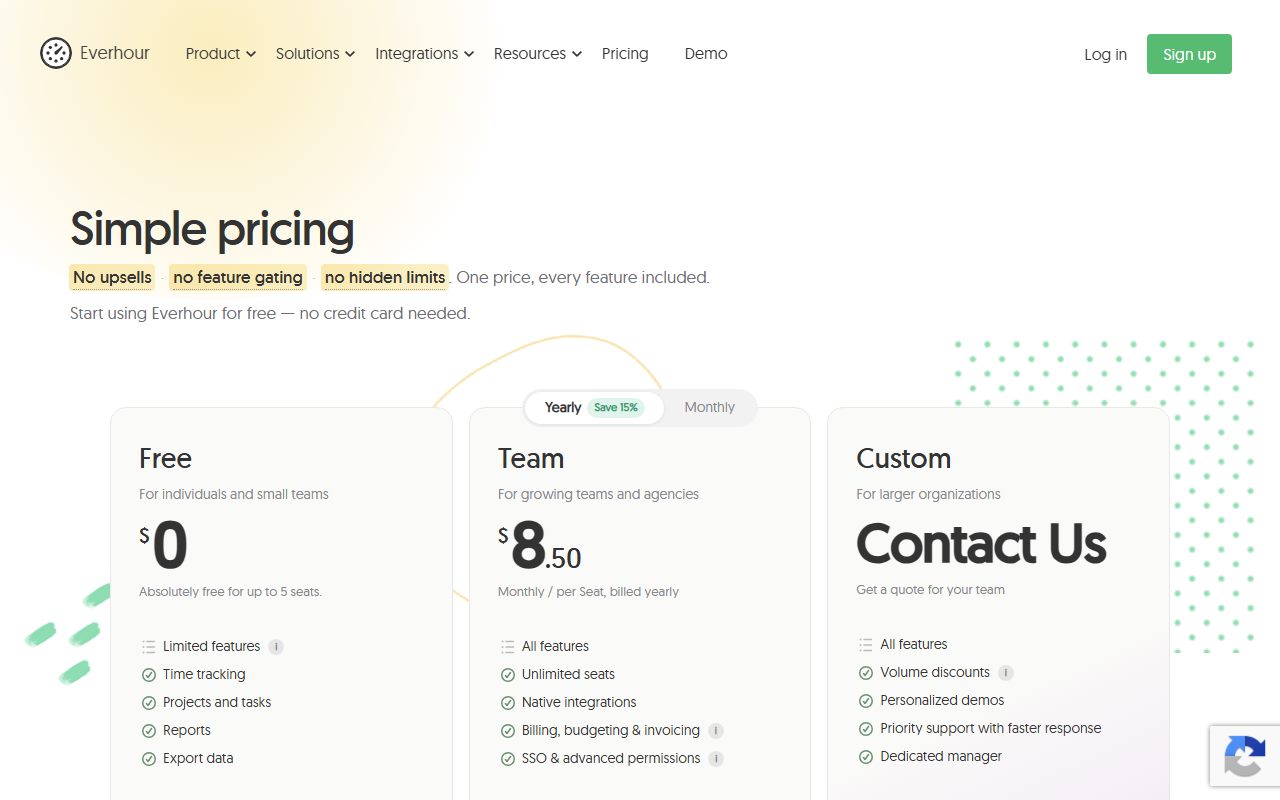
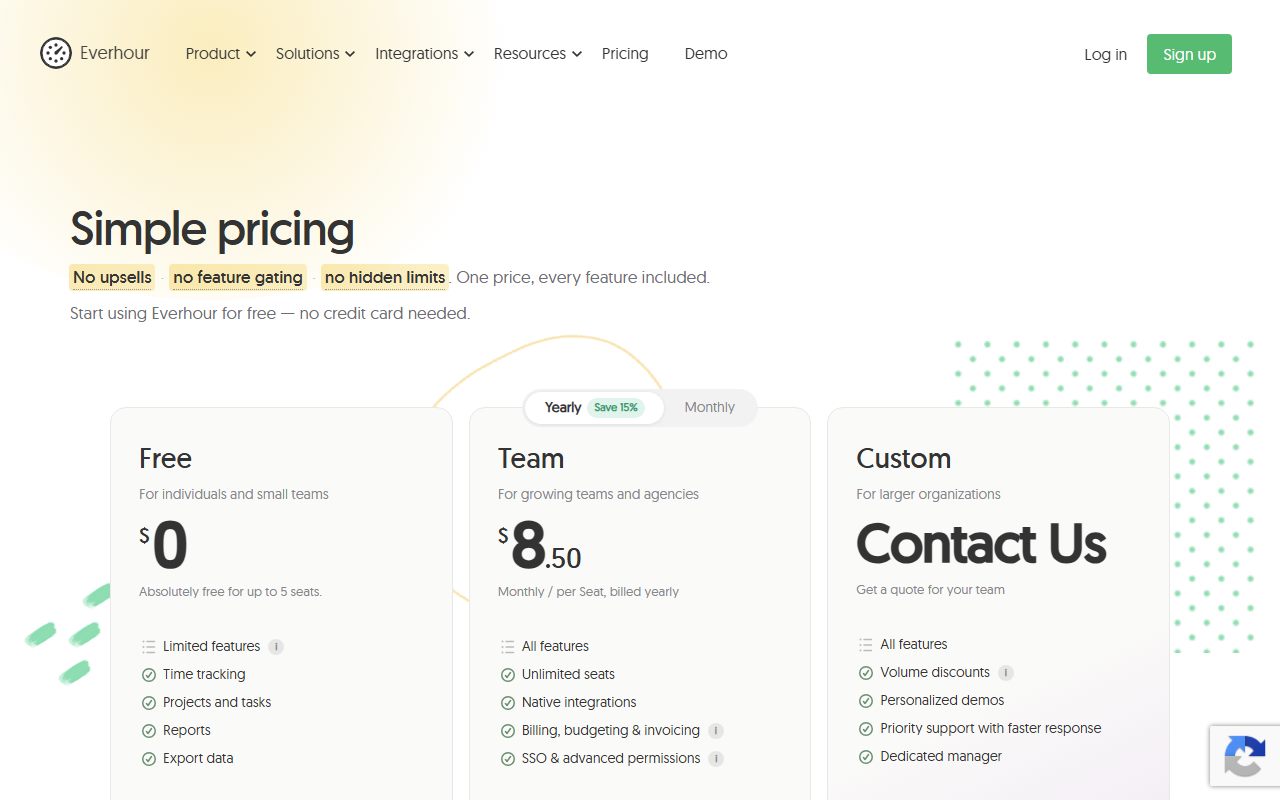
Everhour's pricing page leads with four claims stacked in one line: no upsells, no feature gating, no hidden limits, one price with every feature included.
Two of those hold. There genuinely is one paid tier, so there is no ladder to climb and no upsell to a profitability add-on. Everything the product does is on that one card.
Two do not. The free plan is labelled limited features by the vendor, in the card's own subheading, and the FAQ confirms the limit is integrations.
The paid plan carries a stated minimum of five seats, which is a limit on who may buy rather than on what the product does.
None of that makes the page dishonest. The seat floor is printed on the card and explained in the FAQ, which is more than most vendors do. It does mean the headline is written for a five-person agency and read by everyone else.
What Everhour is
A time tracker that installs itself inside the tool your work already lives in, then adds budgets, invoicing and reports on top.
The page lists integrations with Asana, ClickUp, GitHub, Linear, Basecamp, Jira, Trello, Monday and Notion, and claims more than 40 in total. It also claims the number three position in the Asana marketplace.
That is the product thesis and it is a good one. Most time tracking fails because starting a timer is a separate act from starting work; tracking from inside the task list removes the separate act.
Three tiers carry that thesis. Free, for individuals and small teams, at $0 for up to five seats. Team, for growing teams and agencies, at $8.50 per seat per month billed yearly. Custom, for larger organisations, by quote, with a stated minimum of 50 seats.
The five-seat minimum is the whole story for one person
The Team card carries a short line under the button: minimum 5 seats. The FAQ turns that into a number.
Asked what minimum seats means, the page answers that it is the minimum number of seats required for a paid plan, similar to a minimum usage fee, and that even with two or three users you will be charged for a minimum of five.
So the entry price for a solo freelancer is not $8.50. It is five seats at $8.50, which is $42.50 a month, or $510 a year, by our arithmetic on the vendor's figure. Billed monthly it is five at $10, or $50 a month.
For scale, and by our arithmetic on the monthly figures, that is about 4.7 times what Harvest charges for a single Teams seat and about 7.7 times Clockify's Standard tier. Both of those include invoicing, and both will sell you exactly one seat.
The seat definition compounds it. The FAQ explains that removing a user does not automatically remove the seat, so that people can be replaced without reinvoicing. Convenient for an agency with turnover; irrelevant to a business of one.
- Printed on the card: minimum 5 seats on Team, minimum 50 seats on Custom.
- Printed in the FAQ: with two or three users, you are charged for five.
- Our arithmetic: $42.50 a month or $510 a year billed yearly; $50 a month billed monthly.
- What that buys elsewhere: a year of Clockify Standard with invoicing for about $66, or Harvest Teams for $108.
The free plan removes the one thing worth buying
Everhour's free plan is up to five seats at $0, which looks generous beside a tracker that caps free at one.
The card lists four things: time tracking, projects and tasks, reports, export data. Above them sits the vendor's own label, limited features. Below the button sits a note that the free plan includes a 14-day trial of all features.
The FAQ names the limit. The free plan offers basic time tracking features but does not include integrations, which are available only on the paid plan.
That is the reason to pause. Integration into Asana or Jira is the thing Everhour is better at than its competitors.
A free Everhour is a plain timer competing against free timers that are better resourced, and it loses that fight on the export rows alone.
There is a trap attached. If you connect an integration during the trial, the FAQ says keeping it means choosing a paid plan, and switching to free instead requires a support request so the integration and all its synchronised data can be removed by hand.
How the pricing is structured, and the one discount label that is exact
Two billing periods and one paid tier, which makes the arithmetic short.
Team is $8.50 per seat per month billed yearly. The monthly figure, held in the page source rather than shown by default, is $10. The toggle above the cards reads yearly, save 15%.
$8.50 against $10 is exactly 15% by our arithmetic. Of the four pricing pages read for this cluster, Everhour's is the only one whose printed discount label matches its own two printed prices.
Harvest labels 20% on a pair of prices 18% apart; Toggl labels up to 33% on a tier that saves 25%.
That precision is worth noticing because it is cheap to get right and most vendors do not. A page that rounds its discount in its own favour is telling you something about how it will handle your invoice.
The structured pricing data in the page source carries the same two figures, $0 and $8.50, with prices described as valid until the end of 2027.
Payment is by credit or debit card only, charged in US dollars, with the debit currency depending on your bank.
There is no way to get your money back
Three separate FAQ answers close three separate doors, and together they are the strictest refund position in this cluster.
On discounts: the annual saving requires a commitment, and unused months are not refunded if you cancel. On cancelling: you may cancel before the next billing period, but partial use and remaining subscription time cannot be refunded.
On payment: card only, so there is no chargeback-friendly intermediary in the chain.
Combine that with the seat floor and the exposure for a freelancer is clear. A year of Everhour committed in January is $510 that does not come back in March.
The defence is the trial, and it is a decent one: 14 days of every feature with no card taken, and a reminder email before it lapses. Use it without connecting an integration and you keep the option of the free plan.
The wider version of this calculation, and when to walk away from a tool you have already paid for, is in how to decide to cancel a tool you pay for.
What the vendor says users think, and why none of it is usable
The pricing page carries six testimonials, and they are a useful illustration of why this blog grades documentation rather than praise.
Each is attributed to a first name and a single initial, with a job title and an industry but no company name.
Each carries a precise figure: a billable rate rising from 68% to 91% in two months, budget alerts saving $47,000 in a quarter, billable hour capture going from 72% to 96%, campaign profitability up 23%.
None of those is checkable. There is no company to ask, no case study linked from that page, and no description of how the figures were measured. A number without a source is decoration, however precise it looks.
This is not an accusation that the quotes are invented. It is a statement that they cannot be used as evidence, which is a different and more useful thing to know.
Precision is not verification, and a page that offers four decimal-precise outcomes and no companies has given you nothing to check.
Alternatives worth reading the price list of
For a one-person business, almost anything in this cluster beats Everhour on price. The comparisons that matter are about what you give up.
- Choose Harvest if you are one person. Its free plan covers one seat and two projects and includes invoicing, and Teams is $9 per seat with no floor. Harvest's weakness is usage-based fees it does not price on the page.
- Choose Wave if what you actually needed was the invoice. Unlimited invoices and bookkeeping at $0, earning on payment fees instead, pairs with any free timer.
- Choose Bonsai if you want proposals, contracts and invoices in one chain and are willing to pay per user for it. Check which tier switches invoicing on before comparing headlines.
- Choose FreshBooks if accounting matters more than tracking, and read the first-year promotional price against the regular one. For receipts rather than hours, Expensify is the relevant review.
What the page does not tell you
Three things a buyer would want and the page does not answer.
It does not say what format the free plan's export data produces. The phrase is unqualified, which is better than a format cap, but it is not a promise of CSV either. Every competitor in this cluster states or restricts the format; Everhour does neither.
It does not say whether the free plan's five seats are five users or four invitees plus an owner. Other pages in this cluster have given two different answers to that question, so it is worth asking rather than assuming.
It does not describe a support channel or a response time for the free plan. Priority support with faster response times is listed as a Custom-tier feature, which locates the queue without describing it.
The general shape of these omissions is in what a tool costs besides its price, and how this blog grades them is at editorial policy.
Buy it if, skip it if
The short form, with the condition in bold. The seat floor does most of the work in both lists, and everything below comes from one page read on October 22, 2026.
Bottom line
Everhour is a well-shaped product sold on terms that exclude the reader of this blog.
The single paid tier with every feature in it is the right idea, and the one-price promise is kept once you are inside. The 15% annual discount is the only one in this cluster whose label matches its own arithmetic.
But a stated minimum of five seats turns $8.50 into $510 a year for one person, and the free plan drops the integrations that are the reason to want this product rather than a cheaper timer.
For a five-person agency already working in Asana or Jira, this is a serious candidate and the price is fair. For a freelancer, the answer is no, and the number that decides it is printed on the vendor's own card.
For how the cluster ranks, see the invoicing guide for the billing half of the problem.
Sources
All three readings are of everhour.com/pricing on October 22, 2026, taken from the rendered page and its source rather than from a search result.
The monthly price was read from the billing toggle attributes in the page source because the page defaults to the yearly view.
Buy it if
- You are already five people or more. At that size the seat floor costs nothing and $8.50 per seat per month buys a feature list with no tiers to climb.
- Your work already lives in Asana, ClickUp, Jira, Linear, Trello or Notion. Native tracking inside the tool your tasks are in is the thing Everhour sells, and the page lists more than 40 such integrations.
- You want budgets and invoicing without a tier ladder. Billing, budgeting and invoicing are on the one paid card rather than two steps up, which is unusual in this cluster.
- You will pay yearly and stay. The 15% is real and arithmetically exact, and there is nothing to lose to a tier upgrade later.
Skip it if
- You are one person. The seat floor means your first invoice is for five seats. Read Harvest instead, where the free plan covers one seat and two projects.
- You want the integrations without paying. The free plan excludes them, which is the only reason most people were looking at Everhour.
- You might change your mind. No refunds, no partial refunds, and no refund of unused months on an annual commitment.
Frequently asked
Can a freelancer buy one seat of Everhour?
No. The Team card states minimum 5 seats, and the FAQ repeats it: even with two or three users you are charged for a minimum of five. For one person that is $42.50 a month billed yearly, or $510 a year by our arithmetic.
Is Everhour free plan any good for one person?
It is usable but narrow. The page gives up to 5 seats at $0 with what it calls limited features: time tracking, projects and tasks, reports and export data. The FAQ confirms integrations are excluded, checked October 22, 2026.
How much does Everhour cost per seat?
$8.50 per seat per month billed yearly, or $10 billed monthly, read from the billing toggle values in the page source on October 22, 2026. Both figures also appear in the page's structured pricing data at $0 and $8.50.
Does Everhour include invoicing?
Yes, on the paid Team plan, where the card lists billing, budgeting and invoicing together. It is not on the free plan. There is only one paid tier, so invoicing does not sit behind a further upgrade.
What happens if I connect an integration during the Everhour trial?
You are committed to a paid plan to keep using it. The FAQ says that to move to the free plan instead, you must contact support to manually remove the integration and all the data it synchronised, because that cannot be done automatically.
Does Everhour give refunds?
No. The FAQ says the annual discount requires a commitment and unused months are not refunded on cancellation, and separately that partial use and remaining subscription time cannot be refunded, checked October 22, 2026.
Is the free trial long enough to judge Everhour?
Fourteen days of all features, with no card required. That is longer than Clockify's seven days and shorter than the 30 days Harvest prints. For a tool whose value is budgets and invoices, two weeks covers one billing cycle at best.
Are the customer quotes on the Everhour pricing page verified?
Not by anyone here. The page carries six testimonials attributed to a first name and an initial with a job title but no company, each with a precise figure such as a billable rate rising from 68% to 91%. None links to a case study on that page.
Sources
- Everhour pricing page: plan cards, seat minimums and billing toggle values - checked October 22, 2026
- Everhour pricing FAQ: trial, free plan limits, seat minimums, discounts, refunds, payment - checked October 22, 2026
- Everhour pricing page structured data: listed prices of $0 and $8.50 - checked October 22, 2026
Visit Everhour
We have no affiliate relationship with this vendor. Link goes to the official site.