 My
My
Expensify
An expense and corporate card tool whose free Submit tier is written for employees, with a $5 per member Collect tier and a Control tier that quotes no firm price
Scored on the published rubric, from documentation, pricing and verified user reports.
Best for: A freelancer who wants a free receipt scanner and mileage log today and can live with a price list that contradicts itself about the free tier, or a one-person business happy to pay $60 a year for Collect to get card feeds, reimbursement and QuickBooks or Xero export.
Verdict
What this is based on: the Expensify pricing page, its plan cards, its full plan comparison table, its footnotes and its pricing FAQ, read on October 14, 2026 from the rendered page rather than a summary. No Expensify account was opened for it. That is the documentation review label, the third of the three honest positions on this blog, and it limits this post to what the price list promises.
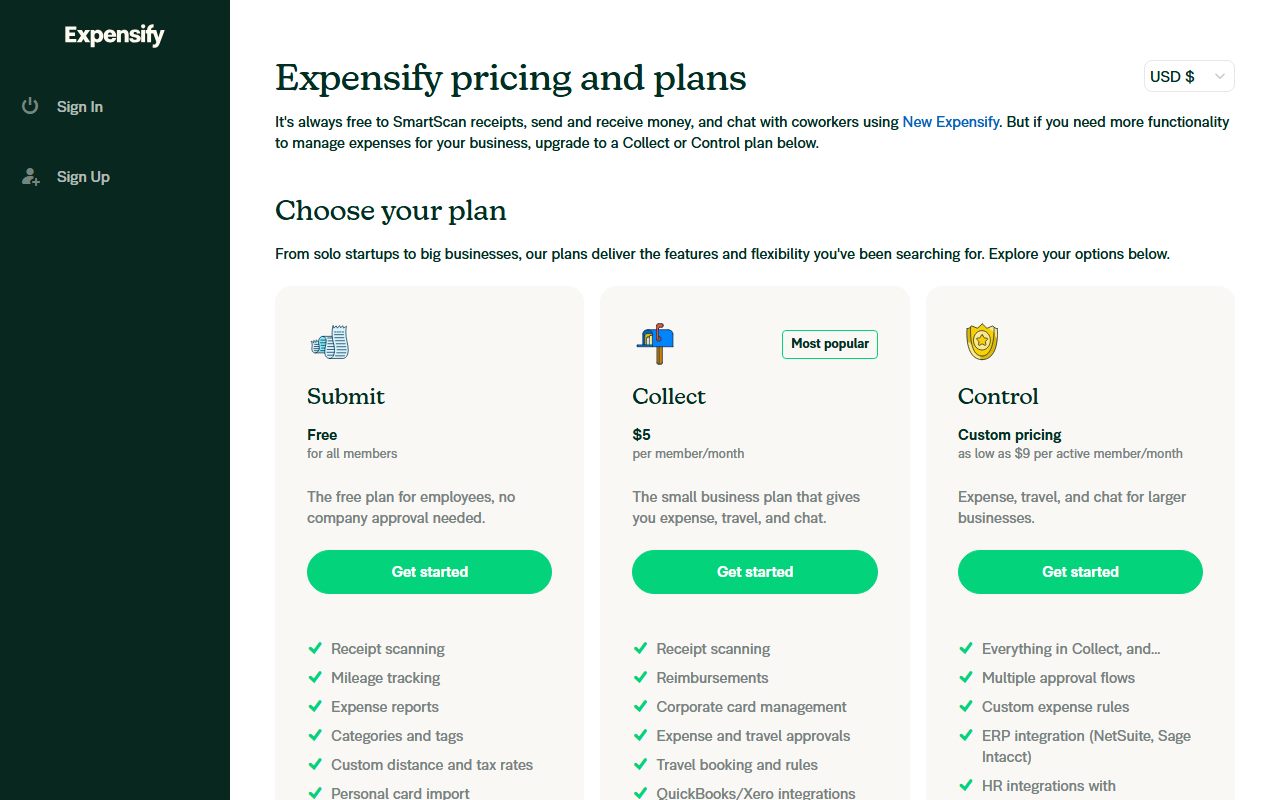
The page sells three named tiers plus Enterprise. Submit is free for all members and described as the plan for employees. Collect is $5 per member a month. Control is custom pricing, with the page adding as low as $9 per active member a month, which is the only place a unit other than member appears.
The feature spread is the widest in this blog's freelance cluster. One subscription covers receipts, mileage, approvals, ACH reimbursement, corporate cards, travel booking, bill and invoice scanning and chat on each expense.
The reason this review does not score higher on ease is that the page cannot keep its own story straight about what the free tier does. Three statements on one page disagree about unlimited receipt scanning and about expense categories, and this review prints all three rather than picking the flattering one.
Visit Expensify
We have no affiliate relationship with this vendor. Link goes to the official site.
Where it is strong
- **A genuinely free named tier.** Submit is listed as free for all members with no company approval needed, and its card names receipt scanning, mileage tracking, expense reports, personal card import and chat on every expense (pricing page, October 14, 2026).
- **Collect is $5 per member a month**, the cheapest paid step in this blog's expense cluster, and the FAQ repeats the figure in words as well as on the card (October 14, 2026).
- **ACH reimbursement, third-party card feeds and QuickBooks Online and Xero export all sit on Collect**, per the plan comparison table, not behind the custom-priced tier (October 14, 2026).
- **Travel booking is included rather than sold as an add-on**: unlimited bookings, flights, hotels, cars and rail, travel rules, trip approvals and a 24/7 travel support line are all ticked from Collect (comparison table, October 14, 2026).
- **24/7 realtime chat with humans and AI-driven alerts are ticked on all three tiers**, including the free one (comparison table, October 14, 2026).
- **The card cash back rates are printed, not implied**: 1 percent on all US purchases with no minimums and 2 percent for monthly spend over $250K, in a footnote under the table (October 14, 2026).
Where it falls short
- **The page contradicts itself three ways about the free tier.** The intro says it is always free to SmartScan receipts; the comparison table leaves Unlimited SmartScans unticked on the free column; the FAQ says free gives unlimited SmartScans but that expense categorization needs a paid plan, while both the card and the table tick categories on free (October 14, 2026).
- **Control has no price.** The card says custom pricing and as low as $9 per active member a month, which is a floor and not a quote, and the page points you to Concierge or sales for the rest (October 14, 2026).
- **Active member is never defined.** The $9 figure is the only use of the word active on the page, and nothing on it says which actions make a member active or when the count is taken (October 14, 2026).
- **The annual discount is named but not sized.** The FAQ says discounts are available for annual commitments and when using the Expensify Card, with no percentage anywhere on the page (October 14, 2026).
- **No trial length and no member minimum are printed** on the visible pricing page, so a solo buyer cannot tell from it whether a one-member workspace is allowed on Collect (October 14, 2026).
- **The Trustpilot distribution is unusually split**: 4.7 across 1,274 reviews, but 85.8 percent at five stars against 10.0 percent at one star and only 2.7 percent at four, which is a shape worth reading before trusting the average (October 14, 2026).
What this review is based on, and what it cannot tell you
Documentation only. Everything below comes from the Expensify pricing page, read on October 14, 2026: the three plan cards, the plan comparison table, its footnotes and the pricing FAQ. No account was opened.
That is the third of the three positions this blog allows itself, set out in what I will and will not claim. It is the weakest of the three. What it can do is read a price list slowly enough to notice when the page disagrees with itself.
One method note. A first machine read of this page came back empty, because the prices are drawn after the page loads. The figures below were taken from the rendered page instead, which is also how the per-column ticks were read.
What Expensify is
Expensify is an expense tool sold per member a month, with a corporate card, travel booking and bill scanning attached to the same subscription.
The page frames the product around a company rather than a sole trader. The free tier is called Submit and described as the free plan for employees, no company approval needed. Collect is the small business plan that gives you expense, travel, and chat. Control is for larger businesses.
That framing matters for a freelance desk. A one-person business is both the employee who submits and the company that approves, so the free tier is half of a workflow with no second half here.
The shape differs from the invoicing tools on this blog. Wave and FreshBooks start from money coming in. Harvest starts from hours. Expensify starts from money going out.
Who Expensify is best for
Read from the plan cards and the comparison table, the page is shaped for these people:
- A freelancer who wants a free receipt scanner and mileage log, since both are named on the free card.
- A one-person business that needs a card feed reconciled, ticked as third-party card feeds from Collect.
- Anyone who pays a subcontractor by ACH, since ACH reimbursement is ticked from Collect.
- A freelancer who exports to QuickBooks Online or Xero at year end rather than keeping books by hand.
- Someone who travels for client work and would otherwise buy a booking tool.
- A small studio that wants one subscription for receipts, bills, cards and chat instead of three.
Who should skip it
Three profiles the page argues against:
- Anyone who needs a firm quote. Control is custom pricing and its floor uses a unit the page does not define.
- A freelancer whose main need is sending invoices, where the invoicing guide is the better reading.
- Anyone who wants the free tier's limits before signing up, because the page gave three different answers.
What each tier includes, as of October 2026
Three named tiers on the cards, plus an Enterprise route through the sales and demo links.
Submit is free for all members. Its card names receipt scanning, mileage tracking, expense reports, categories and tags, custom distance and tax rates, personal card import, chat on every expense, and AI and human support.
Collect at $5 per member a month is marked most popular. Its card names receipt scanning, reimbursements, corporate card management, expense and travel approvals, travel booking and rules, QuickBooks and Xero integrations, chat, and AI and human support.
Control is custom pricing: everything in Collect, plus multiple approval flows, custom expense rules, ERP integration, HR integrations, SAML and SSO, custom insights and budgeting.
- What the free column of the table ticks: distance tracking, expense approvals, expense categories and tags, in-product reporting, 24/7 chat with humans and the four chat rows.
- What moves a freelancer to Collect: unlimited SmartScans, card feeds and reconciliation, ACH reimbursement, delegated access, QuickBooks Online and Xero, the Expensify Card, travel, and bill and invoice scanning, all unticked on free.
- What moves a company to Control: NetSuite, Sage Intacct, QuickBooks Desktop, Certinia, Workday, Gusto, Zenefits, multiple approvers, SAML and SSO, admin-enforced controls, custom insights and budgeting.
- The only discount with a number on it: save up to 50% on Expensify, ticked on the Control column alone.
How the pricing is structured
Per member a month on Collect, per active member on Control, with no annual figures printed.
Collect is $5 per member a month, and the FAQ repeats it in words. Nothing on the page gives an annual rate, a seat minimum or a trial length.
Control is custom pricing, with the subheading as low as $9 per active member a month. That is a floor, not a quote, and it is the only place on the page where the unit changes from member to active member. No definition of active follows it.
The FAQ says discounts are available for annual commitments and when using the Expensify Card, and the table ticks save up to 50% on Expensify for Control. Neither the annual percentage nor the card mechanism is printed.
Editorial arithmetic from the published rate on October 14, 2026: Collect is $60 a year for one member and $180 for three. A selector at the top of the page switches the figures between USD, GBP, AUD, NZD and EUR.
The free tier the page describes three different ways
This is the paragraph that costs Expensify most of a point on ease, and it is worth quoting rather than paraphrasing.
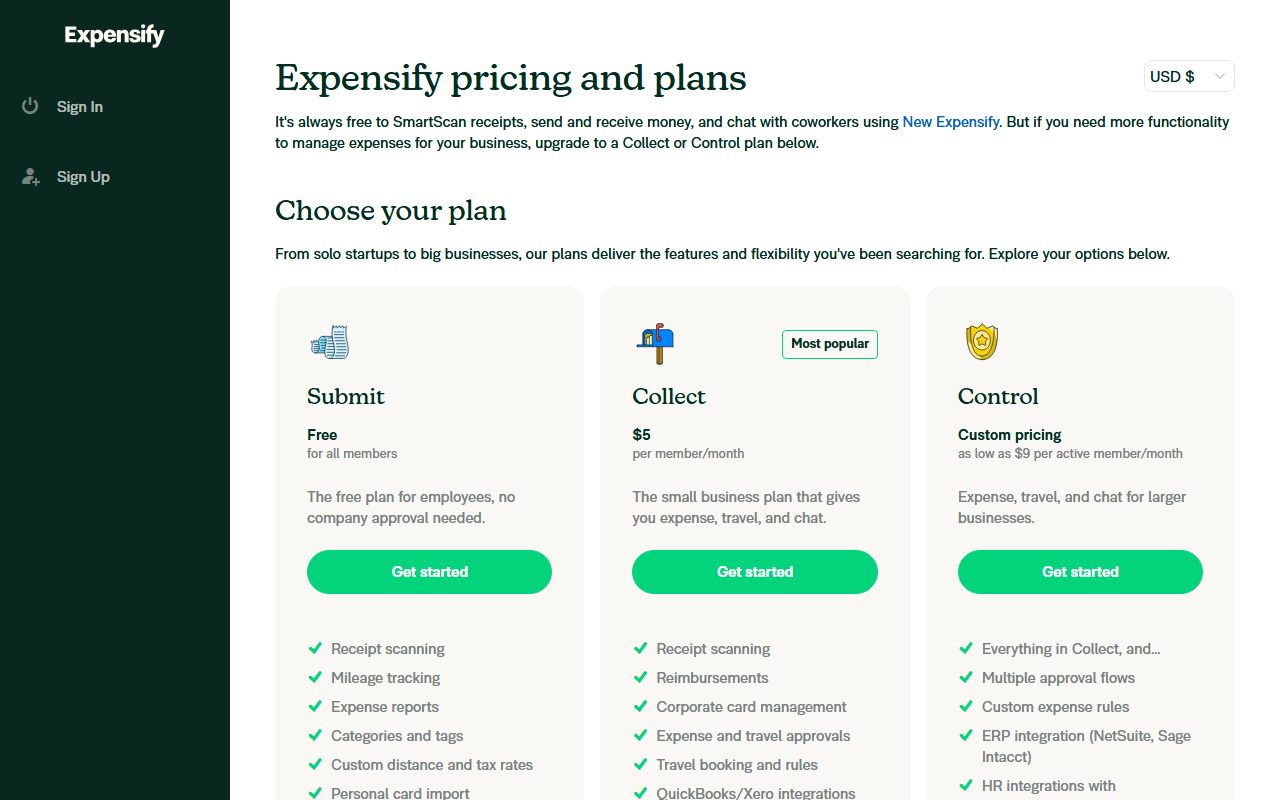
The introduction says: it's always free to SmartScan receipts, send and receive money, and chat with coworkers using New Expensify.
The plan comparison table lists Unlimited SmartScans as its first expense row and leaves it unticked on the free column, ticked on Collect and Control.
The FAQ says: individuals can use New Expensify for free with unlimited SmartScans, but additional functionality such as expense categorization requires a paid plan. Yet the free card lists categories and tags, and the table ticks them on free.
So the page says free scanning is unlimited, says it is not, and says categories are paid while ticking them as free. All three were on the page on October 14, 2026.
What a tool costs besides its price is this blog's list of lines to settle before signing, and an unstated cap on the one feature you came for belongs on it. Ask Concierge for the free scan limit in writing.
Ease of use: the score is about the price list, not the app
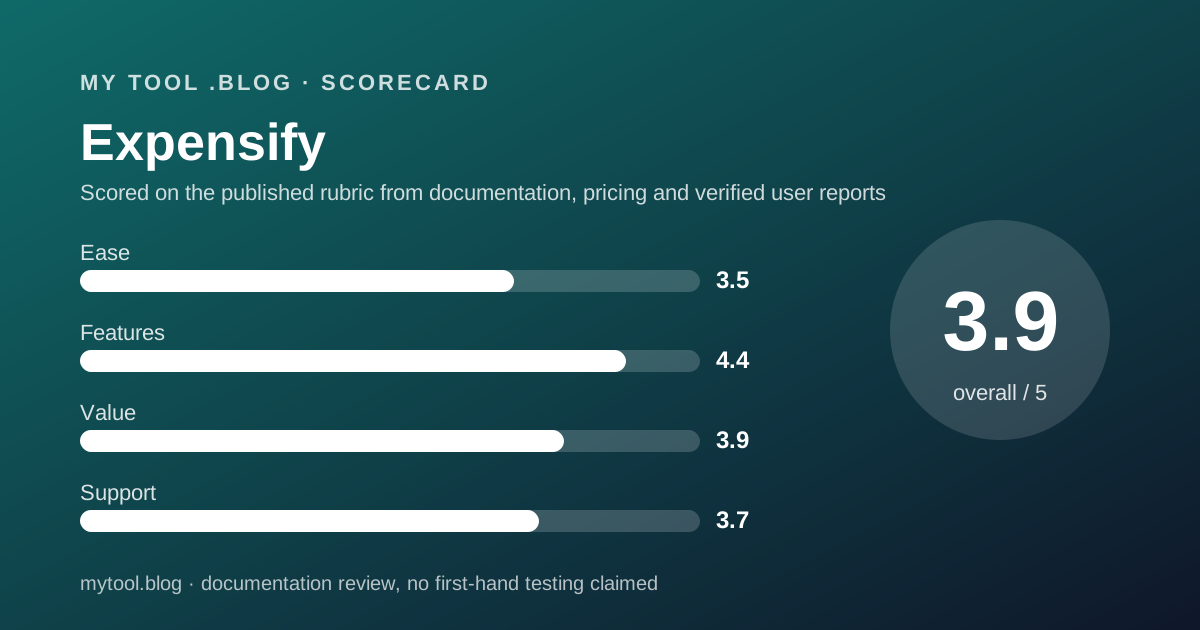
A 3.5, built from the structure of the page and reduced by its contradictions.
The case for the score is organisation. Three cards with one price each, a comparison table split into Expense, Expensify Card, Travel, AI and Support, Chat and Bills, two footnotes and a short FAQ. A buyer sees the whole product in one scroll.
The first deduction is the three-way disagreement above. A page that cannot describe its own free plan is a page a buyer cannot plan from.
The second is that the prices are drawn after delivery, so ordinary machine readers see a pricing page with no prices on it.
Nothing here judges the app itself. No account was opened, and the label at the top says so.
Features: the widest spread in this blog's cluster
A 4.4, and the comparison table is the reason.
Counting the ticks on October 14, 2026, the free column carries eleven of the table's rows, Collect thirty-one and Control all forty-one. No other price list in this cluster covers receipts, mileage, card feeds, ACH reimbursement, a card with printed cash back, travel booking and bill scanning at once.
Travel is the unusual inclusion. Unlimited bookings, flights, hotels, cars and rail, travel rules, group policies, trip approvals, a 24/7 travel support line and travel reporting are ticked from Collect with no separate price.
The deductions are for the gates. Audit, ERP and identity features sit on the custom-priced tier, and the account manager row is restricted to accounts of 100 or more members. For a freelancer those gates do not bite, which is why the score stays high.
Value: strong at the published rate, unknowable above it
A 3.9, and the split is between the two halves of the page.
At $5 per member a month, Collect is the cheapest paid step in this blog's expense cluster and it carries card feeds, ACH reimbursement and accounting export. $60 a year for one person, against a tool that also books travel, is a defensible trade.
Above that line the value cannot be scored. Control has no price, its floor uses an undefined unit, and the annual discount has no number.
The free tier is worth something real, with the caveat that its scanning cap is unstated. How to decide to cancel a tool you already pay for is the renewal test here: was a card feed or an accounting export used last quarter? If not, the free tier is the right size.
Support: printed generously, with one footnote to read
A 3.7, mostly from the table and partly from the review picture.
The table ticks 24/7 realtime chat with humans and AI-driven alerts on all three tiers, including free, which is more than most price lists in this cluster promise at any price. An account executive is ticked from Collect. An account manager and quarterly business reviews are ticked on Control, with the footnote available on accounts of 100+ members.
The FAQ gives two routes for pricing questions, Concierge inside the account or an email address. That is the channel for the unanswered questions this review lists.
The deduction comes from the review picture below, where complaints cluster on what updates changed rather than on reaching a person.
What verified users report
On October 14, 2026, Trustpilot listed 1,274 reviews for www.expensify.com with a score of 4.7, on a profile claimed by the company in December 2022.
The star distribution that day was 85.8 percent five-star, 2.7 percent four-star, 0.5 percent three-star, 0.9 percent two-star and 10.0 percent one-star. A rating with more one-star reviews than four-star and three-star combined is two populations, not one average.
Trustpilot's summary of 726 recent reviews reports praise for easy expense tracking, receipt scanning on the go and clear summaries, and an intuitive mobile app. It also reports that some customers found recent updates made functions complicated or caused receipt scanning issues, and the interface messy on specific tasks.
The company's own blurb on that listing claims 15 million members worldwide. That is a vendor figure on a vendor-written profile, reported here as such. G2, Capterra and the app stores were not opened.
Limits stated by the vendor, and limits the page leaves open
The page is specific about features and quiet about the commercial terms a solo buyer needs.
Stated: three named tiers, one price each on free and Collect, forty-one comparison rows with per-tier ticks, 1 percent card cash back with no minimums and 2 percent above $250K monthly spend, and five display currencies.
Not stated: any annual price or the size of the annual discount. Not stated: a trial length. Not stated: a member minimum, or whether a single-member paid workspace is sold. Not stated: what an active member is, or the free tier's scanning cap.
The footer does carry the commercial detail: the card is a Visa Commercial Card issued by The Bancorp Bank, N.A., and money transmission comes from partners including Expensify Payments LLC, NMLS ID 2017010. That is worth reading before routing client money through any tool.
Alternatives worth reading the price list of
Three, all read on this blog.
Wave is the free alternative for the money-in side. Choose Wave if invoicing and basic books are the job and receipts are a side task. Choose Expensify if the receipt pile and the mileage log are the job.
FreshBooks is the paid all-rounder. Choose FreshBooks if you want invoices, expenses and reports under one bill. Choose Expensify if you want card feeds, travel and a corporate card and are happy to export to accounting software. FreshBooks against Wave works the invoicing half through.
Bonsai is the suite alternative. Choose Bonsai if contracts and proposals matter more than receipt volume. Choose Expensify if the opposite is true.
For the hours side of the same desk, Harvest is the price list to read, and the best invoicing tools for freelancers ranks the money-in group.
Buy it if, skip it if
Conditions, not conclusions, because a documentation review is not entitled to conclusions.
- Start on the free Submit tier if you want a receipt and mileage log today, and ask Concierge for the scan limit in writing on day one.
- Take Collect if you need card feeds, ACH reimbursement or an accounting export. That is $60 a year for one member.
- Ask for a Control quote in writing if you need SSO, ERP export or multiple approvers, and ask what active member means first.
- Skip it if your main need is sending invoices, where this blog's invoicing guide is the better start.
- Do not rely on this post if you want to know what Expensify is like to use. Nobody here has used it, and the label says so.
Bottom line
On the published terms as of October 14, 2026, Expensify has the widest printed feature set in this blog's expense cluster and the cheapest named paid step in it, at $5 per member a month.
It also has the least trustworthy free-tier description this blog has read. Three statements on one page disagree about scanning and categories, and the undefined active member in the Control floor price means the top of the range cannot be priced at all.
For a freelancer the useful reading is narrow: the free tier is a plausible receipt and mileage log with an unstated cap, and Collect at $60 a year buys the card feed and the accounting export. Everything above that needs a written quote.
This is a reading of a price list on one date. There is no affiliate link on this page and no commission attached to it.
Sources
Read on October 14, 2026. Where a figure is missing above, the editors could not read it on the vendor's pricing page on that date.
- Expensify pricing page, plan cards, forty-one-row comparison table with per-tier ticks, footnotes and pricing FAQ: www.expensify.com/pricing
- Expensify pricing page footer, card issuer and money transmission disclosures, same date
- Trustpilot listing for www.expensify.com, 1,274 reviews, score 4.7, star distribution and summary of 726 recent reviews
- This blog's scope and labels: what I will and will not claim
- This blog's editorial policy: editorial policy and about
Visit Expensify
We have no affiliate relationship with this vendor. Link goes to the official site.