 My

Bitwarden
The only password manager in this cluster whose free plan is a finished product, priced at $19.80 a year when you outgrow it
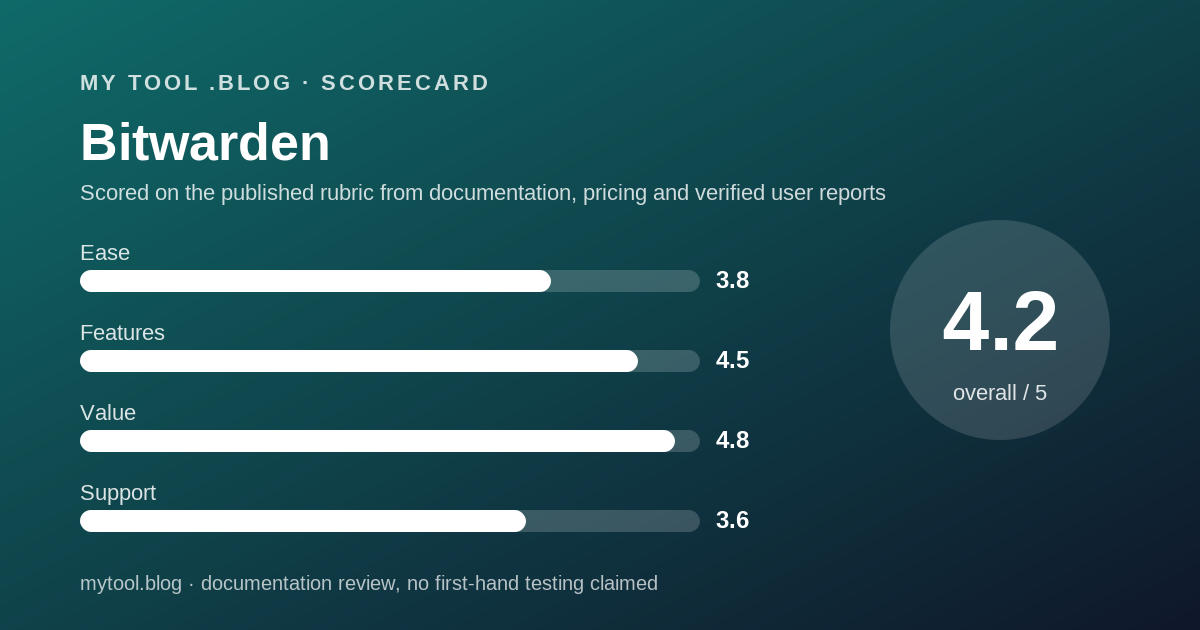
Scored on the published rubric, from documentation, pricing and verified user reports.
Best for: A freelancer who wants a vault that costs nothing until it needs to, and who will trade a little polish for the lowest honest price in the category.
Verdict
What this review is based on: the Bitwarden pricing page, its two plan tabs and its personal plan comparison table, read from the rendered page on November 2, 2026, with the same figures confirmed a second time from the page source. No account was opened and no plan was purchased. On this blog that is the documentation review label, the third of the three honest positions.
The finding that matters is the shape of the free plan. Unlimited passwords, unlimited devices, passkey storage, an encrypted export and sharing with one other person are all listed as core features of every Bitwarden account, paid or not.
That is not a trial. For a one-person business it is a working password manager at $0.
Premium then costs $19.80 for the year. It adds an integrated authenticator, 5 GB of file attachments, emergency access and vault health alerts.
The second finding is a tension inside the page. Self-hosting is ticked on the $19.80 personal plan and is also sold on the business card as an enterprise-level capability.
Visit Bitwarden
We have no affiliate relationship with this vendor. Link goes to the official site.
Where it is strong
- **The free plan carries unlimited passwords and unlimited devices**, listed under core features included in every Bitwarden account rather than as a free-tier teaser (pricing page, November 2, 2026).
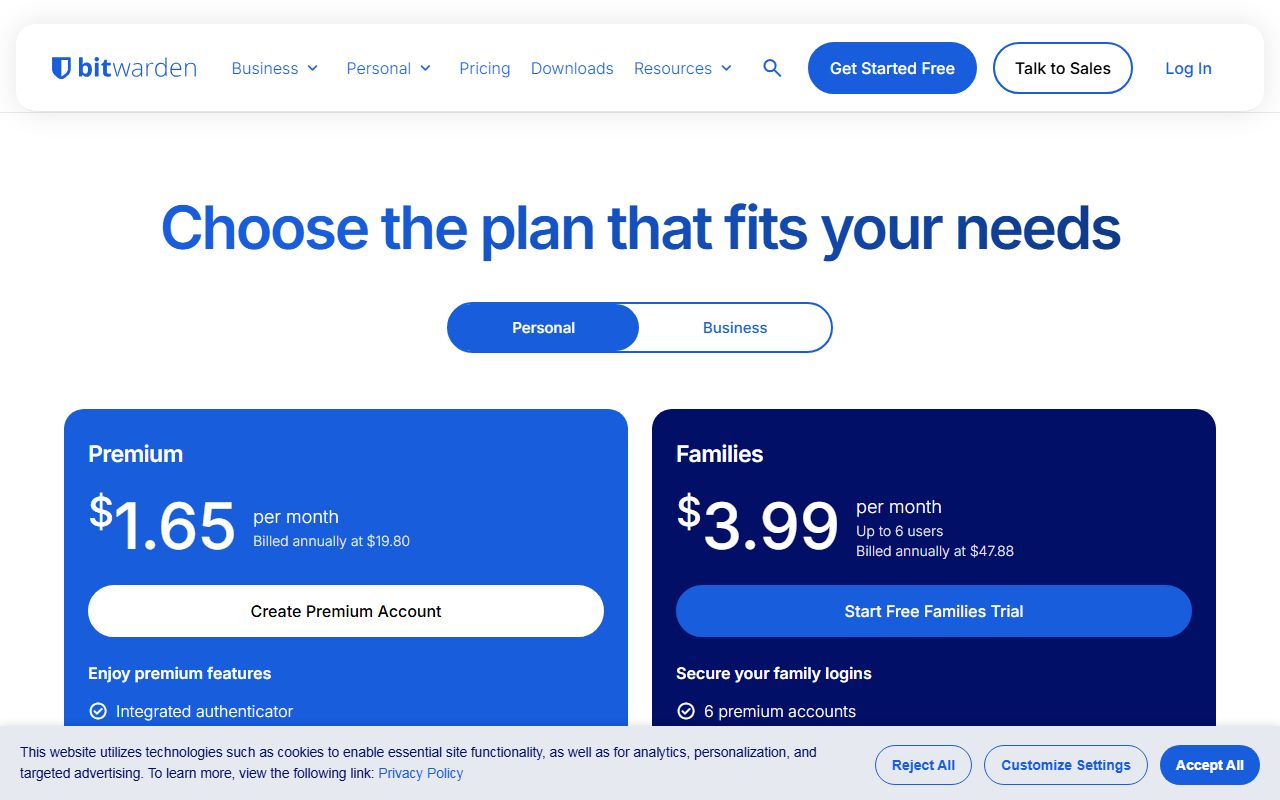
- **Premium is $19.80 for a year**, which the page prints both as $1.65 per month and as the annual total, so the multiplication checks out exactly (pricing page, November 2, 2026).
- **Sharing with one other person is a core feature of every account.** The comparison table describes it as sharing items with one other Bitwarden user through a free organization.
- **An encrypted export is listed as a core feature**, so the exit route is on the free plan and not behind a paywall. That is rare in this cluster.
- **Self-host options are ticked on both Premium and Families** in the personal comparison table, not reserved for business plans (comparison table, November 2, 2026).
- **Open source security and zero-knowledge encryption are named as core features of every account**, including the free one, alongside built-in phishing protection.
Where it falls short
- **No monthly billing price is published for any plan.** A footnote under both plan tabs states that pricing shown is in USD and based on an annual subscription, so the monthly option is not priced on the page.
- **No refund or money-back statement appears anywhere on the pricing page** read November 2, 2026. Proton prints a 30-day guarantee on its equivalent page; Bitwarden prints none.
- **No trial length is given for the personal plans.** The Families card says start a free trial and gives no number. Only the business menu names a length, at 14 days.
- **The free plan's storage allowance is not stated.** Encrypted file attachments appear in the comparison table as 5 GB on Premium and Families, with no figure for Free.
- **Self-hosting is described two ways on the same page**, which makes it hard to know what the $19.80 plan actually permits without reading the help centre.
At a glance
| Starting price | $0 (Free), then Premium at $1.65 per month billed annually at $19.80 |
|---|---|
| Pricing note | Free $0; Premium $1.65 per month billed annually at $19.80; Families $3.99 per month for up to 6 users billed annually at $47.88; Teams $4 per user per month billed annually; Enterprise $6 per user per month billed annually (pricing page, checked November 2, 2026) |
| Free plan | Unlimited passwords, unlimited devices, browser, mobile and desktop apps, passkey management, encrypted export and free sharing with another user |
| Paid personal tiers | Premium $19.80 a year for 1 person; Families $47.88 a year for up to 6 users |
| Business tiers | Teams $4 per user per month billed annually; Enterprise $6 per user per month billed annually |
| Seat minimum | None stated on the pricing page read November 2, 2026 |
| Trial | 14 days named in the business menu; no length given for the personal plans |
| Support | The comparison table tooltip reads 24/7 email support for everyone and priority support for paid users |
| File storage | 5 GB personal on Premium; 5 GB personal plus 5 GB for family items on Families, both marked expandable |
| Refunds | No refund statement on the pricing page read November 2, 2026 |
| Monthly billing | Not priced on the page; a footnote says pricing shown is based on an annual subscription |
What this review is based on, and what it cannot tell you
The source is Bitwarden's own pricing page, read from the rendered page on November 2, 2026. That page carries a Personal tab, a Business tab, a core features list and a comparison table of the two personal plans.
Every figure below was then read a second time from the page source, so each number appears twice from two different tools on the same URL.
No account was opened and no plan was purchased. This review can tell you what Bitwarden charges and promises. It cannot tell you how the browser extension behaves on a bad Monday.
Where the page gives a number, the number is quoted with the date. Where it is silent, this review says it is silent, as set out in what this blog will and will not claim.
What Bitwarden is, and what sits in every account
Bitwarden is a vault for passwords, passkeys, notes, cards and identities, with apps and browser extensions. The unusual part is how much of it is not tied to a plan.
The pricing page carries a block headed core features included in every Bitwarden account. Under it sit three groups.
Security and protection lists open source security, zero-knowledge encryption, advanced two-step login and built-in phishing protection. Credential management lists notes, cards, identities, passkey management, a username and password generator, email alias integration and encrypted export.
Access and sharing lists unlimited devices, unlimited passwords, the browser, mobile and desktop apps, free sharing with another user, and Bitwarden Send.
That list is the product. The paid plans add to it rather than unlock it.
The free plan is the whole tool for one person
Most free tiers in this cluster are shaped to annoy you into paying. This one is not, and the page is blunt about it.
Under the two personal cards sits a line reading: just getting started, get basic password management today, always free.
For a freelancer the practical test is whether the free plan can hold every login for a working business. Unlimited passwords and unlimited devices answer that, and both are printed as core features.
The second test is whether you can hand one credential to a client or a contractor. The comparison table says you can share items with one other Bitwarden user by creating a free organization.
A subtext note adds that free organization sharing for two users is available only in cloud accounts.
Who this fits
This is the cheapest serious answer in the category, so the fit is mostly about what you are willing to trade for that.
- A solo freelancer who wants every client login in one place and does not want a new monthly bill
- Anyone who already pays for invoicing and a scheduler and is counting subscriptions
- A freelancer who needs to share exactly one credential with one client, which Free covers
- Someone who wants two-factor codes in the same vault, which is the main reason to pay the $19.80
- A contractor who values an open codebase and a free encrypted export over interface polish
- A one-person business that may hire a second person later and wants a $48-a-year upgrade path
Who should skip Bitwarden
Three kinds of freelancer should read a different price list.
- Anyone who wants a printed refund window before paying, which this page does not provide
- Anyone who needs a monthly rolling price, because only annual pricing is published here
- Anyone who will abandon a password manager that feels utilitarian, in which case the cheapest plan is the most expensive mistake
How the pricing is structured, and the one thing it withholds
There are two tabs and four priced plans, plus a free tier and a sales-only enterprise route.
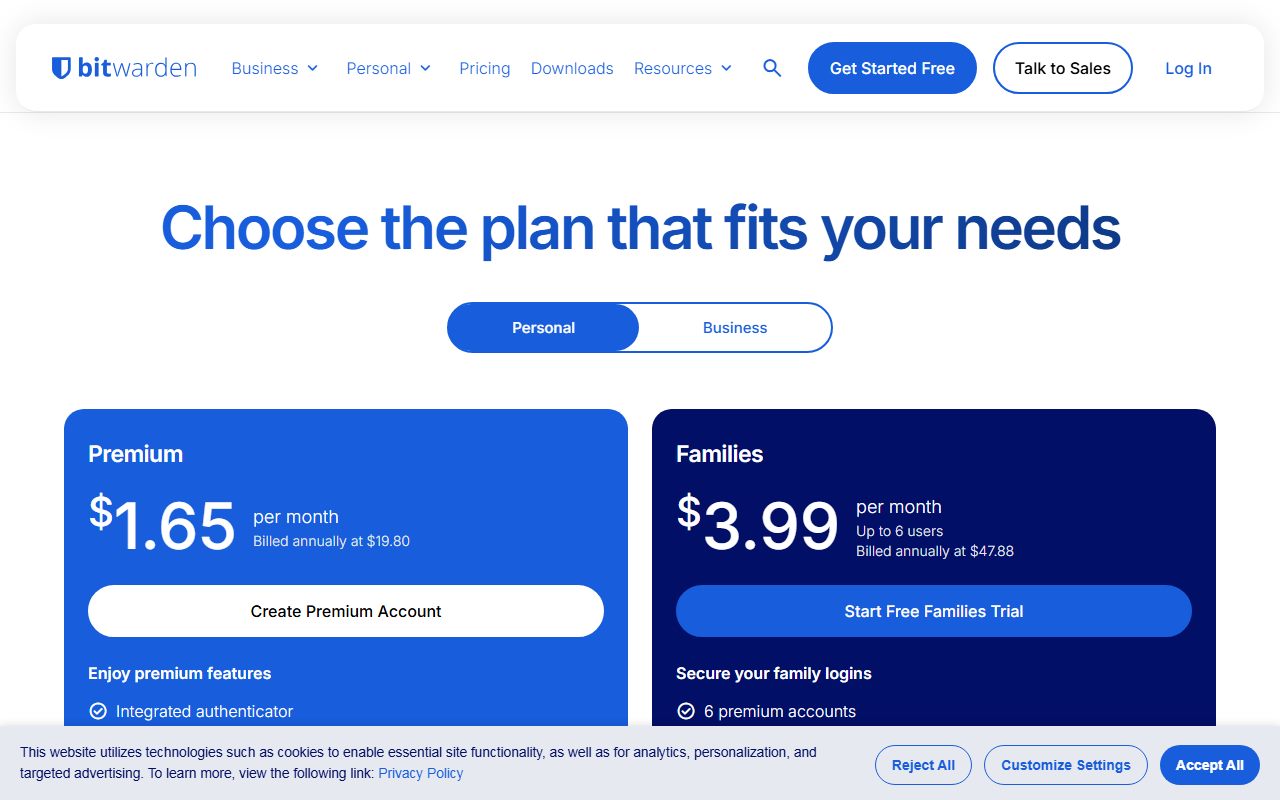
On the Personal tab, Premium is $1.65 per month, billed annually at $19.80. Families is $3.99 per month for up to 6 users, billed annually at $47.88.
On the Business tab, Teams is $4 per user per month billed annually and Enterprise is $6 per user per month billed annually.
Both tabs carry the same footnote: pricing shown is in USD and based on an annual subscription, taxes not included.
That footnote is also the withholding. No monthly figure is published for any plan, so the page cannot tell you what rolling billing costs or whether the annual discount is worth the commitment.
Premium at $19.80 a year buys four things a freelancer uses
The Premium card lists an integrated authenticator, file attachments, emergency access, and security reports and more.
The comparison table is more specific. Integrated authenticator rows as TOTP codes generated inside Bitwarden. File attachments row as 5 GB personal, marked expandable.
Emergency access, vault health reports, vault health alerts with password coaching, and email alias integration are all ticked on Premium.
For a one-person business the authenticator is usually the deciding line. It collapses two apps into one, which matters when a client portal demands a code during a call.
Two-step login on both personal plans is listed as up to 10 hardware security keys, Yubico OTP, Duo, email and an authentication app.
Families is the cheapest way to buy six vaults
Families is $47.88 a year for up to 6 users, and six separate Premium accounts would be $118.80 by our arithmetic.
So the family plan is $70.92 cheaper, or about 60 percent less for the same six premium accounts. Per person it works out at $7.98 a year.
That arithmetic is worth knowing even if you have no family. A freelancer with a partner who also freelances, or a two-person studio, is better served by Families than by a business plan.
The card lists 6 premium accounts, unlimited sharing, unlimited collections and organization storage.
The comparison table adds 5 GB personal storage plus 5 GB for family items, both marked expandable.
The business plans cost more than Premium and are not aimed at you
Teams is $4 per user per month billed annually, which our arithmetic makes $48 a year for one person. Enterprise is $6, which is $72 a year.
So the cheapest business plan costs 2.4 times a Premium account and buys things a freelancer rarely needs.
The Teams card lists secure credential sharing, event log auditing, directory synchronisation and SCIM provisioning. Enterprise adds granular access control, passwordless single sign-on, enterprise policies, self-hosting flexibility and a free Families plan for every user.
No seat minimum is stated on the page read November 2, 2026, so nothing printed there stops a sole trader buying one Teams seat.
There is simply no printed reason to. The same logic applies to expense tools sold by seat.
Self-hosting appears on both sides of the same page
This is the contradiction worth flagging before you pay for anything.
In the personal comparison table, the row labelled self-host options is ticked for Premium and for Families. Its tooltip reads: run the Bitwarden server application on your own network or server, compatible with all Bitwarden end-clients.
On the Business tab, the Enterprise card lists flexibility to self-host as one of its enterprise-level capabilities, alongside enterprise policies and passwordless single sign-on.
Both statements sit on the same URL, read the same day. They are not strictly incompatible, but they point a reader in opposite directions about what $19.80 permits.
If self-hosting is why you are buying, confirm the scope in writing with support before the card goes in.
Support on every plan is email, and the page says so
The comparison table has a row called priority support. Its tooltip is unusually candid: 24/7 email support for everyone and priority support for paid users.
So free users are not cut off from support, and paid users are not promised a phone number. There is no live chat commitment and no response-time figure anywhere on the page.
For a password manager that is a reasonable trade. The product you most need working is the browser extension, not the support queue.
It is still thinner than it looks at a glance. Compare it with the support rows in our e-signature cluster, where response windows are printed.
What the page does not publish
Five numbers a freelancer would want are absent from the pricing page read November 2, 2026.
There is no monthly price for any plan, no refund or money-back window, no trial length for the personal plans, no storage figure for the free tier, and no seat minimum for the business plans.
The 14-day trial figure does appear, but only in the business navigation menu, attached to a business sign-up call to action.
None of those gaps is a lie. They are simply the questions you will have to ask before a renewal, which is the point of counting what a tool costs besides its price.
Write them down now, while you still have leverage.
Alternatives worth reading the price list of
Two alternatives are worth a price-list comparison rather than a feature comparison.
Proton Pass publishes a free tier with 10 hide-my-email aliases and a paid tier at $2.99 a month, plus a 30-day money-back guarantee that Bitwarden does not print.
1Password publishes no free plan at all, and its small-business page disagrees with its own FAQ about what a ten-person pack costs.
Choose Proton Pass if the refund window and the alias generator matter more than the lowest price. Choose 1Password if interface polish is worth paying for and no free tier is acceptable.
Otherwise Bitwarden wins on arithmetic, which is how this blog ranks tools you cancel or keep.
Buy it if, skip it if
Buy Premium if you want two-factor codes and the vault in one app for $19.80 a year, or buy nothing at all and stay on Free.
Buy Families if two or more people need vaults, because $47.88 for six beats $118.80 for six.
Skip the business plans unless you actually need event logs and directory sync, because they cost more than Premium and add nothing a sole trader uses daily.
Skip Bitwarden entirely if you need a printed refund window, a monthly price or a named response time before you will hand over a card.
Those are the three things this page does not give you, and no review can supply them.
Bottom line
Bitwarden is the cheapest honest answer in this category and the only one whose free plan is a finished tool rather than a sample.
For a freelancer the sensible path is to start on Free, which holds unlimited passwords on unlimited devices and shares one item with one client.
Pay the $19.80 when you want the authenticator in the same vault, which is usually within a month of taking on a second client portal.
The two things to confirm before paying are the refund position and what self-hosting actually means on a personal plan, because the page answers neither.
It sits alongside the free tiers we graded in the scheduling cluster as a rare case of free meaning finished.
Sources
Bitwarden pricing page, Personal tab, Free, Premium and Families cards, read November 2, 2026.
Bitwarden pricing page, Business tab, Teams and Enterprise cards, read the same day.
Bitwarden pricing page, core features block and the personal plan comparison table with its tooltips and subtext notes.
Every price above was then confirmed a second time from the page source on the same URL. All multiplication and percentages are the arithmetic of this blog, built only from printed figures.
Related reading on this blog: Bonsai for the all-in-one argument and FreshBooks for how an annual discount is normally presented.
Buy it if
- You want a vault that costs nothing and still holds unlimited passwords on unlimited devices
- You need one shared credential with a client and would rather not pay for a seat to do it
- $19.80 a year is the ceiling you had in mind for a tool you will never show a client
- You care that the code is open and the export is free, because that is the cheap insurance against lock-in
Skip it if
- You want a printed refund window before you hand over a card, because this page does not give one
- You need to know the monthly price before committing, since only annual pricing is published
- You want the most polished interface in the category, which is not what the lowest price buys
Frequently asked
Is Bitwarden really free for a freelancer?
Yes. The pricing page read November 2, 2026 lists unlimited devices, unlimited passwords, passkey management, encrypted export and free sharing with another user as core features included in every Bitwarden account, including the free one.
How much does Bitwarden Premium cost?
The card prints $1.65 per month and billed annually at $19.80. Those two figures multiply out exactly, which is more than several price lists in this cluster manage.
What does Premium add over Free?
The card lists an integrated authenticator, file attachments, emergency access and security reports. The comparison table adds vault health alerts, password coaching and email alias integration, all ticked on Premium and Families.
Is the Families plan worth it for one person?
Only if you need more than one vault. Families is $47.88 a year for up to 6 users, which is $7.98 per person per year by our arithmetic, against $19.80 for a single Premium account.
Does a freelancer need the Teams plan?
Probably not. Teams is $4 per user per month billed annually, which our arithmetic puts at $48 a year for one person. That is more than twice Premium, and it buys directory sync and event logs.
Does Bitwarden offer a free trial or a refund?
The business menu names a 14-day free trial. No trial length is printed for the personal plans, and no refund or money-back statement appears anywhere on the pricing page read November 2, 2026.
Can I get my passwords out again?
The page lists encrypted export among the core features of every account. That means the export is on the free plan, so leaving does not require a paid month first.
Sources
- Bitwarden pricing page: Personal tab, Free, Premium and Families cards - checked November 2, 2026
- Bitwarden pricing page: Business tab, Teams and Enterprise cards - checked November 2, 2026
- Bitwarden pricing page: core features list and personal plan comparison table - checked November 2, 2026
Visit Bitwarden
We have no affiliate relationship with this vendor. Link goes to the official site.